
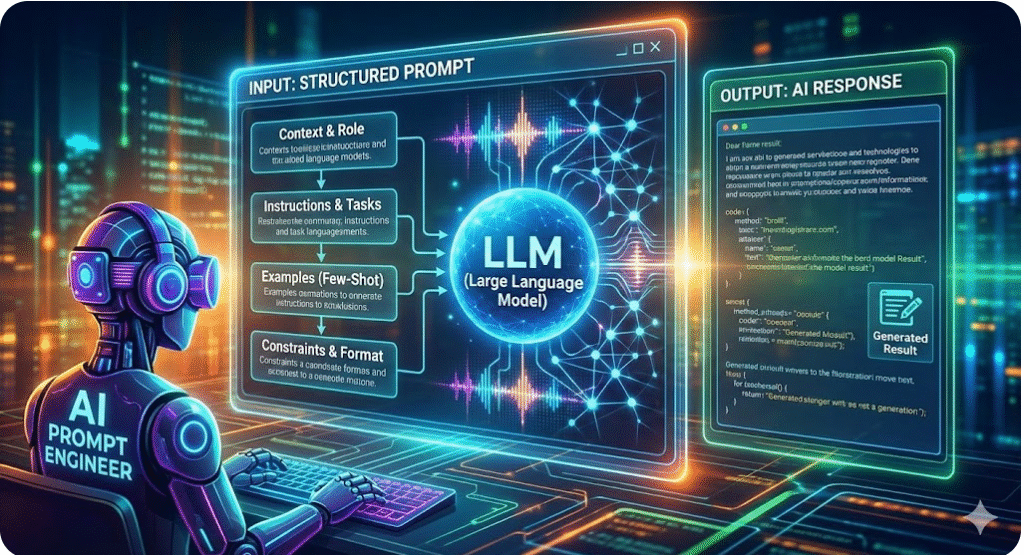

Prompt Engineering for LLMs: A Comprehensive Guide
Prompt engineering is the art of crafting clear, concise, and context-rich instructions to get the desired output from large language models (LLMs). In today’s AI-driven workplace, prompt engineering is a core skill. Think of the LLM as a highly capable but naive “new employee” that needs explicit guidanceplatform.claude.com. Just as you’d give a new hire detailed instructions on a task, you must give the model detailed, context-rich prompts to “understand” what you wantplatform.claude.comcloud.google.com. Leading AI services like OpenAI’s ChatGPT (GPT-4/5), Anthropic’s Claude, Google’s Gemini, or Perplexity.AI all rely on your prompt to steer them. The more specific and informative your prompt, the better these models performcloud.google.comai.google.dev.
Effective prompts are instructions, not vague questions. They often include: clear task descriptions, context or background information, constraints or formats, and sometimes examples or role-playing instructions. For example, Google’s developer guides stress that prompts should be specific to your goal – e.g. instead of “Write a recipe for blueberry muffins,” you’d say “I am hosting 50 guests. Write a recipe for 50 vegan blueberry muffins, including tips for baking efficiently.” That level of detail helps the model generate exactly what you needcloud.google.com. In short, treat prompt engineering like design work: define your objective, incorporate relevant context, and guide the model’s persona, tone, and output format.

Why Prompt Engineering Matters
- Bridging the Gap: LLMs are trained on vast data, but they don’t innately know your intent. A good prompt provides the missing context. As Claude’s documentation puts it, these models are like brilliant employees with no memory of your world – they need explicit context to work effectivelyplatform.claude.com.
- Maximizing Capabilities: Well-crafted prompts unlock the full potential of LLMs. Models can summarize, translate, write code, analyze data, generate images and more – but only if asked correctly. For instance, multimodal models (like GPT-4V or Google’s Gemini) can process images and text; a prompt telling it to “Describe the key objects and their colors in the image below” yields powerful multimodal outputdevelopers.google.comdevelopers.google.com.
- Efficiency & Accuracy: Clear, unambiguous prompts reduce trial-and-error. Instead of blindly guessing, you leverage best practices (context, few-shot examples, chain-of-thought, etc.) to get it right faster. Google Cloud’s AI blog notes that investing effort in prompt design makes your applications more accurate and personalizedcloud.google.comcloud.google.com.
Key Principles of Prompt Design
- Be Clear and Specific: State exactly what you want. Use explicit instructions and list formats if needed. For example, “List five security best practices for web development in bullet points.” Claude’s guidelines recommend thinking of Claude (the model) as a new person – if you would be confused, it will be tooplatform.claude.com. They advise adding context (task purpose, audience, end goal) and telling the model step-by-step what to doplatform.claude.com. For instance, you might instruct:
- “Write a complete SQL query in MySQL that selects all
StudentNamevalues fromstudentswhoseDepartmentNameis ‘Computer Science’, given two tables with schemas provided above.”
Notice we gave the schema context, the exact task, and the language. This clarity yields accurate codepromptingguide.ai.
- “Write a complete SQL query in MySQL that selects all
- Provide Context: Include any relevant background. This can be factual (e.g. data descriptions, user personas, tone of voice) or procedural (e.g. parts of a conversation). For example, a prompt might start with “You are an expert vegan chef…” or “The user is a beginner learning Python…”, which helps the model tailor its response style. Google’s guides point out that contextual prompts (like “emulate a vegan chef”) guide the model’s knowledge and voicecloud.google.com. Also mention why the task matters: “This email will be sent to customers, be professional.” That way the model knows the intended outcome and audience.
- Give Examples: Few-shot prompting can dramatically improve quality. Providing one or more example Q&A pairs or structured inputs/outputs helps “prime” the model. For instance:
Q: What are the top 3 benefits of exercise? A: 1. Improves cardiovascular health; 2. Boosts mood and energy; 3. Helps maintain healthy weight. Q: [Your new question goes here] A:This example helps the model see the desired format. Google recommends including examples explicitly in your prompt, as models treat them as part of the instructioncloud.google.com. Similarly, in code generation, showing a sample snippet or result can steer the output. (See few-shot in code prompts below.) - Set Constraints and Output Format: Tell the model how to behave. You can specify length (“in one sentence”), format (“as bullet points”, “in JSON”), style (“be concise”, “write formally”), or even what not to do (“do not use slang”). For example, the Gemini documentation shows asking “Count the number of cats in this picture. Give me only the number” to force a simple numeric outputdevelopers.google.comdevelopers.google.com. In text prompts, you might say “Answer with a numbered list,” or “Use markdown table format.” Clearly stating constraints prevents irrelevant or overly verbose answers.
- Chain-of-Thought and Step-by-Step: For complex reasoning or code, ask the model to break the problem into steps. Phrases like “Let’s reason step by step” can improve accuracy in tasks like math or planning. This chain-of-thought technique has proven effective for LLMscloud.google.com. For example, instead of just “Solve this puzzle,” you’d prompt: “First identify the odd numbers, add them, then decide if the result is even or odd, and explain your reasoning.” Models often give much more reliable answers when asked to explain their logic firstcloud.google.com. (This is akin to turning on the model’s internal “thinking” before it answers.)
Illustration: Be as specific as possible. A vague prompt like “Write a recipe for blueberry muffins” yields generic results. Adding context (e.g. “I have 50 guests coming, and they need vegan muffins”) guides the model to a precise solutioncloud.google.com.
- Persona and Role-Playing: You can instruct the model to adopt a role or personality, which influences style and content. E.g. “Act as a senior backend engineer” or “Reply as a friendly customer support agent.” This persona prompt can incorporate domain knowledge and tone. For code tasks, saying “You are an expert Python security engineer” often yields more robust code with best practicesdev.to. However, be careful: overly creative personae might introduce style variations, so balance it with direct instructions.
- Iterate and Refine: Prompt engineering is iterative. Test different prompt phrasings, lengths, and structures. Try reordering information or using bullet lists for instructions (Claude docs explicitly recommend list-format tasks)platform.claude.com. If the output is off, adjust the prompt: add clarity, shorten it, or split tasks into multiple queries. The Google Cloud guide encourages experimentation: tweak keywords, try positive vs negative wording, etc., to discover what the model responds to bestcloud.google.com. Consider A/B testing prompts to see which yields higher accuracy for your task.
- Utilize System and Assistant Messages (Chat APIs): In chat-based models (like ChatGPT), use the system message to set high-level instructions (e.g. “You are an AI assistant specialized in finance”), and user messages for queries. The system role is a powerful anchor. For example, OpenAI’s ChatGPT system prompt might restrict how the assistant should behave overall. By setting “You are concise, professional, and cite sources for factual answers,” you influence all subsequent responses. Similarly, Claude or Gemini may allow special “prefix” instructions. Use these mechanisms when available to encode global rules or styles.

Advanced Prompting Techniques
- Multishot and Format Priming: Beyond just one example, you can provide several examples (few-shot). For code generation, the
vibecodex.ioresource suggests creating skeletons or templates in your prompt. For instance, include code comments or partial code blocks and ask the model to fill them invibecodex.io. This anchors the output structure. Similarly, asking the model to rewrite your own prompt to be clearer is a meta-prompt that can improve future promptsvibecodex.io. - Feedback Loops: Incorporate the model’s own feedback. You might ask it to check its output: “Check the code for errors, then refine it.” or use chain-of-thought prompting within coding. The dev community recommends asking for reasoning or iterative refinement. For example, prompt “Refine this Flask login code to add input validation”. Combining code generation with debugging prompts (like “Find a bug in the code below”) can improve quality.
- Prompt Engineering Tools: Use tools like prompt testers or galleries. Anthropic provides a Claude prompt “generator” or “improver” that suggests how to rewrite prompts for clarity. There are community tools (e.g. OpenAI Playground, PromptBase) to share and test prompts. Embed your context (memory, files, search results) whenever possible. For example, GPT-4 now supports uploading a file or browsing, so you can feed documents and ask targeted questions about them. These expanded capabilities effectively make your prompt richer.
Multimodal Prompting
With the advent of multimodal LLMs, prompts can include images (and potentially audio or video). For example, Google’s Gemini can accept an image plus text instructionsdevelopers.google.com. Some tips:
- Combine Text and Image: Always provide guiding text. For instance, show an image of a chart and ask “What trend do you observe in this chart?” or include an alt-text placeholder. Gemini’s examples include prompts like “Count the number of cats in this picture. Only give a number.” which yields a numeric answerdevelopers.google.comdevelopers.google.com. The text guides what to look for in the image.
- Use Multimodal Capabilities: Ask classification or description questions about an image. For example, “Describe all the items you see in this image.” In Gemini, combining a relevant prompt with the image can identify objects, even hand-written text or scene contextdevelopers.google.comdevelopers.google.com. Google’s docs show how Gemini can do image classification, counting, or even reasoning from images. If your model supports it, exploit these features (e.g. GPT-4V can caption images, answer questions about them, or even solve math from a picture of a graph).
- Experiment with Chain-of-Thought on Images: Just as with text, asking the model to reason through an image step by step can improve accuracy. For instance, “Break down what is happening in this photo, then answer the question.” This can help with tasks like visual question answering (VQA). Shawn’s prompt guide suggests “Describe the scene step by step” for better visual reasoningmedium.com.
- Instruct Fine-Tuning (If Possible): Some APIs allow you to fine-tune or instruct-tune models on custom multimodal data. This is more advanced, but worth noting in a corporate setting. Even if not fine-tuning, you can adapt formats used by the model. For example, Gemini’s official prompts use a JSON-like structure for agent actions. Align your prompts to the expected input format of the service.
Prompting for Code Generation (Vibe Coding)
Prompt engineering shines in code assistance. Whether using GitHub Copilot, OpenAI’s code models, or proprietary tools, follow these guidelines:
- Be Explicit About Language and Libraries: Start by naming the programming language, framework, or library. e.g. “Write a Python function using pandas to remove null values.” LLMs know many languages, but specifying prevents ambiguity. The OpenAI docs emphasize that models can output code in many languages if you define the language in your promptpromptingguide.ai.
- Use Descriptive Comments: One trick is to prompt with commented code as in natural language. For example:
// Ask user for name and greet them in JavaScriptThe model then completes with code. This was shown to work: a comment prompt “Ask the user for their name and say ‘Hello’” produced valid JavaScript codepromptingguide.ai. Comments or docstrings in prompts effectively translate your intent into code actions. - Provide Examples or Templates: For complex code, give a scaffolding. This could be a function signature, a class with TODOs, or sample inputs/outputs. Vibe coding prompts often include a “skeleton” with blanks to filldev.to. For instance, you might start a prompt with:
# Implement login route with Flask def login(): if request.method == 'POST': # Step 1: # Step 2: pass return render_template('login.html')Then ask the model to fill in the blanks. This constraints the output to fit your architecture (Skeleton Primingdev.to). - Step-by-Step & Chain-of-Thought: Encourage the model to plan out its solution. For example, “Explain how to connect to the database and validate user before giving the final code.” The model might first outline the steps in plain language, then produce the code. This reduces errors. In code generation research, methods like “CodePLAN” have shown that having the model produce a solution plan (chain-of-thought) greatly boosts correctnessarxiv.org.
- Persona and Domain Knowledge: Sometimes asking the model to assume a persona (e.g. “You are a senior JavaScript developer”) helps incorporate best practices and conventionsdev.to. However, in code prompts you often also need explicit constraints (e.g. “Use error handling, and do not use global variables”).
- Test and Validate: After generating code, always test it. Use prompts to ask the model to generate test cases or verify logic. For example, “Write unit tests for this function, including edge cases.” This “vibe coding” style prompt not only gives you tests, but also indirectly verifies the code’s correctnessvibecodex.io. Encouraging the model to critique or analyze its output can uncover mistakes.
- Beware of Hallucinations in Code: Code generation can suffer from “hallucinated” content (inventing nonexistent libraries, functions, or data)cacm.acm.org. For instance, the model might reference an API or package that doesn’t exist in your environment. Always review the code. The Communications of the ACM warns that LLMs are trained to always produce an answer, even if it’s not factualcacm.acm.org. In practice, this means any code output should be treated as a draft: run it through linters, unit tests, and security scans. For critical code, consider coupling the model with tools (code search, static analysis). There are emerging techniques (like the RepairAgent or De-Hallucinator) that automatically insert relevant API docs or data to reduce hallucinationscacm.acm.orgcacm.acm.org – keep an eye on those developments.
Illustration: AI Code Hallucinations. LLMs may confidently generate incorrect or insecure code if prompted poorly. Always validate and test AI-generated code. As noted by researchers, models “make things up” when unsurecacm.acm.org.
Practical Best Practices (Corporate & Professional)
- Security & Privacy: In a corporate setting, never feed sensitive data into a public LLM. Use on-premise or secured APIs if available. Frame prompts to avoid exposing private details. Also, consider adding instructions like “Do not share this conversation” as a system message. Check company policies on data usage.
- Guardrails Against Bias: Specify fairness requirements or diversity of viewpoints if relevant. For example, “Analyze the text for hate speech and remove any biased language.” Always critically assess outputs for bias or inappropriate content.
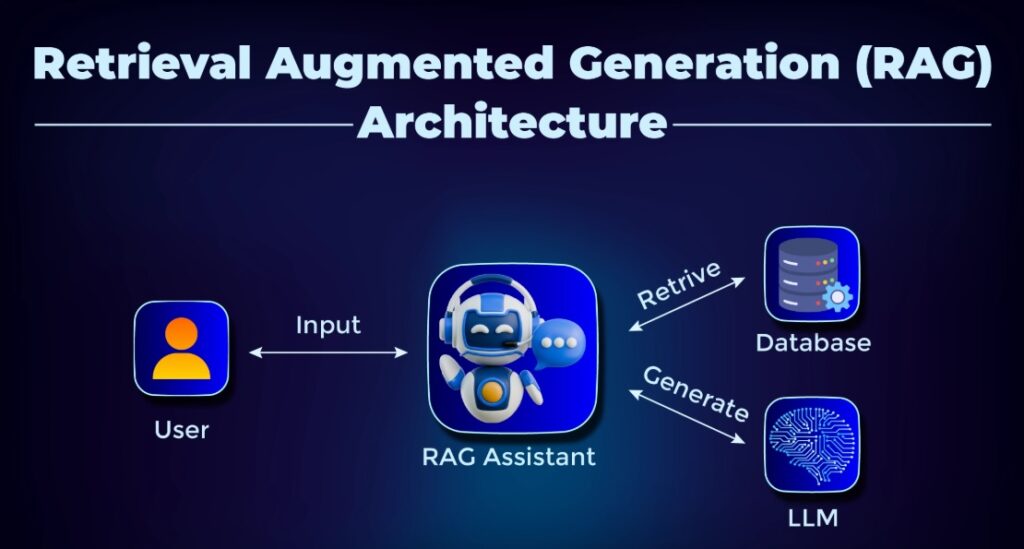
- Performance and Cost: Large models can be expensive per query. Design prompts to use the least powerful model that suffices. Also, keep prompts concise to fit token limits. If a prompt is very long, consider summarizing parts or using embeddings/RAG (retrieval-augmented generation) to provide context as needed.
- Versioning and Testing: Treat prompts like code/configuration: version-control them. For critical applications, maintain a suite of test prompts with expected outputs to detect when model updates cause regressions (similar to software tests)cacm.acm.org. Also log prompts and responses to analyze failures.
- Stay Updated: LLM capabilities evolve rapidly (GPT-5, Claude 4, Gemini updates, etc.). Periodically revisit your prompt designs. A prompt that works on one version may need tweaking for another. Follow official docs (e.g. OpenAI, Anthropic, Google AI) for any changes to prompt limits or new features like function calling.
Bringing It All Together
Effective prompt engineering is part science, part art. It blends understanding of how LLMs work with creativity in phrasing requests. Key takeaways:
- Always define your objective clearly and build context into the prompt.
- Use formats and examples to show the desired output.
- Apply advanced techniques (chain-of-thought, personas, few-shot) as needed for complex tasks.
- Carefully validate all outputs, especially code, and incorporate feedback loops.
In practice, a prompt development workflow might be: 1) Start with a clear problem statement, 2) draft a prompt with context and instructions, 3) run it through the model and evaluate the result, 4) refine the prompt (change wording, add constraints, supply examples), 5) repeat until performance is satisfactory. Organizationally, encourage knowledge sharing of effective prompts (a “prompt library”) so engineers can learn from each other’s successes.
By mastering these techniques, a new AI engineer can leverage LLMs like ChatGPT, Claude, Gemini, and others to automate tasks, generate insights, and build intelligent applications efficiently. As one expert notes, learning to prompt well is a “never-ending journey” – the models keep getting better, so your prompts should evolve toocloud.google.comarxiv.org.