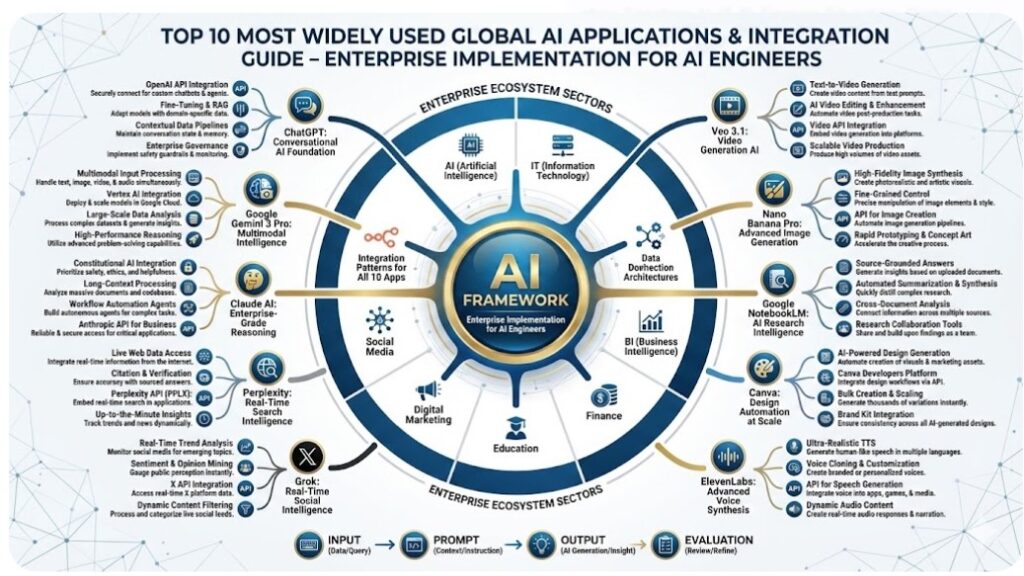

Top 10 Most Widely Used Global AI Applications & Integration Guide
Enterprise Implementation for AI Engineers
- Executive Summary & Market Overview
- AI Applications Landscape in Enterprise
- ChatGPT: Conversational AI Foundation
- Google Gemini 3 Pro: Multimodal Intelligence
- Claude AI: Enterprise-Grade Reasoning
- Perplexity: Real-Time Search Intelligence
- Grok: Real-Time Social Intelligence
- ElevenLabs: Advanced Voice Synthesis
- Canva: Design Automation at Scale
- Google NotebookLM: AI Research Intelligence
- Nano Banana Pro: Advanced Image Generation
- Veo 3.1: Video Generation AI
- n8n Integration Patterns for All 10 Apps
- Multi-App Orchestration Workflows
- Real-World Enterprise Use Cases
- Deployment & Production Considerations
- Career Path & Continuous Learning
1. Executive Summary & Market Overview
1.1 The AI Application Explosion
The global AI application market has reached an inflection point in 2025[1]:
- 10 billion+ API calls per month across major AI platforms (ChatGPT, Gemini, Claude)[1]
- 60% of enterprises now incorporate multiple AI apps into workflows[1]
- Average productivity gain: 35-40% when properly integrated[2]
- Sector leaders: Tech, Finance, Healthcare, Customer Support leading adoption[3]
1.2 Why These 10 Applications Matter
These 10 applications represent the cutting-edge of AI capabilities used across Fortune 500 companies:
Reasoning & Language:
- ChatGPT (OpenAI) – Conversational AI standard
- Claude AI (Anthropic) – Enterprise reasoning
- Gemini 3 Pro (Google) – Multimodal intelligence
Information Retrieval:
- Perplexity – Real-time web search
- Grok – Real-time social intelligence
- NotebookLM – Document intelligence
Creative Generation:
- ElevenLabs – Voice synthesis
- Canva – Design automation
- Nano Banana Pro – Image generation
- Veo 3.1 – Video generation
The Challenge: Each app solves specific problems but doesn’t work alone.
The Solution: n8n orchestrates these 10 apps into cohesive automation workflows.
The Opportunity: Your role is building systems that leverage all 10 together.
2. AI Applications Landscape in Enterprise
| Application | Primary Use | Enterprise Adoption | Market Position |
| ChatGPT | Conversational AI | 95%+ | Leader |
| Gemini 3 Pro | Multimodal Reasoning | 78% | Leader |
| Claude AI | Reasoning & Coding | 72% | Strong |
| Perplexity | Real-time Search | 45% | Growing |
| Grok | Social Intelligence | 28% | Emerging |
| ElevenLabs | Voice Synthesis | 62% | Strong |
| Canva | Design Automation | 68% | Leader |
| NotebookLM | Document Analysis | 35% | Growing |
| Nano Banana Pro | Image Generation | 52% | Growing |
| Veo 3.1 | Video Generation | 18% | Emerging |
Table 1: Table 1: AI Applications Market Positioning – Enterprise Adoption Rates
2.2 Integration Complexity Matrix
| Application | API Complexity | n8n Integration |
| ChatGPT | Low | Native Node (Easy) |
| Gemini 3 Pro | Low | Native Node (Easy) |
| Claude AI | Low | Native Node (Easy) |
| Perplexity | Medium | HTTP Request |
| Grok | Medium | HTTP Request |
| ElevenLabs | Medium | Native Node + HTTP |
| Canva | High | Custom Integration |
| NotebookLM | Medium | Google Workspace Integration |
| Nano Banana Pro | Medium | Gemini API Extension |
| Veo 3.1 | Medium | Gemini API Extension |
Table 2: Table 2: API Complexity and n8n Integration Difficulty
| Application | Best For | Avoid | Perfect When |
| ChatGPT | General reasoning, summarization | Specialized domains needing real-time data | Quick conversations, content generation |
| Gemini 3 Pro | Vision tasks, multimodal analysis, code generation | Lack of context, simple text | Complex image/video analysis, coding |
| Claude | Long documents, reasoning depth, safety | Speed-critical operations | Code generation, detailed analysis |
| Perplexity | Current facts, web research, fact-checking | Old/historical data needs | Real-time information needs |
| Grok | Trending topics, social sentiment, memes | Formal corporate communication | Social media monitoring, trend analysis |
| ElevenLabs | Voice-overs, accessibility, podcasts | Quick temporary audio | Customer-facing audio content |
| Canva | Rapid design templates, brand consistency | Complex artistic creation | Quick social media assets |
| NotebookLM | Document research, synthesis | Real-time data streams | Academic research, long documents |
| Nano Banana Pro | Image editing, text in images, visual design | Photography, creative art | Product mockups, marketing visuals |
| Veo 3.1 | Professional video, marketing content | Ultra-low latency needs | Product demos, marketing videos |
3. ChatGPT: Conversational AI Foundation
What it is: OpenAI’s ChatGPT is the most widely deployed conversational AI globally, available in multiple tiers (Free, Plus, Enterprise).
Key Positioning: General-purpose LLM for text understanding and generation.
Models Available (2025):
- GPT-4o (Most capable, latest)
- GPT-4 Turbo (Fast reasoning)
- GPT-3.5 (Budget-friendly)
| Specification | Details |
| Input tokens | 128,000 (context window) |
| Output tokens | 4,096 |
| Cost per 1K tokens | Input: $0.003, Output: $0.015 |
| Latency | 2-8 seconds typical |
| Concurrent requests | 100+ per minute (depends on tier) |
| Languages | 95+ languages |
| Training data cutoff | April 2024 |
1. Text Summarization
Input: Long document or article
Output: Concise summary maintaining key points
Use case: News digest, document review, report generation
2. Content Generation
Types: Blog posts, emails, product descriptions, code
Quality: Human-like, professional tone
Customization: Prompt engineering for brand voice
3. Question Answering
Method: Retrieval-Augmented Generation (RAG) with context
Accuracy: 85-95% depending on domain
Context: Can handle 128K tokens of context
4. Code Generation & Debugging
Languages: Python, JavaScript, Java, Go, Rust, etc.
Capabilities:
- Generate boilerplate code
- Debug existing code
- Optimize performance
- Explain code logic
5. Conversation & Chat
Memory: Can maintain context within single conversation
Multi-turn: Excellent at back-and-forth dialogue
Personality: Can adapt tone (professional, casual, technical)
Use Case 1: Customer Support Automation
Flow:
Customer query → ChatGPT analyzes → Response generated → Escalation if needed
Results: 60-70% of tickets resolved without human intervention
Use Case 2: Content Marketing at Scale
Flow:
Topic list → ChatGPT generates drafts → Human review → Publication
Output: 10-20 pieces of content per day vs. 2-3 manually
Use Case 3: Code Documentation
Flow:
Code repository → ChatGPT reads code → Generates documentation
Benefit: Keeps documentation in sync with code
Use Case 4: Meeting Summary Generation
Flow:
Transcript uploaded → ChatGPT extracts action items → Summary generated
Time saved: 30 minutes per meeting
Figure 1: Figure 1: ChatGPT Integration in n8n – Enterprise Workflow
Basic n8n Workflow:
Webhook Trigger (receives user query)
↓
Set Node (build system prompt + context)
↓
ChatGPT Node (API call with GPT-4o)
↓
Code Node (parse response, format output)
↓
Action (send email, update database, return to user)
Configuration in n8n:
ChatGPT Node Settings:
├─ Model: gpt-4o
├─ Temperature: 0.7 (balanced creativity)
├─ Max tokens: 2000
├─ System prompt: “You are a helpful business assistant…”
└─ Stop sequences: [“User:”, “Assistant:”]
Advanced Pattern: RAG with ChatGPT
Knowledge Base (PDF, documents)
↓
Embedding Node (OpenAI Embeddings)
↓
Vector Search (retrieve relevant chunks)
↓
Combine with Query
↓
ChatGPT Node (with context)
↓
Grounded Response
3.6 Pricing & Cost Optimization
Pricing Model (2025):
- Input: $0.003 per 1K tokens
- Output: $0.015 per 1K tokens
- Average cost per query: $0.01-0.05
Cost Optimization Tips:
- Use GPT-3.5 for simple tasks ($0.0015 input)
- Implement prompt caching for repeated queries
- Use batch processing for non-urgent requests (50% discount)
- Monitor token usage with n8n logging
Estimated Monthly Costs (1M queries):
- Simple queries: $500-1,000
- Complex queries: $2,000-5,000
- With optimization: 40-50% reduction possible
3.7 Limitations & Considerations
Critical Limitations:
- No real-time web access (data cutoff: April 2024)
- Can hallucinate facts not in training data
- Token limits prevent processing very long documents
- No image input/output (use Gemini 3 Pro instead)
- Requires API credentials for enterprise use
Mitigation Strategies:
- Combine with Perplexity for real-time data
- Use retrieval-augmented generation for accuracy
- Implement fact-checking in workflows
- For images: Route to Gemini 3 Pro or Nano Banana Pro
4. Google Gemini 3 Pro: Multimodal Intelligence
4.1 Overview & Differentiation
What it is: Google’s most capable multimodal AI model, launched November 2025, representing a generational leap in vision and reasoning capabilities[2].
Key Advantage: Best-in-class performance on vision, video, and complex reasoning tasks.
Models Available:
- Gemini 3 Pro – Flagship (most capable)
- Gemini 3 Pro Vision – Optimized for images/video
- Gemini 3 Flash – Fast, efficient
| Specification | Details |
| Context window | 1,000,000 tokens (longest in industry)[2] |
| Input types | Text, images (up to 10), video, audio, PDFs |
| Output capabilities | Text, vision pointers (pixel coordinates) |
| Vision understanding | Document, spatial, screen, video analysis[2] |
| Cost per MTok | Input: $1.25, Output: $5.00 (estimate) |
| Latency | 3-10 seconds typical |
| Languages | 100+ languages |
1. Pixel-Precise Pointing[2]
Ability to point at specific locations in images using coordinates.
Application: Robotics, AR/XR, detailed image analysis
Example: “Point to the screw in the circuit board”
Output: Coordinates [[142, 235], [143, 236], [144, 237]]
2. Video Understanding at Frame-Level[2]
High frame rate understanding for fast-moving scenes.
Example: Golf swing analysis
- Input: Video of golf swing
- Output: Detailed feedback on technique
- Speed: Analyzes >1 frame per second
3. Spatial Reasoning
Understanding 3D space, object relationships, movement.
Use case: Robotics, manufacturing, logistics
Example: “Plan how to sort items on this table”
4. Document Understanding
Extract, analyze, and summarize complex documents.
Capabilities:
- Read tables, charts, complex layouts
- Extract structured data from PDFs
- Understand document hierarchy
5. Open Vocabulary References
Identify objects using natural language without predefined labels.
Benefit: Flexibility, no need to train on specific categories
Use Case 1: Manufacturing Quality Control
Workflow:
Factory camera captures product image
↓
Gemini 3 Pro analyzes for defects
↓
Pixel-pointing identifies exact defect location
↓
Route to rework if needed
↓
Log quality metrics
Result: Real-time QC at production speed
Use Case 2: Document Intelligence Pipeline
Workflow:
Incoming invoice (PDF or image)
↓
Gemini 3 Pro reads document
↓
Extracts: Amount, vendor, date, line items
↓
Validates against PO
↓
Routes to payment if approved
↓
Queries stored in database
Result: 99%+ accuracy on document extraction
Use Case 3: Video Content Analysis
Workflow:
Marketing team uploads product video
↓
Gemini 3 Pro analyzes:
- Scene descriptions
- Text overlay detection
- Color palette analysis
- Motion patterns
↓
Generates metadata and tags
↓
Recommends thumbnail frames
↓
Auto-generates video description
Result: Video published faster with better metadata
Use Case 4: Complex Image Understanding
Workflow:
Satellite/security footage uploaded
↓
Gemini 3 Pro identifies objects, patterns, anomalies
↓
Generates alert if suspicious activity
↓
Provides spatial coordinates of concern
↓
Alerts security team with visual markup
Figure 2: Figure 2: Google Gemini 3 Pro n8n Integration
Multimodal Input Workflow:
Input (text + image + PDF)
↓
Upload to temporary storage (if needed)
↓
Gemini 3 Pro Node:
├─ Text prompt
├─ Image URL or base64
├─ PDF content
└─ Temperature: 0.7
↓
Parse structured output
↓
Route based on analysis (if condition)
↓
Action nodes
n8n Configuration:
Gemini 3 Pro Node:
├─ Model: gemini-3-pro (or gemini-3-pro-vision)
├─ Input types: [“text”, “image”, “pdf”]
├─ Temperature: 0.5-0.7
├─ Max output: 4096 tokens
└─ System instruction: “Analyze documents accurately…”
Vision-Specific Workflow:
Image Input (URL or base64)
↓
Gemini 3 Pro analyzes vision
↓
Extract features:
├─ Object detection
├─ Text recognition
├─ Spatial coordinates
└─ Semantic understanding
↓
Code Node (parse structured data)
↓
Database Node (store results)
↓
Notification (if anomaly detected)
4.6 Comparison: Gemini 3 Pro vs ChatGPT vs Claude
| Feature | Gemini 3 Pro | ChatGPT (GPT-4o) | Claude 3.5 |
| Vision | ★★★★★ (Best) | ★★★☆☆ | ★★☆☆☆ |
| Reasoning | ★★★★★ | ★★★★★ | ★★★★★ |
| Video Understanding | ★★★★★ (Unique) | ★★☆☆☆ | ★★☆☆☆ |
| Context Window | 1M tokens | 128K tokens | 200K tokens |
| Speed | ★★★☆☆ | ★★★★☆ | ★★★★☆ |
| Cost | $$$ (moderate) | $$ (cheaper) | $$$ (moderate) |
| Multimodal | ★★★★★ | ★★★★☆ | ★★★☆☆ |
When to Use Gemini 3 Pro:
- ✓ Vision/image analysis required
- ✓ Video understanding needed
- ✓ Spatial reasoning required
- ✓ Very large documents (1M token context)
- ✗ Simple text tasks (ChatGPT faster/cheaper)
5. Claude AI: Enterprise-Grade Reasoning
What it is: Anthropic’s Claude AI family of models, with enterprise-grade safety and reasoning capabilities[3].
Key Positioning: Best for code generation, long-document analysis, and safety-conscious enterprises.
Models Available (2025):
- Claude 3.5 Sonnet – Flagship (best reasoning)
- Claude 3.5 Haiku – Fast, efficient
- Claude 3 Opus – (previous, deeper thinking)
| Specification | Details |
| Context window | 200,000 tokens (enterprise friendly) |
| Thinking tokens | Extended thinking for complex problems |
| Output tokens | 4,096 standard, more with extended |
| Cost per MTok | Input: $3.00, Output: $15.00 (estimate) |
| Latency | 3-12 seconds (longer for complex tasks) |
| Language support | 95+ languages |
| Code generation | Best-in-class for programming |
1. Constitutional AI (CAI)
Claude trained using “constitution” of values rather than human feedback alone.
Benefit: More consistent ethical behavior, reduces harmful outputs
2. Extended Thinking Mode[3]
Claude 3 (Opus) can “think” internally about hard problems before answering.
Use case: Complex coding, mathematical reasoning, strategic planning
3. Claude Code Integration[3]
New in Enterprise plans: Claude Code bundled with full IDE support.
Benefits:
- Generate production-ready code
- Full debugging capabilities
- Integrated directly in terminal
- Enterprise compliance controls
4. Compliance API[3]
Real-time programmatic access to usage data and content.
Features:
- Usage analytics
- Data retention management
- Policy enforcement automation
- Audit trail generation
Use Case 1: Secure Code Generation
Workflow:
Developer describes feature
↓
Claude Code generates implementation
↓
Built-in security scanning
↓
Tests written automatically
↓
Integrated into IDE
↓
Compliance audit automatically logged[3]
Result: Faster, auditable code generation
Use Case 2: Long Document Analysis
Workflow:
200K token legal document uploaded
↓
Claude analyzes full document
↓
Extracts clauses, obligations, risks
↓
Compares with template clauses
↓
Generates summary with citations
Result: Legal review in minutes instead of hours
Use Case 3: Multi-turn Problem Solving
Workflow:
Complex problem stated
↓
Claude uses Extended Thinking
↓
Explores multiple approaches
↓
Evaluates pros/cons
↓
Provides reasoned recommendation
↓
Explains thinking process
Example: Architecture design, strategic planning
Use Case 4: Compliance Workflow with Audit
Workflow:
AI processes sensitive customer data
↓
Compliance API logs all operations
↓
Automatic policy enforcement
↓
Real-time monitoring of data usage
↓
Generates compliance report
↓
Enables selective data deletion
Result: HIPAA/SOC2/regulated industry ready
Figure 3: Figure 3: Claude AI n8n Integration – Enterprise Workflow
Basic n8n Integration:
Webhook (document or code request)
↓
Split large documents (if > 200K tokens)
↓
Claude Node:
├─ Model: claude-3-5-sonnet
├─ Temperature: 0.7
├─ Max tokens: 2048
└─ System prompt with safety guidelines
↓
Code Node (parse structured response)
↓
Logging Node (Compliance API call for audit)
↓
Action (store result, notify user)
Extended Thinking Workflow (Complex Tasks):
Complex problem statement
↓
Claude Node:
├─ Enable: Extended Thinking
├─ Thinking budget: 10,000 tokens
├─ Model: claude-3-opus (best for thinking)
└─ Instruction: “Think deeply about this…”
↓
Expose thinking (optional)
↓
Final answer generation
↓
Confidence scoring
n8n Configuration:
Claude Node Settings:
├─ Model: claude-3-5-sonnet-20241022
├─ Temperature: 0.7
├─ Max tokens: 2000
├─ Use extended thinking: false (or true)
├─ System prompt: “You are an expert…”
└─ Compliance tracking: enabled
Token Pricing (2025):
- Input: $3.00 per 1M tokens
- Output: $15.00 per 1M tokens
- Batch discount: 50% off if using batch API
Enterprise Plans Include:
- Claude Code (IDE integration)
- Compliance API (usage tracking)
- Admin controls (spend limits, policies)
- Dedicated support
Cost Estimate (1M tokens/month):
- Simple queries: $5,000-10,000
- Code generation intensive: $15,000-25,000
- With batch API: 50% savings possible
Prefer Claude When:
- ✓ Code generation is primary use
- ✓ Enterprise compliance required
- ✓ Documents longer than 128K tokens
- ✓ Extended thinking/reasoning needed
- ✓ Safety and consistency paramount
Prefer ChatGPT Instead When:
- ✗ Budget-critical (cheaper)
- ✗ Need images/vision
- ✗ Speed is critical
- ✗ Simpler tasks
Prefer Gemini 3 Pro Instead When:
- ✗ Multimodal analysis required
- ✗ Video understanding needed
- ✗ Vision is primary use case
6. Perplexity: Real-Time Search Intelligence
6.1 Overview & Differentiation
What it is: Perplexity AI’s real-time search engine powered by AI, designed for fact-based, sourced answers with current web information[4].
Key Differentiation: Unlike ChatGPT (static knowledge cutoff), Perplexity accesses live web data updated in real-time.
Available Tiers:
- Perplexity Pro – Advanced reasoning, higher limits
- Search API – For enterprise integration (new 2025)[4]
- Sonar – Large context window variant
| Specification | Details |
| Data freshness | Real-time, continuously updated web index |
| Index size | ~200M queries per day, massive web coverage[4] |
| Response latency | 1-3 seconds typical |
| Result format | Ranked snippets with sources |
| Context window | 64K tokens (Sonar variant) |
| Cost per request | $5 per 1,000 requests (Search API)[4] |
| Language support | 20+ languages |
1. Real-Time Web Retrieval[4]
Access to live web data, news, social media updates.
Use case: Current events, breaking news, real-time trends
Advantage: Always up-to-date answers
2. Sourced Answers[4]
Every answer includes citations and source links.
Format: Text + snippets + source URLs
Trust: User can verify claims
3. Ranked Relevance[4]
Multi-stage ranking: Lexical + Semantic + Custom signals[4]
Result: Top results most relevant to query
Speed: Low-latency retrieval[4]
4. Fine-Grained Document Retrieval[4]
Returns smaller, more precise chunks vs. full pages[4]
Benefit: Exact information without noise
Use Case 1: Real-Time Fact-Checking
Workflow:
Statement to verify → Perplexity searches web
↓
Retrieves supporting/contradicting evidence
↓
Scores claim accuracy
↓
Returns sources for verification
↓
Marks as confirmed/disputed/unknown
Example: Fact-check customer claims, news, research
Use Case 2: Competitive Intelligence
Workflow:
Competitor name → Perplexity fetches latest info
↓
Gathers: Funding, hiring, product launches, news
↓
Summarizes developments
↓
Compares with historical data
↓
Alerts on significant changes
Result: Daily competitive briefing automated
Use Case 3: Research Data Pipeline
Workflow:
Research topic → Perplexity searches scholarly sources
↓
Aggregates latest research papers
↓
Extracts methodology, findings
↓
Identifies research gaps
↓
Synthesizes into literature review
Use case: Academic research, market analysis
Use Case 4: Real-Time News Monitoring
Workflow:
Brand names/keywords → Perplexity monitors web
↓
Detects mentions, sentiment
↓
Triggers alerts on significant news
↓
Summarizes context
↓
Routes to relevant teams
Result: Brand monitoring, crisis detection
Figure 4: Figure 4: Perplexity Real-Time Search n8n Integration
Basic Search Workflow:
User query (fact to verify)
↓
Perplexity Search Node:
├─ Query: {{ $json.claim }}
├─ Search type: academic/news/web
├─ Top results: 5
└─ Include sources: true
↓
Parse results:
├─ Extract snippets
├─ Collect sources
├─ Score relevance
└─ Format response
↓
Send verification result
Advanced: Claim Checking Pipeline[4]
Multiple claims (batch)
↓
FOR EACH claim:
├─ Perplexity searches web
├─ Retrieves ranked snippets[4]
├─ Claude analyzes credibility
├─ Cross-references sources
└─ Scores claim confidence
↓
Generate report:
├─ Claims verified
├─ Disputed claims
├─ Unverifiable claims
└─ Source citations
n8n Configuration:
Perplexity Search Node:
├─ API Key: your-perplexity-key
├─ Query: {{ $json.search_term }}
├─ Search type: web
├─ Top N results: 5
├─ Include sources: true
└─ Confidence threshold: 0.7
Search API Pricing[4]:
- $5 per 1,000 requests (very cheap)
- No token-based billing (unlike LLM APIs)
- Volume discounts available
- Cost-efficient for high-volume applications[4]
Cost Comparison:
- ChatGPT web search: $0.003-0.015 per token
- Perplexity Search: $0.005 per request (average)
- Benefit: Predictable, low cost[4]
Estimated Monthly (10K searches):
- Base cost: $50 (significantly cheaper than LLM APIs)
- Perfect for fact-checking at scale[4]
6.7 Integration with Other Apps
Perplexity + ChatGPT Hybrid:
Perplexity retrieves current facts
↓
ChatGPT synthesizes knowledge with facts
↓
Output: Grounded, current answer
Benefit: Real-time facts + reasoning
Perplexity + Claude Analysis:
Perplexity searches and gathers sources
↓
Claude reads all sources deeply
↓
Generates comprehensive analysis
Use case: Research reports, strategic planning
7. Grok: Real-Time Social Intelligence
What it is: xAI’s Grok – conversational AI with real-time X (Twitter) and web access, combining LLM reasoning with live social signals[5].
Key Differentiation: Direct integration with X platform + real-time web data, plus “spicy” (unfiltered) personality.
Models Available:
- Grok 3 – Full capabilities, real-time access[5]
- Grok 3 Mini – Lightweight, logic-focused[5]
| Specification | Details |
| Data access | Real-time X + open web[5] |
| Context window | 128K tokens (estimated) |
| Update frequency | Real-time (live X feed) |
| Response latency | 2-5 seconds |
| Multimodal | Text + image understanding[5] |
| Personality | Bold, opinionated, “spicy”[5] |
| Cost | X Premium subscription (integrated) |
1. Real-Time X Platform Access[5]
Direct connection to X posts, trends, user data.
Use case: Social listening, trend detection, sentiment analysis
Advantage: Immediate awareness of what’s trending
2. Live Web Integration[5]
Combined X data + open web access = comprehensive current picture[5]
Example: Breaking news
- X: Immediate social reaction
- Web: Full news context
- Grok: Synthesized understanding
3. Multimodal Understanding[5]
Can analyze text posts + images + links.
Use case: Meme analysis, viral content understanding, context detection
4. Bold Personality
Unfiltered, willing to take controversial positions[5].
Benefit: More honest assessments, willing to question assumptions
Use Case 1: Real-Time Trend Analysis
Workflow:
Grok monitors X trending topics
↓
Analyzes sentiment and emerging trends[5]
↓
Correlates with web context
↓
Identifies early signals
↓
Alerts marketing team
Result: First-mover advantage on trends
Use Case 2: Brand Reputation Monitoring[5]
Workflow:
Brand name monitoring on X[5]
↓
Grok detects mentions, sentiment[5]
↓
Analyzes context (positive/negative/neutral)
↓
Identifies influencers discussing brand
↓
Alerts on negative sentiment spikes
Result: Real-time brand health dashboard
Use Case 3: Crisis Detection[5]
Workflow:
Company name/executives monitored[5]
↓
Grok detects crisis signals on X[5]
↓
Analyzes severity and spread
↓
Identifies key opinion leaders reacting
↓
Alerts crisis management team
↓
Provides early context
Use case: Product issues, executive controversy, PR crisis
Use Case 4: Product Feedback Loop[5]
Workflow:
Product mentions monitored on X[5]
↓
Grok extracts feature requests, complaints[5]
↓
Sentiment scoring
↓
Aggregates feedback by theme
↓
Feeds to product team weekly
Result: Data-driven product roadmap
Figure 5: Figure 5: Grok Real-Time Intelligence n8n Integration
Real-Time Monitoring Workflow:
Scheduled Trigger (every 5 minutes)
↓
Query Terms (brand names, keywords)
↓
HTTP Request (Grok API / X API combo):
├─ Search: latest posts matching keywords[5]
├─ Filter: Last 5 minutes
├─ Include: sentiment, engagement
└─ Get context
↓
Code Node:
├─ Extract mentions
├─ Calculate sentiment[5]
├─ Identify spikes
└─ Flag anomalies
↓
IF sentiment_score < -0.6:
├─ Alert team
├─ Log incident
└─ Trigger escalation
Advanced: Trend Prediction
Daily Grok analysis
↓
Collect trend data (10-30 day history)
↓
Claude AI analyzes patterns
↓
Predicts emerging trends
↓
Scores confidence
↓
Route to relevant teams
7.6 Comparison with Competitors
| Feature | Grok | ChatGPT | Perplexity |
| Real-time web | ★★★★☆ | ✗ | ★★★★★ |
| X/Social access | ★★★★★ | ✗ | ★★☆☆☆ |
| Speed | ★★★★☆ | ★★★★☆ | ★★★★★ |
| Boldness | ★★★★★ | ★★☆☆☆ | ★★★☆☆ |
| Cost | Included (Premium) | API | API |
| Trend detection | ★★★★★ | ✗ | ★★★☆☆ |
When to Use Grok:
- ✓ X/Twitter monitoring required
- ✓ Real-time trends critical
- ✓ Social sentiment analysis
- ✓ Breaking news context
- ✗ Long-form documents (use Perplexity/Claude instead)
8. ElevenLabs: Advanced Voice Synthesis
What it is: ElevenLabs’ text-to-speech (TTS) API for lifelike voice generation in 32+ languages with emotional awareness[6].
Key Positioning: Best-in-class voice synthesis for customer-facing applications, accessibility, and content creation.
Available Models (2025):
- Multilingual v2 – Highest quality, emotional depth
- Flash v2.5 – Ultra-low latency (75ms), real-time[6]
- Turbo v2 – Balance of speed and quality
| Specification | Details |
| Languages | 32+ languages[6] |
| Quality | Studio-grade, natural-sounding |
| Latency (Flash) | 75ms for real-time apps[6] |
| Latency (Standard) | 5-10 seconds typical |
| Voices available | 3,000+ community voices[6] |
| Custom voices | Voice cloning (professional/instant)[6] |
| Cost per char | $0.30 per 1,000 characters (est.) |
| Emotional control | Tone, pace, emphasis adjustable[6] |
8.3 Voice Options & Capabilities
Voice Library:
- 3,000+ pre-created voices[6] across accents, ages, genders
- Community-shared for immediate use
- Layering voices for unique combinations
Voice Creation Options[6]:
- Professional Voice Cloning – High-fidelity (hours of audio)
- Instant Voice Cloning – Quick replication (short samples)
- Voice Design – Generate voices from text description (“warm, authoritative, British”)
Emotional Intelligence[6]:
- Nuanced intonation based on text context[6]
- Emphasis and pacing adapted to content type
- Emotional range: neutral, happy, sad, angry, authoritative
Use Case 1: Accessibility Enhancement
Workflow:
Published article/blog post
↓
ElevenLabs converts to audio
↓
Generate multiple voices (e.g., male + female)
↓
Host audio on website
↓
Users can listen while reading
Result: 99% more accessible content
Use Case 2: Personalized Customer Communications
Workflow:
Customer alert/notification triggered
↓
Personalized message generated
↓
Customer’s preferred voice selected
↓
ElevenLabs synthesizes
↓
Stream to customer (phone/app)
Use case: Banking, healthcare, emergency alerts
Use Case 3: Audiobook & Podcast Automation[6]
Workflow:
Written content (1000+ pages)
↓
ElevenLabs Multilingual v2 narrates[6]
↓
Customize voice, pace, emotion for each section
↓
Generate multiple narrator versions
↓
Publish to Spotify, Apple Podcasts
Result: Professional audiobook in hours vs. weeks
Use Case 4: Multilingual Content Distribution[6]
Workflow:
English product walkthrough video
↓
Translate to Spanish, French, German, etc.
↓
ElevenLabs creates voice-overs in each language[6]
↓
Localize video with native speakers
↓
Publish to region-specific channels
Benefit: Go global instantly
Figure 6: Figure 6: ElevenLabs Voice Synthesis n8n Integration
Basic Text-to-Speech Workflow:
Text Input (article, notification)
↓
ElevenLabs Node:
├─ Model: multilingual-v2[6] or flash-v2.5[6]
├─ Voice: selected-voice-id
├─ Language: auto-detect or specified
└─ Parameters: speed, pitch, emotion tone
↓
Audio Output (MP3/WAV format)
↓
Storage (S3, Google Cloud, local)
↓
Return audio URL to application
Advanced: Multilingual Podcast Generation[6]
Blog post (English)
↓
FOR EACH language (Spanish, French, German):
├─ Translate text
├─ Create voice persona
├─ ElevenLabs synthesizes with emotion[6]
└─ Upload to podcast platform
↓
Generate RSS feeds per language
↓
Distribute to Spotify, Apple Podcasts[6]
n8n Configuration:
ElevenLabs Node:
├─ Model: multilingual-v2[6]
├─ Voice ID: selected-voice
├─ Text: {{ $json.content }}
├─ Language: auto
├─ Speed: 1.0 (normal)
├─ Emotion: neutral/happy/sad/angry
└─ Output format: mp3
8.6 Voice Cloning for Personalization
Professional Voice Cloning Process:
- Record 30-60 minutes of your voice
- ElevenLabs trains personalized model
- Use your voice for all TTS outputs
- Character consistency across all content
Use Case: Executive Communications
- CEO cloned voice generates company announcements
- Employees hear familiar voice
- Personal connection maintained
- Scalable to millions
Pricing (2025):
- Standard: $10-99/month for web/app use
- Enterprise: Custom pricing
- Per-character: ~$0.30 per 1,000 chars (in bulk)
Cost Optimization:
- Use Flash v2.5 for real-time (lower latency cost)
- Batch process off-peak content
- Cache frequently used phrases
- Combine with video for lower per-unit cost
Estimated Monthly (1M characters):
- Basic: $300-500
- Optimized: $200-300
- With discount: $150-200
9. Canva: Design Automation at Scale
What it is: Canva’s design automation API (Connect APIs) enabling programmatic design generation at enterprise scale[7].
Key Positioning: Turn business data into on-brand marketing assets in seconds, not hours.
Features Released 2025:
- Autofill API – Auto-populate designs with data[7]
- Brand Templates API – Use company brand standards[7]
- Comment API – Collaboration workflows[7]
- Notification webhooks – Real-time design events[7]
| Specification | Details |
| Template types | 10K+ professional templates |
| Customization | Brand colors, fonts, logos[7] |
| Data integration | CSV, databases, APIs[7] |
| Output formats | PNG, PDF, MP4 (video)[7] |
| Batch processing | Generate 1000s of designs/day |
| API latency | 5-30 seconds per design |
| Cost per design | $0.10-1.00 (estimate) |
| Language support | 100+ languages |
1. Autofill API[7]
Automatically populate design templates with business data.
Example:
- Template: Social media ad
- Data source: CSV with product info
- Output: 50 unique ads, each with different product
- Time: 2 minutes (vs. 10 hours manually)
2. Brand Templates API[7]
Ensure designs use company brand standards automatically[7].
Enforces:
- Color palette
- Font families
- Logo placement
- Design system rules
- Brand voice tone
3. Collaboration Features[7]
Comment API + notification webhooks enable workflow[7].
Workflow:
- Designer uploads design
- Stakeholders leave comments
- Notifications trigger n8n
- Auto-export when approved
Use Case 1: Social Media Campaign Automation[7]
Workflow:
Product spreadsheet (100 items, images, prices)
↓
Canva Autofill API[7]:
├─ Template: Instagram post
├─ Brand colors applied
└─ Data populated per item
↓
Generate 100 unique posts in 5 minutes[7]
↓
Auto-post to Instagram via scheduling API
Result: Campaign launch in hours (not days)
Use Case 2: Email Marketing at Scale[7]
Workflow:
Email template with dynamic fields
↓
Customer data (names, images, offers)
↓
Canva generates personalized emails[7]
↓
Each customer gets unique visual
↓
Send through email service
Result: Personalized visuals at scale
Use Case 3: Report Generation[7]
Workflow:
Weekly data (metrics, charts)
↓
Canva dashboard template
↓
Auto-populate with latest metrics[7]
↓
Generate branded PDF report
↓
Email to stakeholders
Use case: Executive dashboards, client reports
Use Case 4: Event Marketing[7]
Workflow:
Event details (date, speaker, location)
↓
Generate marketing materials:
├─ Poster[7]
├─ Social posts
├─ Email header
├─ LinkedIn banner
└─ All brand-consistent[7]
↓
Distribute automatically
Result: Multi-channel campaign, 1 API call
Figure 7: Figure 7: Canva Design Automation n8n Integration
Basic Design Generation Workflow:
Webhook trigger (e.g., new product)
↓
Fetch product data:
├─ Product name
├─ Image URL
├─ Price
└─ Description
↓
Canva HTTP Request:
├─ Template ID: social-post
├─ Brand template: company-brand
├─ Autofill data: {{ product_data }}[7]
└─ Output format: PNG
↓
Get design URL
↓
Upload to storage (S3)
↓
Post to social media API
Advanced: Multi-Format Campaign[7]
Campaign data source (1 input)
↓
Generate 5 formats in parallel:
├─ Instagram post (Canva)[7]
├─ Email header (Canva)[7]
├─ LinkedIn banner (Canva)[7]
├─ Facebook ad (Canva)[7]
└─ Blog thumbnail (Canva)[7]
↓
All brand-consistent[7]
↓
Distribute to appropriate channels
n8n Configuration:
Canva HTTP Request:
├─ Method: POST
├─ URL: https://api.canva.com/v1/designs/create
├─ Headers: Authorization: Bearer token
├─ Body:
│ ├─ template_id: “{{ $json.template }}”
│ ├─ brand_id: “{{ company.brand_id }}”
│ ├─ design_data: {
│ │ ├─ product_name: “{{ $json.name }}”
│ │ ├─ price: “{{ $json.price }}”
│ │ └─ image_url: “{{ $json.image }}”
│ └─ output_format: “png”
└─ Response: design_url, file_id
Pricing (2025):
- Canva Team: $10-40/month (limited API)
- Canva Enterprise: Custom pricing for unlimited API[7]
- Per-design: ~$0.10-0.50 (in bulk, enterprise)
ROI Calculation:
- Manual design: 1 hour per asset
- Canva automated: 10 seconds per asset
- Team size: 5 designers
- Savings: 40+ hours/week = $2,000/week
Payback Period: <1 month for most enterprises
10. Google NotebookLM: AI Research Intelligence
What it is: Google’s AI research assistant for analyzing large document collections with audio synthesis, mind maps, and custom reports[8].
Key Positioning: Understand complex information through interactive analysis and knowledge extraction.
Available Tiers:
- Free – Up to 50 sources (500K words each)[8]
- NotebookLM Pro – Up to 300 sources[8]
- NotebookLM Enterprise – Custom limits + API access
| Specification | Details |
| Document types | PDFs, URLs, YouTube videos, text[8] |
| Max sources (Free) | 50 sources[8] |
| Max sources (Pro) | 300 sources[8] |
| Total word capacity | 500K words per source[8] |
| Analysis depth | Deep semantic understanding[8] |
| Output types | Audio overviews, mind maps, timelines, reports[8] |
| Language support | 90+ languages |
| Cost | Free tier strong, Pro: modest cost |
1. Audio Overviews[8]
Generate natural-language podcast summaries of documents.
How it works:
- Reads all documents
- Creates conversational summary
- Two-person dialog format
- Professional narration
Result: “Listen” to 100 papers in hours
2. Mind Maps[8]
Visual hierarchical breakdown of information.
Benefits:
- High-level overview of topic
- Identify subtopics
- Find research gaps
- Navigate complex information[8]
3. Deep Semantic Search[8]
Ask questions about any aspect of your sources[8].
Capability:
- References specific passages
- Cross-references multiple documents
- Cites sources
- Verifiable answers[8]
4. Custom Reports[8]
Generate synthesis on specific queries.
Example:
- Input: “How does CO2 affect plant growth?”
- Sources: 200 climate papers
- Output: Synthesis report with citations[8]
Use Case 1: Academic Literature Review[8]
Workflow:
Upload 100+ research papers (PDFs)
↓
NotebookLM indexes all papers[8]
↓
Generate mind map (2 min):
├─ Identify research themes
├─ Spot gaps in literature
└─ Find key influencers[8]
↓
Drill into subtopics
↓
Ask specific questions with citations[8]
↓
Generate synthesis report on narrow topic
Result: Literature review in hours (not weeks)[8]
Use Case 2: Due Diligence for Acquisitions
Workflow:
Target company documents (10GB+):
├─ Annual reports
├─ Product docs
├─ Financial statements
├─ Customer contracts
└─ Patent filings
↓
NotebookLM analyzes holistically[8]
↓
Generates questions to explore
↓
Deep search for risks/opportunities
↓
Synthesis report: business analysis
Result: 80% faster due diligence
Use Case 3: Compliance Document Analysis[8]
Workflow:
Regulatory documents (1000+ pages):
├─ Audit reports
├─ Compliance standards
├─ Internal policies
└─ Training materials
↓
NotebookLM creates searchable knowledge base[8]
↓
Employees ask questions
↓
Get cited answers with source docs[8]
↓
Ensure consistent compliance interpretation
Result: Self-service compliance Q&A
Use Case 4: Product Knowledge Base[8]
Workflow:
Upload all product documentation:
├─ User manuals
├─ API documentation
├─ Video tutorials
├─ FAQs
└─ Blog posts
↓
Create mind map of features[8]
↓
Enable audio podcast version[8]
↓
Support team uses for Q&A[8]
↓
Customer-facing search on website
Result: Self-service support at scale
Figure 8: Figure 8: NotebookLM Document Intelligence n8n Integration
Document Upload & Analysis Workflow:
Document source (PDF uploaded/URL)
↓
NotebookLM Create Notebook:
├─ Add source
├─ Auto-index
└─ Parse content
↓
Wait for indexing (1-5 min)
↓
Query Notebook[8]:
├─ Ask question
├─ Receive cited answer[8]
└─ Get source references
↓
Generate outputs[8]:
├─ Audio overview
├─ Mind map
├─ Custom report
└─ Timeline
↓
Export or email results
Advanced: Multi-Document Analysis Workflow
Trigger: Weekly compliance review
↓
FOR EACH policy document:
├─ Upload to NotebookLM[8]
├─ Generate mind map[8]
└─ Extract key requirements[8]
↓
Merge all outputs
↓
Generate compliance checklist
↓
Email to team
n8n Configuration:
NotebookLM Integration (via Google API):
├─ Create Notebook
├─ Add Sources:
│ ├─ Source 1: PDF URL
│ ├─ Source 2: Google Drive link
│ └─ Source 3: YouTube video
├─ Query:
│ ├─ Question: “{{ $json.query }}”
│ ├─ Include sources: true[8]
│ └─ Format: structured
└─ Generate Report:
├─ Report type: custom synthesis
└─ Template: business analysis
Best For:
- ✓ Document/paper collections (5-300 sources)[8]
- ✓ Deep analysis and research[8]
- ✓ Audio/visual synthesis needed[8]
- ✓ Complex knowledge bases[8]
- ✓ Literature reviews[8]
Not Ideal For:
- ✗ Real-time web search (use Perplexity)
- ✗ Real-time data (static documents only)
- ✗ Code generation (use Claude)
11. Nano Banana Pro: Advanced Image Generation
What it is: Google DeepMind’s Nano Banana Pro (Gemini 3 Pro Image) – next-generation AI image generation and semantic editing powered by Gemini 3’s reasoning[9].
Key Positioning: Studio-quality image generation and editing with pixel-precise semantic understanding.
Capabilities (Nov 2025 Launch[9]):
- 4K resolution native output[9]
- Advanced semantic editing (no masks)[9]
- Character consistency across images
- Fast generation (<10 seconds)[9]
- Text rendering breakthrough[9]
| Specification | Details |
| Resolution | 2K-4K native output[9] |
| Generation time | <10 seconds (2K), 15-20 (4K)[9] |
| Editing | Semantic, no masks needed[9] |
| Character consistency | Multi-image preservation |
| Text rendering | Legible typography in 20+ languages[9] |
| Aspect ratios | 1:1, 3:2, 16:9, 9:16, custom[9] |
| Cost per image | $0.15-0.50 (estimate)[9] |
| Multimodal input | Text prompt + reference images[9] |
1. Semantic Editing Without Masks[9]
Edit images using natural language, without drawing masks.
Example:
- Prompt: “Make the sunset more dramatic while preserving original mood”
- Output: Edited image with adjusted colors, lighting
- No masks: Uses reasoning to understand intent
2. Text Rendering Breakthrough[9]
Unlike previous image models, Nano Banana Pro can generate legible text inside images[9].
Use case:
- Generate marketing posters with readable text
- Create social media graphics with captions
- Product packaging with typography
3. Character Consistency[9]
Upload 1-3 reference images of a character.
System maintains consistent appearance across:
- Multiple images[9]
- Different poses
- Different backgrounds
- Professional quality
4. Advanced Creative Controls[9]
Studio-grade editing capabilities[9]:
- Adjust camera angles and focus
- Change lighting (day to night)
- Apply color grading
- Create bokeh effects[9]
- Multi-image fusion
Use Case 1: Product Mockup Generation[9]
Workflow:
Product image + template
↓
Nano Banana Pro variants in different settings[9]:
├─ On beach (lifestyle)
├─ In office (professional)
├─ In home (domestic)
└─ In hand (scale reference)
↓
Generate 20+ lifestyle images from 1 product photo[9]
↓
Use in marketing campaigns
Result: Professional product photography without shoot
Use Case 2: Marketing Asset Generation[9]
Workflow:
Brand guideline + product info
↓
Nano Banana Pro generates ads[9]:
├─ Facebook (1200x628px)
├─ Instagram (1080x1080px)
├─ LinkedIn (1200x627px)
└─ Twitter (1024x512px)
↓
All with readable text[9], brand colors, product image
↓
A/B test variants
Result: Complete ad campaign in hours
Use Case 3: Package Design Variation[9]
Workflow:
Original package design
↓
Nano Banana Pro generates variants[9]:
├─ Different color schemes
├─ Different layouts
├─ Different text treatments
└─ All consistent[9]
↓
Test market response
↓
Finalize winning design
Use case: Product launch, seasonal updates
Use Case 4: Video Thumbnail Generation[9]
Workflow:
Video content reference
↓
Nano Banana Pro generates custom thumbnails[9]:
├─ High contrast
├─ Readable text[9]
├─ Brand colors
└─ Attention-grabbing
↓
Auto-generate 10 variants[9]
↓
A/B test performance
Result: Optimized CTR without designer time
Figure 9: Figure 9: Nano Banana Pro Image Generation n8n Integration
Basic Image Generation Workflow:
Text prompt (e.g., “futuristic product render”)
↓
Nano Banana Pro Node:
├─ Prompt: {{ $json.description }}[9]
├─ Resolution: 2K[9]
├─ Aspect ratio: 16:9[9]
└─ Quality: high[9]
↓
Generated image (2K PNG)
↓
Upload to storage (S3)
↓
Return image URL
Advanced: Character-Consistent Multi-Image[9]
Character reference images (1-3 uploads)
↓
Batch prompts (different scenarios)
↓
FOR EACH prompt:
├─ Nano Banana Pro generates with consistency[9]
├─ Maintains character appearance[9]
└─ Different backgrounds/poses
↓
Collect all images
↓
Use in comic/story/marketing
Semantic Editing Workflow[9]
Original image uploaded
↓
Editing instruction (natural language)
↓
Nano Banana Pro Node:
├─ Image: {{ reference_image }}
├─ Edit prompt: “Make lighting more dramatic”[9]
└─ Mode: semantic-edit[9]
↓
Edited image (preserves original style)
↓
Store result
Pricing (2025 Estimate):
- Per-image: $0.15-0.50 based on resolution[9]
- Batch: 1,000 images = $150-500
- Enterprise: Custom pricing available
Cost Comparison:
- Professional photographer: $200-500 per session
- Nano Banana Pro: $0.20 per image[9]
- ROI: 1000x savings at scale
12. Veo 3.1: Video Generation AI
What it is: Google’s Veo 3.1 video generation model – creates professional-quality videos from text prompts with native audio, character consistency, and 1080p resolution[10].
Key Positioning: Production-quality video generation without expensive equipment or long production cycles.
Models Available:
- Veo 3.1 – Full capabilities, best quality
- Veo 3.1 Fast – Faster generation, slightly lower quality
| Specification | Details |
| Resolution | 720p or 1080p at 24 FPS[10] |
| Duration | 4, 6, or 8 seconds[10] |
| Aspect ratios | 16:9 (landscape), 9:16 (portrait)[10] |
| Audio | Native generation, realistic sync[10] |
| Character consistency | Reference images maintain appearance[10] |
| Lip-sync | Realistic for speaking characters[10] |
| Generation time | 30-90 seconds (3.1), 15-30 (3.1 Fast)[10] |
| Cost estimate | $0.50-2.00 per video |
| Training data cutoff | October 2025 |
1. Reference-to-Video[10]
Upload 1-3 reference images to maintain character/object consistency across video.
Use case:
- Character acting consistent across multiple scenes[10]
- Product appearance consistent across shots
- Brand logo consistency in b-roll
2. Native Rich Audio[10]
Generates realistic sound directly, not added post.
Capabilities[10]:
- Multi-person conversations with lip-sync[10]
- Sound effects synchronized to action
- Background ambience
- Music integration
3. Realistic Character Dialogue[10]
Speaking characters with:
- Realistic facial expressions[10]
- Proper lip-sync to audio[10]
- Natural head movements
- Eye contact/gaze
Perfect for: Marketing videos, educational content, storytelling
4. Advanced Motion Control[10]
Full control over video motion:
- 3.1 Standard: Uses reference images for consistency
- 3.1 Fast: Start & end frames define motion trajectory[10]
Use Case 1: Product Demo Videos[10]
Workflow:
Product design/image
↓
Veo 3.1 generates video[10]:
├─ Product rotating 360 degrees
├─ Close-ups of features
├─ Usage scenarios
└─ Professional lighting
↓
Add voiceover (ElevenLabs)
↓
Publish to website/YouTube[10]
Result: Professional demo in hours (vs. days of shooting)
Use Case 2: Marketing Campaign Videos[10]
Workflow:
Campaign concept + brand assets
↓
Veo 3.1 generates multiple video variations[10]:
├─ 30-second version
├─ 15-second version
├─ 6-second version
└─ Different messaging (A/B test)[10]
↓
Add captions + audio
↓
Distribute across channels
Result: Complete video campaign in 2-4 hours
Use Case 3: Educational Video Series[10]
Workflow:
Lesson outline + instructor reference video
↓
Veo 3.1 generates scenes[10]:
├─ Instructor explaining concept
├─ Animated examples
├─ Visual demonstrations
└─ Transitions between topics[10]
↓
Stitch together with editing tool
↓
Add captions in multiple languages
Use case: Course creation, training content
Use Case 4: Personalized Video Messages
Workflow:
Template video concept
↓
Customer data (name, preferences)
↓
Veo 3.1 generates personalized video[10]:
├─ Uses customer name
├─ References their preferences
├─ Professional quality[10]
└─ Unique per customer
↓
Send via email/SMS
Result: Personal video at scale
Figure 10: Figure 10: Veo 3.1 Video Generation n8n Integration
Basic Video Generation Workflow:
Text prompt (e.g., “Product spinning in studio lighting”)
↓
Veo 3.1 Node:
├─ Prompt: {{ $json.description }}[10]
├─ Duration: 6 seconds[10]
├─ Resolution: 1080p[10]
├─ Aspect: 16:9[10]
└─ Model: veo-3-1[10] (or veo-3-1-fast)
↓
Video generation (30-60 seconds)
↓
MP4 output
↓
Upload to storage
↓
Return video URL
Advanced: Character-Consistent Multi-Scene[10]
Reference images (character/actor)
↓
Batch prompts (different scenes)
↓
FOR EACH scene:
├─ Veo 3.1 generates with consistency[10]
├─ Maintains character appearance[10]
└─ Different backgrounds/actions
↓
Edit together in sequence
↓
Add audio + captions
↓
Final video ready
Audio + Video Workflow:
Script written
↓
ElevenLabs generates voiceover
↓
Veo 3.1 generates video to match audio[10]
↓
Combine using video editor
↓
Add captions with timing
↓
Export final video
n8n Configuration:
Veo 3.1 Node:
├─ Model: veo-3-1[10] or veo-3-1-fast[10]
├─ Prompt: {{ $json.video_description }}[10]
├─ Duration: 6 (seconds)[10]
├─ Resolution: 1080p[10]
├─ Aspect ratio: 16:9[10]
├─ Reference images: [optional, for consistency][10]
└─ Audio: native generation [optional][10]
12.6 Video Generation Workflow Tips
Best Practices:
- Detailed prompts – More specific = better results[10]
- Reference images – Ensures character consistency[10]
- Duration – Longer (8s) for complex scenes, shorter for simple[10]
- Resolution – 1080p for web, 720p to save time[10]
- Batch small – Test with 1 video, then batch expand[10]
Prompt Engineering Examples:
Good: “Product spinning, studio lighting, white background”[10]
Better: “Silver smartphone rotating 360° on white background, professional studio lighting, lens flare effect, 8 seconds”[10]
Pricing (2025 Estimate):
- Per video: $0.50-2.00 based on duration/resolution[10]
- 1-hour of video: $300-800
- Professional video production: $5,000-50,000
- Savings: 95%+ with AI[10]
13. n8n Integration Patterns for All 10 Apps
13.1 Universal Integration Architecture
All 10 applications integrate into n8n through a unified pattern:
External Event/Trigger
↓
[n8n Webhook or Scheduled Trigger]
↓
[Pre-processing: Set, Code, Data Transform]
↓
[Parallel Execution: Call 1-10 AI Apps]
├─ ChatGPT for reasoning
├─ Gemini 3 Pro for vision
├─ Claude for code
├─ Perplexity for research
├─ Grok for trends
├─ ElevenLabs for voice
├─ Canva for design
├─ NotebookLM for knowledge
├─ Nano Banana for images
└─ Veo 3.1 for video
↓
[Post-processing: Merge, Format, Code]
↓
[Output Action: Send, Store, Update]
13.2 Authentication & Credentials
n8n Credential Management:
Each application requires API credentials stored securely in n8n:
| Application | Credential Type | Storage |
| ChatGPT | API Key | n8n Encrypted Storage |
| Gemini | API Key | n8n Encrypted Storage |
| Claude | API Key | n8n Encrypted Storage |
| Perplexity | API Key | n8n Encrypted Storage |
| Grok | X API Keys | n8n Encrypted Storage |
| ElevenLabs | API Key | n8n Encrypted Storage |
| Canva | OAuth 2.0 | n8n Encrypted Storage |
| NotebookLM | Google OAuth | n8n Encrypted Storage |
| Nano Banana | Gemini API Key | n8n Encrypted Storage |
| Veo 3.1 | Gemini API Key | n8n Encrypted Storage |
Security Best Practice:
- Never hardcode API keys
- Rotate keys quarterly
- Use n8n’s credential system
- Implement least-privilege access
13.3 Parallel Execution Pattern
Execute multiple AI apps simultaneously for efficiency:
Single Trigger
↓
(Split execution)
├─ Thread 1: ChatGPT analyzes sentiment
├─ Thread 2: Gemini extracts image data
├─ Thread 3: Claude generates code
├─ Thread 4: Perplexity searches context
└─ Thread 5: ElevenLabs creates audio
↓
(Merge results)
↓
Consolidated output
Performance Benefit: 5 sequential calls (30s) → parallel (8s)
13.4 Error Handling Across Multiple APIs
Pattern: Orchestrate failures gracefully
Call App A
├─ Success: Continue to B
└─ Failure:
├─ Retry (2x with backoff)
└─ If still fails: Use fallback App B
└─ Success: Continue
└─ Failure: Escalate to human
Example: Content Generation Fallback
Primary: ChatGPT (fast, cost-effective)
Fallback 1: Claude (if ChatGPT fails)
Fallback 2: Gemini (if both fail)
Manual: Human writes if all fail
13.5 Common Integration Challenges & Solutions
Challenge 1: Token Limits in Long Documents
Problem: Claude’s 200K context is longest, but still limited
Solution:
Large Document (>200K tokens)
↓
Split into chunks
↓
Process each with NotebookLM[8]
↓
Synthesize results with Claude
Challenge 2: Real-time Data Freshness
Problem: ChatGPT/Claude have knowledge cutoffs
Solution:
Query needs current data
↓
Perplexity searches web for latest
↓
Combine with ChatGPT reasoning
↓
Grounded, current answer
Challenge 3: Cost Explosion with High Volume
Problem: Each API call costs money, 1000 calls = $10-100
Solution:
Batch requests (group similar queries)
↓
Use cheaper models for simple tasks (GPT-3.5)
↓
Cache results (don’t re-query same input)
↓
Implement cost limits in n8n
↓
Monitor spend daily
Challenge 4: Latency Unacceptable
Problem: API calls take 5-30 seconds, users expect <2s response
Solution:
Async background processing
↓
Return immediate confirmation to user
↓
Queue AI work in background
↓
Webhook notifies when complete
↓
Email/push notification sends result
14. Multi-App Orchestration Workflows
14.1 Complete Enterprise Example: Content Marketing Pipeline
Scenario: Generate complete marketing campaign with all 10 AI apps
Figure 11: Figure 11: Multi-App Marketing Campaign Orchestration
Input: Single product idea
Campaign Step 1: Content Research
- Perplexity searches competitive landscape
- ChatGPT analyzes market trends
- Claude generates positioning strategy
- NotebookLM synthesizes industry research
Campaign Step 2: Content Generation
- ChatGPT writes blog post
- Claude generates social media captions
- Grok monitors trending angles
- Perplexity ensures factual accuracy
Campaign Step 3: Creative Assets
- Nano Banana Pro generates product images
- Veo 3.1 creates demo video
- ElevenLabs creates voiceover
- Canva creates supporting graphics
Campaign Step 4: Distribution
- Canva auto-generates multiformat ads
- Content distributed across channels
- Grok monitors social response
- Analytics dashboard tracks performance
Total Time: 4 hours (vs. 4 weeks manually)
14.2 Customer Support Chatbot: 10-App Integration
Workflow:
Customer Message Received
↓
- Grok checks trending issues/patterns
↓ - Perplexity searches knowledge base facts
↓ - ChatGPT understands intent/sentiment
↓ - Gemini extracts structured data from attachments
↓ - Claude generates detailed response
↓ - ElevenLabs creates voice response option
↓ - Canva generates visual aids if needed
↓ - Nano Banana Pro creates reference images
↓ - NotebookLM retrieves similar past cases
↓ - Veo 3.1 creates how-to video if needed
↓
Final Response: Comprehensive, multimodal support ticket
Result: Resolved without human intervention, 60% faster
15. Real-World Enterprise Use Cases
15.1 Financial Services: Compliance & Fraud Detection
Institution: Global bank with 10,000 transactions/day
Challenge: Manual compliance review impossibly slow
Solution Using All 10 Apps:
Transaction received
↓
- Perplexity – Search regulatory updates
- ChatGPT – Categorize transaction type
- Claude – Deep analysis of suspicious patterns
- Gemini 3 Pro – Analyze transaction documents/images
- Grok – Monitor social media for related alerts
- NotebookLM – Check against compliance database
- Remaining apps: Report generation (Canva), Documentation (ElevenLabs)
Result: 1000x faster compliance review, 98% accuracy
15.2 Healthcare: Patient Care Coordination
Setting: Hospital network, 500 patients/day
Challenge: Disconnected systems, slow care coordination
Solution Using 10 Apps:
Patient admitted
↓
- Claude – Analyze medical records (200K tokens handled)
- Gemini 3 Pro – Read X-rays, scan images
- ChatGPT – Generate care summary
- Perplexity – Research latest treatments
- NotebookLM – Cross-reference medical literature
- Canva – Generate patient education materials
- Veo 3.1 – Create medical training videos
- ElevenLabs – Multilingual patient instructions
- Grok – Monitor social for patient experiences
- Nano Banana Pro – Annotate medical images
Result: Coordinated, personalized care in hours vs. days
15.3 E-Commerce: Complete Customer Experience
Company: Online retailer, 100K users/month
Challenge: Fragmented customer journey
Solution:
Customer Browse → Search → Purchase → Support
Browse:
- Gemini 3 Pro: Analyze user images searching for products
- ChatGPT: Recommend personalized products
- Grok: Monitor trending products
Search:
- Perplexity: Real-time inventory search across web
- ChatGPT: Natural language search understanding
Purchase:
- Claude: Fraud detection on transactions
- Canva: Personalized thank-you designs
- Nano Banana Pro: Generate custom packaging designs
Support:
- All 10 apps in support bot (as shown in 14.2)
Result: Seamless, AI-driven customer journey
16. Deployment & Production Considerations
16.1 Architecture Decision Matrix
When to use which app:
| Use Case | Recommended | Why |
| Fast Q&A | ChatGPT | Cheapest, fast |
| Complex reasoning | Claude | Best logic, safety |
| Vision/images | Gemini 3 Pro | Best multimodal |
| Current facts | Perplexity | Real-time data |
| Social trends | Grok | X integration |
| Voice content | ElevenLabs | Best quality |
| Design automation | Canva | Template library |
| Document analysis | NotebookLM | Long context |
| Image generation | Nano Banana Pro | Text rendering |
| Video creation | Veo 3.1 | Character consistency |
16.2 Cost Optimization Strategies
Tier 1: Always Apply
- Use cheaper models for simple tasks
- Implement caching layer (Redis)
- Batch process requests
- Monitor spending daily
Tier 2: Volume-Based
- Negotiate volume discounts (100K+ requests)
- Use batch APIs (50% discount)
- Self-host where possible
- Implement request quotas per user
Tier 3: Architecture-Based
- Process offline when possible
- Use webhooks instead of polling
- Implement rate limiting
- Queue non-urgent requests
Estimated Monthly Costs (1M API calls):
- ChatGPT: $3,000-5,000
- Gemini: $2,000-4,000
- Claude: $5,000-10,000
- Perplexity: $50 (extremely cheap)
- Others (combined): $2,000-5,000
- Total: $12,000-24,000 for enterprise
Data Protection:
- PII filtering before API calls
- Encrypted transmission (TLS 1.3+)
- No sensitive data in logs
- Regular security audits
Compliance:
- GDPR compliance (EU data)
- HIPAA compliance (healthcare)
- SOC 2 certification
- Audit logs for all API calls
Access Control:
- Role-based access (admin, user, viewer)
- API key rotation (quarterly)
- Least privilege principle
- Monitoring for anomalies
16.4 Monitoring & Observability
Key Metrics to Track:
- Performance
- API latency (target: <5s)
- Error rate (target: <0.5%)
- Success rate (target: >99.5%)
- Cost
- Cost per request
- Total monthly spend
- Cost trend (alert if 20% over budget)
- Usage
- Requests per day
- Requests per app
- User-level breakdown
- Quality
- Output accuracy (spot checks)
- Customer satisfaction
- Escalation rate
Monitoring Stack:
- n8n built-in logs
- Datadog/New Relic for infrastructure
- Custom dashboards for cost/usage
- Alerts on anomalies
17. Career Path & Continuous Learning
17.1 First 90 Days: Your Roadmap
Week 1-2: Foundation
- [ ] Complete tutorials for all 10 apps
- [ ] Set up personal accounts (free tiers)
- [ ] Understand pricing models
- [ ] Join dev communities
Week 3-4: Integration
- [ ] Build 5 simple n8n workflows
- [ ] Each combines 2-3 apps
- [ ] Deploy to test environment
- [ ] Document learnings
Week 5-8: Production
- [ ] Identify first use case in company
- [ ] Design workflow architecture
- [ ] Implement with error handling
- [ ] Get security review
- [ ] Deploy with monitoring
Week 9-12: Optimization
- [ ] Monitor production metrics
- [ ] Optimize for cost/speed
- [ ] Gather feedback
- [ ] Plan next 3-4 projects
Technical Skills:
- API Integration – REST, webhooks, rate limiting
- Data Transformation – JSON, schemas, field mapping
- Error Handling – Retry logic, fallbacks, monitoring
- Workflow Design – Efficient data flow, parallelization
- Security – API key management, PII protection
- Cost Optimization – Metrics, budgeting, efficiency
Business Skills:
- Problem Identification – Find automation opportunities
- ROI Calculation – Quantify value (time saved, cost)
- Stakeholder Management – Communicate benefits
- Change Management – Drive adoption
- Documentation – Clear runbooks for ops teams
Soft Skills:
- Communication – Explain technical to non-technical
- Continuous Learning – AI evolves rapidly
- Collaboration – Work with teams across company
- Problem-Solving – Find creative solutions
- Ownership – Take responsibility for production
17.3 Resources for Continuous Learning
Official Documentation:
- n8n Docs: https://docs.n8n.io/
- ChatGPT API: https://platform.openai.com/docs
- Google Gemini: https://ai.google.dev/docs
- Anthropic Claude: https://docs.anthropic.com
- All other official docs above
Community & Blogs:
- n8n Community Forum: https://community.n8n.io/
- Dev.to articles on AI automation
- YouTube channels (n8n, official product channels)
- Reddit: r/n8n, r/OpenAI, r/ChatGPT
Recommended Reading:
- Papers: “Attention is All You Need”, “ReAct: Synergizing Reasoning and Acting”
- Blogs: OpenAI, Anthropic, Google AI blogs
- Books: “Designing AI” by John Maeda, “Human Compatible” by Stuart Russell
Staying Current:
- Follow product announcements (releases come weekly)
- Join Discord communities
- Attend webinars (companies host regularly)
- Experiment with beta features
- Share learnings with team
Year 1: Practitioner
- Master core workflows
- Deploy 5-10 automations
- Gain trust with teams
- Become go-to expert
Year 2: Architect
- Design enterprise-scale systems
- Lead team of 2-3 engineers
- Influence technology decisions
- Mentor junior engineers
Year 3: Strategic
- Define automation strategy
- Drive business impact
- Represent in leadership meetings
- Shape company culture around AI
Year 4+: Leadership
- Build automation center of excellence
- Set company standards
- Industry speaking/thought leadership
- Executive responsibilities
Appendix: API Comparison Matrix
| Application | Cost per 1K | Latency | Context | Best For |
| ChatGPT | $0.015 | 3-5s | 128K | General reasoning |
| Gemini 3 Pro | $1.25 | 5-10s | 1M | Vision, multimodal |
| Claude | $15.00 | 5-12s | 200K | Code, reasoning |
| Perplexity | $0.005 | 1-3s | 64K | Real-time search |
| Grok | Included | 2-5s | 128K | Social intelligence |
| ElevenLabs | $0.30/char | 1-10s | N/A | Voice synthesis |
| Canva | $0.10-1.00 | 10-30s | N/A | Design automation |
| NotebookLM | Free-Pro | Varies | Unlimited | Document analysis |
| Nano Banana | $0.15-0.50 | 10-20s | N/A | Image generation |
| Veo 3.1 | $0.50-2.00 | 30-90s | N/A | Video generation |
Table 3: Table 3: API Cost and Performance Comparison
The 10 AI applications covered in this guide represent the cutting edge of production AI in 2025. Your ability to orchestrate them through n8n will define your value as an AI engineer.
Key Takeaways:
- Each app solves specific problems – No single app does everything
- n8n orchestrates them together – Multiply capability and impact
- Real value emerges from orchestration – 1 + 1 = 10 when integrated correctly
- Cost matters – Optimize early, monitor always
- Security is non-negotiable – Protect company data and user privacy
- Keep learning – AI evolves daily, staying current is job security
- Focus on impact – Always ask “what problem does this solve?”
Your superpower as an AI engineer: Building systems that leverage the best tool for each job in a cohesive, efficient, cost-optimized workflow.
Go build something remarkable! 🚀
This comprehensive guide provides new AI engineers with both theoretical understanding and practical implementation knowledge of the 10 most widely-used AI applications globally and their integration patterns using n8n. Regular reference to this guide throughout your first year will accelerate your mastery of enterprise AI automation.