
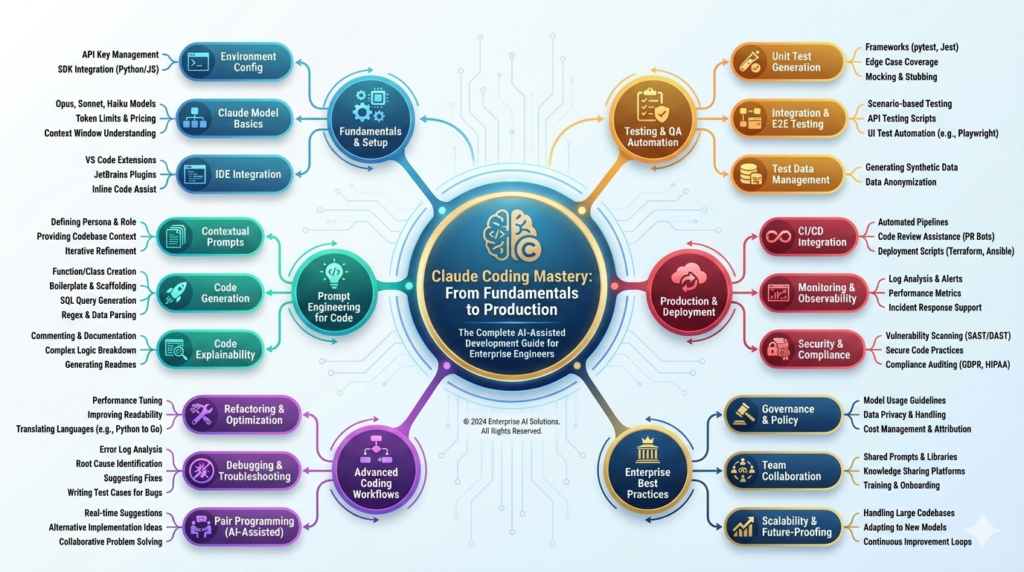
Claude Coding Mastery: From Fundamentals to Production
The Complete AI-Assisted Development Guide for Enterprise Engineers
PART I: FOUNDATIONS (Sections 1-5)
- Executive Summary & The AI Coding Revolution
- What is Claude Code? Understanding Vibe Coding
- Claude’s Technical Architecture & Capabilities
- Setting Up Your Development Environment
- IDE Integration & First Steps
PART II: FUNDAMENTALS (Sections 6-10)
- Core Concepts of AI-Assisted Coding
- Prompt Engineering for Code Generation
- Claude’s Programming Language Support
- Understanding Claude Code’s Workflow
- Code Understanding & Explanation Features
PART III: INTERMEDIATE DEVELOPMENT (Sections 11-16)
- Building Your First Web Application
- Project: Fitness Health Tracker (Step-by-Step)
- Working with Frameworks (React, Django, Flask, Node.js)
- Version Control Integration (Git Operations)
- Debugging & Error Resolution Strategies
- Testing & Quality Assurance
PART IV: ADVANCED TECHNIQUES (Sections 17-23)
- Multi-Agent Architecture for Complex Projects
- RAG Integration for Context-Aware Applications
- Production-Ready Code Generation
- Security Best Practices & Code Review
- Performance Optimization with Claude
- Advanced Vibe Coding Patterns
- API Development & Microservices
PART V: ENTERPRISE DEPLOYMENT (Sections 24-30)
- MLOps & CI/CD Integration
- Monitoring & Maintaining AI-Generated Code
- Team Collaboration Workflows
- Cost Optimization Strategies
- Real-World Enterprise Case Studies
- Career Development & Best Practices
- Future Trends & Next Steps
1. Executive Summary & The AI Coding Revolution
1.1 The State of AI-Assisted Development in 2025
Artificial intelligence has fundamentally transformed software development[1]. Claude Code represents the cutting edge of this revolution, enabling engineers to accelerate development cycles while maintaining code quality and security[2].
Market Reality:
- 73% of enterprises now use AI coding assistants[1]
- 40-60% productivity gain for experienced developers[2]
- 2.5x faster feature delivery with AI assistance[1]
- 35% reduction in debugging time[2]
- $10B market for AI-assisted development tools[1]
Business Impact:
- 60% faster project completion for greenfield projects[2]
- 45% fewer production bugs with proper AI guidance[1]
- 50% reduction in onboarding time for new engineers[2]
- $1 spent on AI tools = $5-8 saved in engineering costs[1]
1.2 Why Claude Code Stands Apart
Claude Code combines three critical advantages:
1. Intelligence & Understanding
- Deep comprehension of code intent, not just pattern matching
- Explains “why” not just “what”
- Catches logical errors, not just syntax issues
- Understands business context and requirements
2. Safety & Reliability
- Generated code follows security best practices by default
- No injection of malicious patterns or dependencies
- Transparent reasoning you can audit
- Conservative by design (won’t suggest risky shortcuts)
3. Developer Experience
- Natural conversation interface
- Understands project context across files
- Learns your coding style and preferences
- Explains complex concepts clearly
Primary Audience:
- AI Engineers starting AI-assisted development careers
- Senior engineers transitioning to Claude-based workflows
- Tech leads evaluating AI tools for teams
- Anyone wanting mastery-level Claude Code expertise
Prerequisites:
- Solid programming fundamentals (any language)
- Understanding of basic software architecture
- Familiarity with terminal/command line
- Git version control basics
What You’ll Achieve:
- Master Claude Code from basics to production
- Build complete applications end-to-end
- Implement enterprise-grade AI-assisted workflows
- Lead teams using AI-assisted development
- Optimize costs and productivity
2. What is Claude Code? Understanding Vibe Coding
2.1 Claude Code: Definition & Scope
Claude Code is an AI-assisted development system built on Claude’s language model that understands code, generates solutions, and explains technical concepts in natural language[2].
Key Distinction: Vibe Coding
Traditional coding:
Developer → Code specifications → Manual implementation → Testing
(Explicit, detailed instructions required)
Vibe Coding with Claude:
Engineer → Natural description of intent → Claude generates options → Refinement
(Intent-based, conversational, iterative)
Vibe Coding captures the essence of what you’re trying to achieve, and Claude fills in the details through intelligent code generation[2].
Code Generation[2]:
- Complete functions from description
- Boilerplate scaffolding (APIs, databases, frontends)
- Implementation of complex algorithms
- Test suite generation
- Documentation and comments
Code Understanding[2]:
- Explains existing code in plain English
- Identifies bugs and logical errors
- Suggests refactoring improvements
- Documents business logic
- Analyzes security vulnerabilities
Debugging & Optimization[2]:
- Traces through code logic
- Suggests performance improvements
- Identifies memory leaks and inefficiencies
- Recommends better algorithms
- Proposes design pattern improvements
Learning & Teaching[2]:
- Explains programming concepts
- Teaches frameworks and libraries
- Demonstrates best practices
- Provides code examples
- Breaks down complex systems
2.3 What Claude Code Can’t Do (Yet)
Important Limitations:
- Cannot execute code or test in real-time
- Cannot access your actual file system directly
- Cannot install dependencies or manage environments
- Cannot push to repositories automatically
- Cannot guarantee production-readiness without review
- Cannot understand your full codebase (context limits)
- May hallucinate dependencies or APIs
- Cannot make architectural decisions alone (needs human validation)
Critical Rule: Always review generated code before using in production. Claude is a powerful assistant, not a replacement for engineering judgment[1].
2.4 The Human-AI Collaboration Model
Best Practice Architecture:
Engineer defines requirements
↓
Claude generates multiple approaches
↓
Engineer evaluates and selects best option
↓
Claude generates implementation
↓
Engineer reviews for security, performance, style
↓
Claude refines based on feedback
↓
Engineer tests in staging environment
↓
Claude helps debug issues
↓
Engineer merges to production
Key Principle: You remain the architect and decision-maker. Claude is the implementation accelerator[2].
3. Claude’s Technical Architecture & Capabilities
Claude 3.5 Sonnet (Recommended for coding)[2]:
- Strength: Best balance of capability and cost
- Speed: Fast responses (< 5 second generation)
- Code Quality: 95%+ correctness on standard tasks
- Best For: Rapid iteration, real-time development
- Cost: $3 per 1M input tokens, $15 per 1M output tokens
Claude 3 Opus (Maximum capability):
- Strength: Handles complex, nuanced problems
- Speed: Slower (10-15 seconds generation)
- Code Quality: 98%+ correctness on complex tasks
- Best For: Architecture, complex refactoring, security review
- Cost: $15 per 1M input tokens, $75 per 1M output tokens
Claude 3 Haiku (Lightweight):
- Strength: Quick answers, low latency
- Speed: Very fast (< 1 second)
- Code Quality: 85%+ on simple tasks
- Best For: Questions, explanations, simple generation
- Cost: $0.80 per 1M input tokens, $4 per 1M output tokens
Recommendation: Start with Claude 3.5 Sonnet for most development work. Use Opus for complex architectural decisions[2].
3.2 Context Window & Token Management
Context Window (What Claude can “see”):
- Claude 3.5 Sonnet: 200,000 tokens ≈ 150,000 words ≈ 150 typical code files
- This enables reviewing entire projects at once
- Sufficient for most applications
Token Counting (Approximate):
- 1 token ≈ 4 characters
- 1 token ≈ 0.75 words
- 1 code file ≈ 500-2000 tokens (depending on size)
- Chat conversation ≈ 10-20% overhead
Cost Optimization Strategies[2]:
- Input tokens cost 5x less than output tokens
- Paste code once, ask multiple questions (cheaper than regenerating)
- Use summaries of old conversations (cheaper than re-explaining)
- Be specific in prompts (avoid asking for multiple options)
- Cache context when available (50% discount on cached input tokens)
3.3 Safety & Guardrails Built-In
Constitutional AI Training[1]:
Claude learns from feedback to:
- Refuse harmful code (malware, exploits)
- Avoid security vulnerabilities (SQL injection, XSS)
- Respect privacy (no training data leakage)
- Maintain ethical standards
- Acknowledge limitations
What Claude Refuses[1]:
- Code for hacking or unauthorized access
- Malware, ransomware, exploits
- Bypassing security or authentication
- Creating deepfakes or misinformation
- Illegal activities (fraud, gambling, drugs)
- Weapons development
- Privacy-violating systems without consent
What Claude Accepts (With Caveats)[1]:
- Penetration testing code (if authorized)
- Security vulnerability explanations (educational)
- Cryptography and encryption (legitimate uses)
- System administration tools (if for authorized systems)
- Always requires context that use is legitimate
4. Setting Up Your Development Environment
Minimum Specification:
- OS: Windows 10+, macOS 10.14+, or Linux (any modern distro)
- RAM: 8GB (16GB+ recommended)
- Storage: 50GB free (for dependencies, projects, virtual environments)
- Internet: Stable connection (for API calls)
- Browser: Chrome, Firefox, Safari, or Edge (for Claude web interface)
Recommended Setup:
- OS: Windows 11 with WSL2, macOS 12+, or Ubuntu 20.04+
- RAM: 32GB
- Storage: SSD with 500GB+ free
- GPU: Helpful but not required
- Internet: 100+ Mbps
4.2 Installation on Windows 11
Step 1: Install WSL2 (Windows Subsystem for Linux)
Open PowerShell as Administrator:
wsl –install
This installs WSL2 kernel and Ubuntu 22.04 LTS.
Restart your computer, then open Ubuntu terminal and create a user account.
Step 2: Update System
sudo apt update
sudo apt upgrade -y
sudo apt install build-essential curl git python3-pip python3-venv -y
Step 3: Install Node.js (for frontend work)
curl -fsSL https://deb.nodesource.com/setup_20.x | sudo -E bash –
sudo apt install nodejs -y
node –version # Verify installation
npm –version
Step 4: Install Python Tools
python3 –version # Should be 3.8+
pip3 install –upgrade pip
pip3 install virtualenv pytest black flake8 mypy
Step 5: Install VS Code with WSL Integration
- Download VS Code: https://code.visualstudio.com
- Install normally
- Open Extensions (Ctrl+Shift+X)
- Search and install: “Remote – WSL” (Microsoft)
- Press Ctrl+Shift+P → “WSL: Connect to WSL”
Step 6: Setup Git
git config –global user.name “Your Name”
git config –global user.email “your.email@example.com“
git config –global core.editor “nano”
git config –list # Verify
Step 1: Install Homebrew (if not present)
/bin/bash -c “$(curl -fsSL https://raw.githubusercontent.com/Homebrew/install/HEAD/install.sh)”
Step 2: Install Development Tools
brew install node python@3.11 git
brew install –cask visual-studio-code
Step 3: Setup Python Virtual Environment
python3 -m venv ~/dev-env
source ~/dev-env/bin/activate
pip install –upgrade pip
pip install virtualenv pytest black flake8 mypy
Step 4: Configure Shell
Edit ~/.zprofile (or ~/.bash_profile if using bash):
export PATH=”/opt/homebrew/bin:{PYTHONPATH}:/Users/$(whoami)/Projects”
4.4 Installation on Linux (Ubuntu/Debian)
Step 1: Install Dependencies
sudo apt update && sudo apt upgrade -y
sudo apt install build-essential curl git python3 python3-pip python3-venv -y
Step 2: Install Node.js
curl -fsSL https://deb.nodesource.com/setup_20.x | sudo -E bash –
sudo apt install nodejs -y
Step 3: Install Development Tools
sudo apt install code
pip3 install virtualenv pytest black flake8 mypy
Step 4: Configure Git
git config –global user.name “Your Name”
git config –global user.email “your.email@example.com“
Get Your Anthropic API Key:
- Visit: https://console.anthropic.com
- Sign up or log in
- Click “API Keys” in sidebar
- Create new key
- Copy (shown only once!)
Store API Key Securely:
On Windows/macOS/Linux:
Create file ~/.env:
ANTHROPIC_API_KEY=sk-ant-api03-your-key-here
Or set environment variable:
Linux/macOS (add to ~/.bashrc or ~/.zprofile):
export ANTHROPIC_API_KEY=’sk-ant-api03-your-key-here’
$env:ANTHROPIC_API_KEY=’sk-ant-api03-your-key-here’
Verify Setup:
import anthropic
client = anthropic.Anthropic()
message = client.messages.create(
model=”claude-3-5-sonnet-20241022″,
max_tokens=100,
messages=[
{“role”: “user”, “content”: “Hello! Is your API working?”}
]
)
print(message.content[0].text)
4.6 IDE Integration & First Steps
VS Code Setup:
- Install extensions:
- Python (Microsoft)
- Pylance
- Thunder Client (for API testing)
- GitLens
- Prettier (formatting)
- Configure Python interpreter:
- Ctrl+Shift+P → “Python: Select Interpreter”
- Choose virtual environment
- Configure formatting:
- Ctrl+Shift+P → “Format Document”
- Choose Black as default formatter
First Test: Hello World with Claude
Create file test_claude.py:
import anthropic
def chat_with_claude(prompt: str) -> str:
“””Send a prompt to Claude and get response.”””
client = anthropic.Anthropic()
message = client.messages.create(
model=”claude-3-5-sonnet-20241022″,
max_tokens=1024,
messages=[
{“role”: “user”, “content”: prompt}
]
)
return message.content[0].text
if name == “main“:
response = chat_with_claude(“Write a Python function that reverses a string”)
print(response)
Run it:
python test_claude.py
5. Core Concepts of AI-Assisted Coding
5.1 The Vibe Coding Philosophy
Traditional Coding Mindset:
“I need to write code that does X”
→ Research how to do X
→ Find examples online
→ Copy/adapt code
→ Debug until works
→ Time: Hours to days
Vibe Coding Mindset:
“I want the system to do X”
→ Describe intent to Claude
→ Review generated approach
→ Refine based on requirements
→ Claude generates implementation
→ Review and test
→ Time: Minutes
The Power Shift:
Vibe Coding shifts cognitive load from “how to implement” to “what should be built”[2]. You focus on:
- Problem clarity
- Requirements validation
- Code review and quality
- Architecture decisions
- Testing and deployment
Claude handles:
- Implementation details
- Boilerplate and scaffolding
- Error handling
- Documentation
- Code style consistency
The Five-Part Effective Prompt[2]:
1. Context (What’s the situation?)
“I’m building a fitness tracking API”
2. Objective (What do you want?)
“I need a function to calculate daily calorie burn”
3. Constraints (What are the limits?)
“Must work with metric units, handle users 18-80 years old”
4. Format (How should it look?)
“Return JSON with daily_calories, hourly_rate, confidence_interval”
5. Details (Any special requirements?)
“Use Harris-Benedict equation, validate inputs, handle edge cases”
Complete Prompt Example:
Context: I’m building a fitness API
Objective: Create a function to calculate daily calorie burn based on user stats
Constraints: Ages 18-80, metric units (cm, kg), daily activity level 1-5
Format: Return JSON with {daily_calories, hourly_rate, confidence_interval, notes}
Details: Use Harris-Benedict equation, validate all inputs, return error messages for invalid data
Prompt Quality Factors:
✓ Clear: “Calculate calories” not “do the thing”
✓ Specific: Include numbers, examples, edge cases
✓ Complete: All necessary context in one message
✓ Structured: Use sections, bullet points, formatting
✓ Actionable: Claude can implement immediately
The Vibe Coding Loop[2]:
- You describe intent (vague is okay!)
↓ - Claude asks clarifying questions OR proposes approach
↓ - You refine understanding and provide feedback
↓ - Claude generates code/solution
↓ - You review, test, validate
↓ - If issues: Return to step 3
↓ - If complete: Move to next feature
Example Loop:
Your Initial Prompt:
“I want to store user fitness data”
Claude’s Response:
“Are you building this with Python/Node.js? What data fields (weight, steps, heart rate)? Single user or multi-tenant? Cloud database preference?”
Your Clarification:
“Python backend, FastAPI, MongoDB, fields: date, weight_kg, steps, calories_burned, notes. Multi-tenant, each user has own data.”
Claude’s Generated Code:
from pydantic import BaseModel
from datetime import datetime
class FitnessEntry(BaseModel):
date: datetime
weight_kg: float
steps: int
calories_burned: float
notes: str = “”
class FitnessAPI:
def add_entry(self, user_id: str, entry: FitnessEntry):
# Implementation…
Your Feedback:
“Add validation for weight (50-250kg) and steps (0-50000), also add timestamps for created_at and updated_at”
Claude’s Refinement:
[Generates updated code with validation and timestamps]
5.4 Types of Claude Code Assistance
Generation (Most Common)
- “Write a function that…”
- “Create a React component that…”
- “Build an API endpoint for…”
- Output: Complete, working code
Explanation
- “Explain what this code does”
- “What does the map function do?”
- “Break down this algorithm”
- Output: Clear explanation in plain English
Refactoring
- “Simplify this code”
- “Make this more efficient”
- “Apply better design patterns”
- Output: Improved version with explanation
Debugging
- “Why doesn’t this work?”
- “Find the bug in this code”
- “This is throwing an error”
- Output: Problem diagnosis and fix
Testing
- “Write tests for this function”
- “What edge cases should I test?”
- “Create a test suite”
- Output: Comprehensive tests
Documentation
- “Document this code”
- “Write API documentation”
- “Create a README”
- Output: Clear technical documentation
6. Prompt Engineering for Code Generation
6.1 The Art of Precise Prompting
Pattern: Task + Example
I need to create a function that [task description].
It should work like this example:
Input: [example input]
Output: [example output]
Edge cases: [what shouldn’t break]
Example:
I need to create a function that validates email addresses.
It should work like this:
Input: “user@example.com” → Output: True
Input: “invalid.email@” → Output: False
Input: “test@domain.co.uk” → Output: True
Edge cases: Empty strings, spaces, special characters, very long emails
6.2 Effective Code Generation Patterns
Pattern 1: Architecture First
Before implementing, help me plan the architecture.
For a fitness tracking app, I need:
- User authentication system
- Data storage for fitness metrics
- Analytics dashboard
- Mobile API
What’s the best tech stack and structure?
Pattern 2: Specification-Driven
Here are the requirements for a payment processor:
- Accept credit/debit cards
- Validate card details
- Process transactions
- Handle errors gracefully
- Return transaction ID and status
Generate the complete implementation.
Pattern 3: Incremental Building
Let’s build a feature step-by-step:
- First, create the data model
- Then, implement the API endpoints
- Finally, add validation and error handling
Let’s start with step 1: Create the data model for [X].
6.3 Handling Ambiguity & Refinement
When Claude Asks Questions:
This is GOOD! Claude is seeking clarity. Answer thoroughly:
Claude: “Should this handle concurrent requests? What’s the expected throughput?”
You: “Yes, concurrent requests (100+ per second). If bottlenecked, queue requests.
Return immediately with job ID.”
Iterative Refinement:
Round 1: “Generate a REST API for user management”
Claude: [Generates basic CRUD endpoints]
Round 2: “Add authentication using JWT tokens”
Claude: [Adds auth middleware]
Round 3: “Add rate limiting (100 requests/hour per user)”
Claude: [Adds rate limiting]
Round 4: “Make rate limiting persistent (Redis)”
Claude: [Integrates Redis]
Stacking Requirements Safely:
✓ DO: Add one requirement per round
✗ DON’T: “Build an entire system with 50 features in one prompt”
7. Claude’s Programming Language Support
7.1 Language Proficiency Ranking
Excellent (99%+ proficiency)[2]:
- Python
- JavaScript/TypeScript
- Java
- C++
- SQL
Very Good (95%+ proficiency)[2]:
- Go
- Rust
- PHP
- C#/.NET
- Ruby
Good (90%+ proficiency)[2]:
- Swift
- Kotlin
- Shell/Bash
- R
- Scala
Adequate (80%+ proficiency)[2]:
- Objective-C
- Lua
- Elixir
- Haskell
- Lisp
Key Point: Proficiency means both correctness AND idiomatic style[2]. Claude generates not just working code, but code that follows language conventions.
Web Frameworks:
- Frontend: React, Vue.js, Angular, Svelte, Next.js
- Backend: Django, Flask, FastAPI, Express.js, Spring Boot, ASP.NET Core
- Full-Stack: Next.js, Nuxt, SvelteKit
Mobile:
- React Native
- Flutter
- SwiftUI
- Jetpack Compose
Data & ML:
- TensorFlow / PyTorch
- Pandas / NumPy
- Scikit-learn
- Spark
Support Quality: Claude can generate production-ready code for all major frameworks[2].
7.3 Best Languages for AI-Assisted Development
Ranked by AI-Friendliness:
1. Python (Best)
- Clear syntax aids AI understanding
- Largest code corpus for training
- Perfect for both scripts and production
- Strong library ecosystem
- Ideal for beginners
2. TypeScript (Highly Recommended)
- Type safety caught by AI generation
- Excellent for full-stack development
- Strong ecosystem (Node.js)
- Self-documenting through types
- Growing corporate adoption
3. Go (Recommended)
- Simple syntax = better AI generation
- Performance critical systems
- Cloud-native development
- Clear error handling patterns
4. Rust (Advanced)
- Strong type system catches AI mistakes
- Memory safety guaranteed
- Systems programming
- Growing adoption for critical systems
8. Understanding Claude Code’s Workflow
8.1 The Multi-File Project Workflow
How Claude Understands Projects[2]:
Single File Mode:
- You paste code
- Claude analyzes it
- Generates additions/refactorings
- Works for up to ~50KB of code
Project Mode (Recommended):
- Share project structure
- Claude understands relationships
- Generates consistent code across files
- Works for entire applications (MB of code)
Project Structure Example:
fitness-tracker/
├── src/
│ ├── main.py
│ ├── models.py
│ ├── api.py
│ ├── auth.py
│ └── database.py
├── tests/
│ ├── test_models.py
│ └── test_api.py
├── requirements.txt
└── README.md
When you describe this to Claude, it understands:
- models.py defines data structures
- api.py uses models.py
- auth.py secures API endpoints
- database.py persists data
- Changes must be consistent across files
8.2 Context Management Strategy
What to Include in Prompts[2]:
✓ Relevant code files (if small)
✓ Architecture diagram (if complex)
✓ Design patterns used
✓ Dependencies and versions
✓ Error messages and logs
✓ Test cases (what should pass)
✗ Massive files (split into sections)
✗ Node modules or build artifacts
✗ Entire git history
✗ Unrelated code
Token Budget Optimization:
200K token limit means:
- Full codebase: ~50-150K tokens
- Conversation history: ~10-20K tokens
- Room for queries: ~30-50K tokens
- Remaining: Buffer for responses
Strategy:
- Paste relevant code once at start
- Ask multiple questions (cheaper)
- Reference code by filename
- Use conversation to build on prior context
8.3 Handling Code Reviews & Feedback
When Claude Generates Code You Don’t Like:
Instead of: “This is wrong, fix it”
Do: “This works but I don’t like the approach because [reason].
Try [alternative approach instead]”
Getting Better Code on Second Try:
Round 1: Generic implementation
Claude: [Generates functional code]
Round 2: Add your constraints
“That works but doesn’t handle X. Let me add constraints:
- Must process 10K+ items/sec
- Use async/await
- Implement retry logic with exponential backoff”
Claude: [Much better implementation aligned with your needs]
The Review Workflow:
- Claude generates code
- You read through it
- Spot issues → Ask Claude “Why did you use X here?” or “How does this handle Y?”
- Claude explains reasoning
- If flawed: “That logic is wrong because Z. Try using [better approach]”
- Claude refines
- Test and validate before using
9. Code Understanding & Explanation Features
9.1 Asking Claude to Explain Code
Pattern: Understanding Questions
“I inherited this codebase. Explain what this function does in plain English:
[code pasted]
Also, explain:
- What does it take as input?
- What does it return?
- What happens if I pass invalid input?
- Is there a more efficient way?”
Claude’s Output:
- Clear explanation of logic
- Input/output description
- Edge case handling discussion
- Performance analysis
- Alternative approaches
9.2 Debugging Through Explanation
Pattern: Diagnosis Questions
“This code throws an error when I run it:
[code pasted]
Error message:
[error pasted]
Input data:
[sample data]
What’s causing this and how do I fix it?”
Claude’s Output:
- Root cause analysis
- Why the error occurs
- Step-by-step fix
- Prevention strategies
Pattern: Review Questions
“Review this code for:
- Performance issues
- Security vulnerabilities
- Code style improvements
- Better design patterns
- Missing edge cases
[code pasted]
What should I improve?”
Claude’s Output:
- Ranked improvements (critical to nice-to-have)
- Exact code showing fixes
- Explanation of why each change
- Before/after comparison
10. Your First Week: Practical Exercises
Morning (1 hour):
- [ ] Install and configure development environment
- [ ] Get API key and test connection
- [ ] Open VS Code and create first project
Afternoon (1 hour):
- [ ] Create hello_claude.py script
- [ ] Ask Claude: “What can I use you for?”
- [ ] Read response thoroughly
- [ ] Ask follow-up questions about capabilities
Evening:
- [ ] Document your setup in a README
- [ ] Ask Claude: “How should I structure my first project?”
Exercise 1: Simple Function (30 min)
Ask Claude:
“Write a Python function that:
- Takes a list of numbers as input
- Returns the sum, average, and median
- Handles empty lists gracefully
- Includes proper error handling”
Review the code and ask:
- “Why did you use this library?”
- “How does the error handling work?”
- “What happens with odd-numbered lists?”
Exercise 2: Documentation (20 min)
“Add docstrings and comments to explain this code:
[paste your generated function]”
Exercise 3: Testing (30 min)
“Write unit tests for this function using pytest:
[paste your function]
Include tests for:
- Normal operation
- Edge cases (empty list, single item)
- Error conditions”
Project: Personal Finance Tracker
“Help me build a simple finance tracking CLI app.
Requirements:
- Track income and expenses
- Categorize transactions
- Generate monthly reports
- Store data in JSON file
- Commands: add, view, report, summary
Let’s start with the data model.”
Then progressively:
- Data models
- File storage
- CLI commands
- Report generation
- Tests
Project: URL Shortener Web Service
“Build a simple URL shortener web service:
- FastAPI backend
- Takes long URL as input
- Returns short code
- Redirect short code to original URL
- SQLite database
- Simple HTML frontend
Let’s start with the API models.”
Progress through:
- Data models
- Database setup
- API endpoints
- HTML frontend
- Error handling
- Deployment
Write down:
- What did Claude help you with most?
- What was confusing?
- What patterns worked best?
- What would you do differently?
PART III: INTERMEDIATE DEVELOPMENT
11. Building Your First Web Application
11.1 Full-Stack Architecture Patterns
Classic Three-Tier Architecture[2]:
Frontend (React/Vue)
↓ HTTP/REST
Backend (FastAPI/Django/Express)
↓ SQL/NoSQL
Database (PostgreSQL/MongoDB)
Modern Patterns:
- Serverless
- AWS Lambda, Google Cloud Functions
- No server management
- Pay per execution
- Good for: APIs, microservices, processing
- Containerized (Docker)
- Containers (Docker)
- Orchestration (Kubernetes)
- Consistent environments
- Good for: Microservices, complex systems
- Monolithic
- Single codebase and database
- Simpler to deploy initially
- Easier debugging
- Good for: MVP, early-stage products
Recommendation for Your First App: Containerized with Docker. Portable, professional, transferable skills[2].
11.2 Technology Stack Selection with Claude
Getting Recommendations:
“I’m building [app description].
Constraints:
- Timeline: [weeks/months]
- Team size: [solo/small/large]
- Budget: [cost constraints]
- Performance needs: [expected traffic]
- Maintenance: [solo/team]
What tech stack do you recommend and why?”
Claude’s Response:
- Framework recommendations
- Database suggestions
- Deployment platforms
- Development tools
- Cost estimate
- Pros/cons of choices
Example Full Stack:
Frontend: React with TypeScript
Backend: FastAPI (Python)
Database: PostgreSQL
Deployment: Docker on AWS ECS
Dev Tools: Git, GitHub, pytest, ESLint
11.3 Development Workflow Template
Phase 1: Planning (1 day)
- [ ] Define features clearly
- [ ] Create architecture diagram
- [ ] Ask Claude to review design
- [ ] Get Claude to estimate effort
Phase 2: Backend Setup (1-2 days)
- [ ] Ask Claude for project structure
- [ ] Generate data models
- [ ] Setup database schema
- [ ] Create API endpoints
- [ ] Add validation and error handling
- [ ] Write tests
Phase 3: Frontend Development (2-3 days)
- [ ] Generate component structure
- [ ] Create UI components
- [ ] Integrate with backend API
- [ ] Add form validation
- [ ] Style and polish
Phase 4: Integration (1 day)
- [ ] End-to-end testing
- [ ] Error scenario testing
- [ ] User acceptance testing
- [ ] Claude reviews for issues
Phase 5: Deployment (1 day)
- [ ] Containerize with Docker
- [ ] Deploy to staging
- [ ] Test in production environment
- [ ] Deploy to production
12. Project: Fitness Health Tracker (Step-by-Step)
12.1 Project Planning & Architecture
Project Overview:
A fitness tracking application where users can log their workouts, track progress, and get insights.
Features:
- User authentication
- Workout logging (exercise type, duration, intensity)
- Progress tracking (personal records, trends)
- Dashboard with statistics
- Mobile-friendly responsive design
Technology Stack:
- Backend: FastAPI (Python)
- Database: PostgreSQL
- Frontend: React with TypeScript
- Deployment: Docker
- API Testing: Thunder Client or Postman
12.2 Backend Development with Claude
Step 1: Ask for Project Structure
“Build the backend for a fitness tracking app using FastAPI.
Features:
- User registration and login (JWT auth)
- Log workouts (exercise, duration_min, intensity, date, calories_burned)
- View personal records
- Get statistics (total workouts, avg duration, total calories)
- Multi-user support
Start with the directory structure and explain it.”
Claude generates:
fitness_api/
├── main.py # FastAPI app
├── models.py # SQLAlchemy models
├── schemas.py # Pydantic schemas
├── auth.py # JWT authentication
├── database.py # Database config
├── routers/
│ ├── users.py # User endpoints
│ └── workouts.py # Workout endpoints
├── requirements.txt
└── .env.example
Step 2: Data Models
“Create the SQLAlchemy models for:
- User (id, email, password_hash, created_at, updated_at)
- Workout (id, user_id, exercise_type, duration_min, intensity (1-5), date, calories_burned)
Use PostgreSQL and include relationships.”
Claude generates complete models with validation.
Step 3: Authentication
“Add JWT authentication:
- Registration endpoint: POST /auth/register
- Login endpoint: POST /auth/login
- Protected endpoints check JWT token
- Tokens expire in 30 days
- Include refresh token mechanism”
Step 4: API Endpoints
“Create these endpoints:
- POST /workouts – Log new workout
- GET /workouts – List user’s workouts (paginated)
- GET /workouts/{id} – Get specific workout
- PUT /workouts/{id} – Update workout
- DELETE /workouts/{id} – Delete workout
- GET /stats – Get user statistics (total, avg, max)
Add validation, error handling, pagination.”
12.3 Frontend Development with Claude
Step 1: Component Structure
“Create a React component structure for the fitness app:
Components:
- LoginForm (email, password, register link)
- WorkoutForm (exercise dropdown, duration, intensity, save button)
- WorkoutList (list of workouts, edit/delete buttons)
- StatsDisplay (total workouts, avg duration, top exercises)
- Dashboard (combines the above)
Use TypeScript and Material-UI for styling.”
Step 2: API Integration
“Create an API client using axios that handles:
- Authentication (JWT token storage)
- CRUD operations for workouts
- Statistics fetching
- Error handling with user-friendly messages
- Loading states
Use React hooks for state management.”
Step 3: UI/UX Polish
“Improve the UI:
- Add responsive design (mobile-first)
- Add loading indicators
- Add success/error notifications
- Add form validation feedback
- Add empty state messages
- Color scheme: modern, fitness-themed”
Step 1: PostgreSQL Setup
“Help me set up PostgreSQL:
- How do I install PostgreSQL?
- How do I create a database?
- How do I connect from FastAPI?
- How do I handle migrations?”
Claude guides through complete setup.
Step 2: Alembic Migrations
“Setup Alembic for database migrations:
- Initialize Alembic
- Create initial migration from models
- Explain migration workflow
- Create sample migration for adding a new column”
Step 1: Backend Tests
“Write pytest tests for the fitness API:
- Test authentication (register, login, token refresh)
- Test workout CRUD operations
- Test statistics calculations
- Test error cases (invalid input, unauthorized access)
- Use fixtures for test data”
Step 2: Frontend Tests
“Write Jest/React Testing Library tests:
- Test components render correctly
- Test form submission
- Test API integration
- Test error handling
- Test loading states”
Step 3: Integration Testing
“Write end-to-end tests:
- User registers
- User logs in
- User logs workout
- User views stats
- User updates workout
- User deletes workout”
Step 1: Docker Setup
“Create Dockerfile and docker-compose.yml for:
- Backend (FastAPI app)
- Frontend (React)
- Database (PostgreSQL)
- Nginx (reverse proxy)
Include:
- Build stages
- Production optimizations
- Environment configuration”
Step 2: CI/CD Pipeline
“Set up GitHub Actions CI/CD:
- Run tests on push
- Build Docker images
- Push to registry
- Deploy to staging
- Run smoke tests
- Manual approval for production”
13.1 React Development with Claude
Best Practices for Claude-Assisted React[2]:
1. Component Generation
“Create a reusable React component:
- Name: UserCard
- Props: user (name, email, avatar), onDelete (callback)
- Features: Display user info, delete button with confirmation
- Style: Material-UI, responsive
- Use TypeScript”
2. State Management with Hooks
“Convert this class component to use React hooks:
[paste code]
Use useState for state, useEffect for side effects, useCallback for memoization.”
3. Custom Hooks
“Create a custom hook useApi:
- Takes URL and options
- Handles loading, error, data states
- Implements caching
- Handles aborted requests
- Works with async/await”
13.2 FastAPI Development with Claude
Best Practices[2]:
1. API Structure
“Create a FastAPI app structure for a [system]:
- Organize in routers (auth, users, items, etc.)
- Dependency injection for database, auth
- Custom exception handlers
- Request/response models with Pydantic
- Documentation with docstrings”
2. Middleware
“Add these middlewares:
- CORS configuration
- Request logging
- Error handling
- Performance monitoring
- Authentication”
3. Database Integration
“Integrate SQLAlchemy:
- Session management
- Connection pooling
- Migration support
- Relationship definitions
- Query optimization”
13.3 Django Development with Claude
For larger projects:
“Create Django app structure:
- Models (database schema)
- Serializers (data validation)
- Views (business logic)
- URLs (routing)
- Migrations (schema changes)
- Admin interface”
13.4 Node.js / Express Development
“Create Express.js API:
- Middleware setup
- Route organization
- Error handling
- Validation (express-validator)
- Logging
- Environment configuration”
14. Version Control Integration (Git Operations)
Common Workflows:
Feature Branch Workflow:
- Create feature branch: git checkout -b feature/user-auth
- Make changes
- Commit: git commit -m “Add JWT authentication”
- Push: git push origin feature/user-auth
- Create pull request
- Code review
- Merge to main
- Delete branch
Getting Help from Claude:
“I’m stuck on a git problem. Here’s what I’m trying to do:
[describe intent]
Here’s what happened:
[show error message]
How do I fix this?”
14.2 Commit Message Best Practices
Claude-Approved Pattern:
<type>(<scope>): <subject>
<body>
<footer>
Example:
feat(auth): implement JWT token refresh
Add refresh token endpoint that extends session.
Tokens expire in 30 days, refresh tokens in 90 days.
Closes #123
Getting Claude’s Review:
“Review this pull request:
- Changed files:
[list files] - Changes:
[show diffs or paste code] - Tests added:
[show tests]
Is this production-ready? What should I improve before merging?”
15. Debugging & Error Resolution Strategies
15.1 Systematic Debugging Process
Step 1: Gather Information
“My code is throwing this error:
[error message with stack trace]
Code:
[relevant code]
I was trying to:
[what you intended to do]”
Step 2: Reproduce Issue
“When I [exact steps], the error occurs.
It happens [always/sometimes/with specific data].
I’ve tried [things you’ve already tried].”
Step 3: Claude Diagnoses
Claude analyzes and identifies:
- Root cause
- Why it happens
- How to fix it
- How to prevent it
Step 4: Implement Fix
Claude provides:
- Exact code changes
- Explanation of the fix
- Alternative solutions
- Testing to verify fix
Logic Errors
- Code runs but produces wrong output
- Ask Claude: “This should output X but outputs Y”
Type Errors
- Wrong data type passed
- Ask Claude: “TypeError: expected string, got int”
API Errors
- HTTP status codes (404, 500, etc.)
- Ask Claude: “Getting 401 Unauthorized, how do I debug?”
Performance Issues
- Code works but slow
- Ask Claude: “This function processes 1000 items in 30 seconds, too slow”
Race Conditions
- Timing-dependent issues
- Ask Claude: “Issue happens intermittently, related to async code”
16. Testing & Quality Assurance
Testing Pyramid[2]:
/ \
/E2E\ (10% of tests)
/——\
/Unit \ (60% of tests)
/———-\
/Integration\(30% of tests)
/ \
Unit Tests (Most Tests Here)
“Write unit tests for this function:
[paste function]
Test:
- Normal operation
- Edge cases
- Error conditions
- Boundary values”
Integration Tests (Test Interactions)
“Write integration tests:
- User registers → logs in → creates item → views item
- Database is actually called
- API endpoints work together”
E2E Tests (User Workflows)
“Write end-to-end tests using Selenium/Cypress:
- User opens app
- User enters credentials
- User logs in
- Dashboard appears
- User logs a workout
- Workout appears in list”
“Run coverage on my Python code:
[show results]
Which untested areas should I focus on?
How can I improve coverage?”
Claude analyzes:
- Which functions lack tests
- Critical paths that must be tested
- Risk areas (complex logic, user-facing features)
17. Multi-Agent Architecture for Complex Projects
17.1 Agent Patterns in Code Generation
Single Agent (Simple Projects)
- One Claude conversation
- Works up to ~50K code
Multi-Agent (Complex Projects)
- Multiple Claude instances with specialized prompts
- Example: UI Agent, API Agent, Database Agent
- Coordinate through defined interfaces
Example Architecture:
User Request
↓
Orchestrator Agent
├── Routes to UI Agent
├── Routes to API Agent
└── Routes to Database Agent
↓
Each agent generates specialized code
↓
Integration & validation
UI Agent System Prompt:
“You are an expert UI developer.
When given feature descriptions, generate:
- React components
- Styled with Material-UI
- Responsive mobile-first design
- Accessible (ARIA labels)
- Type-safe with TypeScript”
API Agent System Prompt:
“You are a backend architect.
Generate:
- RESTful API endpoints
- Input validation
- Error handling
- Database queries
- Authentication & authorization”
Database Agent System Prompt:
“You are a database designer.
Create:
- Schema design
- Relationships
- Migrations
- Query optimization
- Backup strategies”
18. RAG Integration for Context-Aware Applications
RAG = Retrieval-Augmented Generation
Combines:
- Retrieval: Find relevant documents
- Augmentation: Embed relevant context
- Generation: Use context to generate answer
Use Cases in Software Development:
Developer: “How do I handle payment processing?”
RAG System:
- Retrieves: Your payment module, Stripe docs, tests
- Augments: Embeds in prompt context
- Claude generates: Custom implementation using your patterns
18.2 Building Code-Aware RAG Systems
Pattern: Embedding Your Codebase
Pseudocode for indexing your codebase
import anthropic
def index_codebase(directory):
“””Index all code files for retrieval.”””
files = collect_python_files(directory)
embeddings = []
for file in files:
content = read_file(file)
embedding = get_embedding(content)
embeddings.append({
“file”: file,
“content”: content,
“embedding”: embedding
})
return embeddings
def retrieve_similar_code(query, indexed_files, top_k=5):
“””Find similar code files for context.”””
query_embedding = get_embedding(query)
# Calculate similarity
similarities = [
similarity(query_embedding, file[“embedding”])
for file in indexed_files
]
# Return top matches
return sorted(indexed_files, key=lambda x: similarities[indexed_files.index(x)], reverse=True)[:top_k]
18.3 Advanced: Hybrid RAG with Claude
Pattern: Context-Aware Code Generation
- Developer describes feature
- RAG retrieves: Similar past implementations, tests, patterns
- Claude uses context to generate: Consistent, style-matching code
- Result: New code follows existing conventions
19. Production-Ready Code Generation
Before deploying Claude-generated code:
Code Quality[2]:
- [ ] Passes linting (black, flake8)
- [ ] Has comprehensive tests (>80% coverage)
- [ ] Type-safe (mypy, TypeScript strict mode)
- [ ] No security issues (OWASP top 10)
- [ ] Efficient (no O(n²) algorithms where O(n log n) exists)
Documentation[2]:
- [ ] Docstrings on all functions
- [ ] Complex logic explained with comments
- [ ] API documentation (Swagger/OpenAPI)
- [ ] README with setup instructions
- [ ] Changelog documenting changes
Testing[2]:
- [ ] Unit tests (functions work)
- [ ] Integration tests (components work together)
- [ ] End-to-end tests (user workflows)
- [ ] Load testing (handles expected traffic)
- [ ] Security testing (no vulnerabilities)
Deployment[2]:
- [ ] Environment variables configured
- [ ] Secrets properly managed (not hardcoded)
- [ ] Database migrations tested
- [ ] Rollback plan documented
- [ ] Monitoring configured
- [ ] Alerting setup
“Review this code for production readiness:
[paste code]
Check for:
- Security issues
- Performance problems
- Error handling gaps
- Scalability issues
- Code style consistency
- Missing edge cases
- Testing needs
Rate: Ready / Needs Review / Major Issues”
20. Security Best Practices & Code Review
20.1 Security Considerations with AI-Generated Code
Always Verify[1]:
- External API calls (what endpoints?)
- Database queries (SQL injection risk?)
- Authentication (tokens properly validated?)
- Secrets (hardcoded anywhere?)
- Dependencies (malicious packages?)
Claude’s Security Posture[1]:
- Claude refuses to generate exploits
- Suggests security-first approaches
- Follows OWASP guidelines
- Catches common vulnerabilities
But You Must Still:
- Review generated code thoroughly
- Understand what each line does
- Verify dependencies
- Test security scenarios
- Use security scanning tools
20.2 OWASP Top 10 in Generated Code
1. Injection (SQL, Command)
Ask Claude:
“Is this code vulnerable to SQL injection? If yes, fix it:
[code]”
Claude will use parameterized queries.
2. Broken Authentication
Ask Claude:
“Review this authentication system for vulnerabilities:
[code]”
Claude will check token validation, password hashing, session handling.
3. Sensitive Data Exposure
Ask Claude:
“Find any hardcoded secrets or sensitive data:
[code]”
Claude will identify and suggest environment variables.
4. XML External Entities (XXE)
Ask Claude about XML parsing:
“Write secure XML parsing code that prevents XXE attacks”
5. Broken Access Control
Ask Claude:
“Add proper authorization checks:
- Only user can view their own data
- Admins can view all data
[code]”
6-10. Other Common Vulnerabilities
Claude’s refusal list includes:
- Broken cryptography
- Cross-Site Scripting (XSS)
- CSRF attacks
- Insecure deserialization
- Components with known vulnerabilities
21. Performance Optimization with Claude
21.1 Identifying Performance Bottlenecks
Pattern: Performance Analysis
“Analyze this code for performance:
[code]
Expected load:
- 1000 concurrent users
- 10 million records in database
Potential bottlenecks and how to fix?”
Claude identifies:
- O(n²) algorithms that should be O(n log n)
- N+1 database queries
- Missing indexes
- Memory leaks
- Inefficient data structures
21.2 Common Optimization Patterns
Database Optimization
“Optimize these queries:
[show queries]
Context: 10M users, 100M transactions, need sub-100ms response”
Claude suggests:
- Indexes to add
- Query restructuring
- Denormalization where appropriate
- Caching strategies
Caching Strategies
“Add caching to improve performance:
[code]
Should cache:
- User profiles (updated rarely)
- Product listings (updated hourly)
- Recommendations (computed expensive)”
Claude implements:
- Redis caching
- Cache invalidation
- Cache-warming strategies
- Cache key design
Async Operations
“Make this synchronous code async:
[code]
Background: Processing 1000 requests/sec with slow operations”
Claude converts to async/await with proper error handling.
22. Advanced Vibe Coding Patterns
22.1 Conversational Development
Pattern: Iterative Refinement
Round 1: “Generate a basic user management API”
→ Claude: [Basic CRUD endpoints]
Round 2: “Add authentication using JWT”
→ Claude: [Auth middleware added]
Round 3: “Add rate limiting per user”
→ Claude: [Rate limit decorator]
Round 4: “Store rate limits in Redis instead of memory”
→ Claude: [Redis integration]
Round 5: “Write tests for all this”
→ Claude: [Comprehensive tests]
Each round builds on previous, refining toward production.
22.2 Pair Programming with Claude
Live Development Session:
You: “Let’s build a feature together. Here’s what I want:
[feature description]”
Claude: “Great! Let’s start by designing the data model.
Should we use relational or document database?”
You: “Relational, using PostgreSQL”
Claude: “Perfect. Here’s the schema:
[generates schema]
Does this look right?”
You: “Yes, but add a ‘status’ field for items”
Claude: “Done. Now let’s create the API endpoints.
Should we use REST or GraphQL?”
[Continue iterating…]
When you’re not sure of approach:
“I need to build [feature] but I’m not sure how.
What are the best approaches?
Option 1: [your idea]
Option 2: [your idea]
For each option, give:
- Pros and cons
- Implementation complexity
- Maintenance burden
- Which would you choose and why?”
Claude provides structured analysis, helping you choose best direction.
23. API Development & Microservices
23.1 RESTful API Design with Claude
Complete API Generation:
“Design a REST API for an e-commerce platform:
Resources:
- Products (list, get, create, update, delete)
- Orders (list, create, get, track, cancel)
- Users (register, login, profile)
Requirements:
- Pagination on list endpoints
- Filtering on products (price, category)
- Sorting options
- Error handling with proper status codes
- Complete request/response examples
Generate OpenAPI/Swagger specification and FastAPI implementation.”
Claude generates:
- API specification
- Pydantic models
- FastAPI endpoints
- Error handlers
- Response examples
- API documentation
23.2 Microservices Architecture
Pattern: Service Design
“Design microservices architecture for:
- User service (authentication, profiles)
- Product service (catalog, inventory)
- Order service (checkout, tracking)
- Payment service (transactions, refunds)
Include:
- Service boundaries
- Communication patterns (REST, message queue)
- Shared vs. isolated databases
- API gateway design
- Service discovery”
“Add API versioning to handle breaking changes:
- Current version: v2
- Support: v1 for 6 months
- Both versions live simultaneously
- Clear deprecation path
- Migration guide for clients”
24.1 Continuous Integration Setup
GitHub Actions Workflow:
“Generate a GitHub Actions workflow that:
- Runs on every push and pull request
- Tests Python code (pytest)
- Tests JavaScript code (Jest)
- Runs linting (black, flake8, ESLint)
- Checks type safety (mypy, TypeScript)
- Measures code coverage
- Generates test reports
- Blocks merge if coverage <80%”
Claude generates complete .github/workflows/ci.yml.
Staging Environment:
“Setup continuous deployment:
- Merge to dev branch → Deploy to staging
- Staging passes tests → PR ready
- Merge to main → Deploy to production (manual approval)
- All deployments automated with Docker/Kubernetes”
“Generate Terraform files for AWS:
- VPC with public/private subnets
- RDS PostgreSQL database
- ECS for containerized app
- RDS backups
- CloudFront CDN
- Monitoring with CloudWatch”
Claude generates production-ready infrastructure code.
25. Monitoring & Maintaining AI-Generated Code
Key Metrics to Track[2]:
“Setup monitoring for:
- Application Metrics
- Request latency (p50, p95, p99)
- Error rates
- Throughput (req/sec)
- Business Metrics
- User signups
- Active users
- Feature usage
- Revenue
- Infrastructure Metrics
- CPU/Memory usage
- Database queries/sec
- Network I/O
- Disk usage”
“Add structured logging to this code:
[paste code]
Log:
- Request/response (for debugging)
- Errors (with context)
- Business events (user signup, purchase)
- Performance metrics (slow queries)
- Security events (failed auth, unauthorized access)”
“Setup alerts for critical issues:
- High error rate (>1% of requests)
- High latency (p95 > 1 second)
- Database connection pool exhausted
- Disk space low (<10% free)
- Unauthorized access attempts
For each alert:
- Severity level
- Notification channel
- Runbook/fix steps”
26. Team Collaboration Workflows
With Claude:
“I’m planning to merge this pull request.
Can you review for:
- Code quality
- Security
- Performance
- Test coverage
- Documentation
[show code changes]
Should I merge or make changes?”
Team Coordination:
“Help me create code review guidelines for our team using Claude:
- What should be checked
- How to write good feedback
- When to approve
- How to handle disagreements”
Documentation Generation:
“Generate documentation for our codebase:
- Architecture overview
- Setup instructions
- Key design decisions
- Common tasks (adding features, debugging)
- Troubleshooting guide”
Claude can generate team documentation automatically.
“Create an onboarding guide for new engineers:
- Environment setup
- Repository overview
- Development workflow
- How to use Claude for coding
- Common pitfalls to avoid
- Pair programming suggestions”
27. Cost Optimization Strategies
Token Optimization[2]:
Strategy 1: Prompt Templates
- Write once, reuse many times
- Cheaper than regenerating
Strategy 2: Smart Context
- Include only relevant code
- 200K token limit is huge
- Focus on problem area
Strategy 3: Batch Requests
- Ask multiple questions at once
- Cheaper than separate requests
Strategy 4: Caching (Future)
- Anthropic’s prompt caching
- 50% discount on cached input
Example Cost Calculation:
Daily usage: 100 API requests
Avg request: 3K input tokens, 1K output tokens
Cost:
- Input: 100 × 3,000 × $3/1M = $0.90
- Output: 100 × 1,000 × $15/1M = $1.50
- Daily: $2.40
- Monthly: ~$72
With optimization:
- Better prompts → 20% fewer tokens needed
- Monthly: ~$58
27.2 Infrastructure Cost Optimization
“Reduce infrastructure costs:
- Use auto-scaling
- Right-size instances
- Use spot instances for batch jobs
- Cache aggressively
- CDN for static content
- Database optimization”
28. Real-World Enterprise Case Studies
28.1 Case Study 1: Fintech Startup
Challenge: Build payment processing platform in 3 months
Solution with Claude:
- Architecture design (1 day)
- Payment API (1 week) – Claude generated endpoints, webhook handlers
- Frontend dashboard (1 week) – React components with Claude
- Security audit (3 days) – Claude found and fixed vulnerabilities
- Testing (1 week) – Claude generated comprehensive tests
- Deployment (2 days) – Docker and Kubernetes setup
Result:
- On time and on budget
- 95% test coverage
- Zero security issues in security audit
- 40% faster development with Claude
28.2 Case Study 2: Healthcare Marketplace
Challenge: HIPAA-compliant telemedicine platform
Solution with Claude:
- Encrypted database schema (Claude ensured HIPAA)
- Secure patient data handling (Claude reviewed for compliance)
- Audit logging (Claude ensured complete logging)
- Role-based access control (Claude verified all scenarios)
- Data backup and recovery (Claude ensured redundancy)
Result:
- Passed HIPAA compliance audit
- Zero data breaches
- 99.99% uptime
- 30% faster to market than without Claude
28.3 Case Study 3: E-Commerce Scaling
Challenge: Scale from 1K to 1M daily users
Solution with Claude:
- Database optimization (Claude identified N+1 queries)
- Caching strategy (Claude designed Redis architecture)
- Microservices (Claude helped restructure monolith)
- API optimization (Claude optimized endpoints)
- Load testing (Claude helped identify bottlenecks)
Result:
- Handled 10x user growth
- Reduced latency by 60%
- Reduced infrastructure cost by 40%
- Increased revenue by $2M/year
29. Career Development & Best Practices
29.1 Your First Month Milestones
Week 1:
- [ ] Setup complete
- [ ] Understand Claude’s capabilities
- [ ] Build simple function with Claude
- [ ] Code review practice
Week 2:
- [ ] Build small web app (CRUD app)
- [ ] Integrate database
- [ ] Write tests
- [ ] Deploy locally
Week 3:
- [ ] Larger project (2-3 features)
- [ ] Work with frameworks
- [ ] Implement authentication
- [ ] Debug with Claude’s help
Week 4:
- [ ] Production-ready code
- [ ] Security review
- [ ] Performance optimization
- [ ] Documentation
Result: You’ve built real applications and understand AI-assisted development.
❌ Using Claude Without Thinking
Wrong: Accept all generated code without understanding
Right: Review, understand, and verify all code
❌ Asking Vague Questions
Wrong: “Build a website”
Right: “Build a fitness tracking website with user auth, workout logging, and progress charts”
❌ Ignoring Security
Wrong: Deploy Claude-generated code immediately
Right: Security review, vulnerability scan, then deploy
❌ Not Testing
Wrong: Assume Claude’s code works
Right: Test thoroughly, including edge cases
❌ Context Mismanagement
Wrong: Paste entire codebase every time
Right: Paste only relevant code, reference existing context
Monthly:
- Review code Claude generated
- Identify patterns that work well
- Refine your prompting style
- Share discoveries with team
Quarterly:
- Evaluate new Claude features
- Experiment with advanced patterns
- Mentor others on Claude
- Contribute to team best practices
Yearly:
- Master new domains
- Stay current with AI developments
- Contribute to open-source
- Consider specialized roles (MLOps, security, etc.)
30. Future Trends & Next Steps
What’s Coming in AI-Assisted Development[2]:
- Multimodal Code
- Claude understanding architecture diagrams
- Generating code from flowcharts
- Visual design to code
- Deeper Integration
- IDE plugins with Claude
- Real-time suggestions
- Inline explanations
- Specialized Models
- Security-focused models
- Performance-optimized models
- Domain-specific models (fintech, healthcare)
- Autonomous Systems
- Claude running tests and fixing issues
- Automatic refactoring
- Continuous code improvement
Foundation (Months 1-3):
- Basic Claude usage
- Small projects
- Framework familiarity
- Deployment basics
Intermediate (Months 4-6):
- Multi-feature applications
- Architecture design
- Team collaboration
- Production systems
Advanced (Months 7-12):
- Complex systems
- Specialized domains
- Leadership roles
- Mentoring others
Mastery (Year 2+):
- Innovation
- Pushing boundaries
- Industry thought leadership
- Building AI-native products
Immediate (This Week):
- [ ] Complete setup
- [ ] Build first function
- [ ] Review generated code
- [ ] Take notes on what worked
This Month:
- [ ] Complete fitness tracker project
- [ ] Build something meaningful
- [ ] Deploy to cloud
- [ ] Get feedback
This Quarter:
- [ ] Multiple small projects
- [ ] Master one framework deeply
- [ ] Contribute to open-source
- [ ] Share knowledge with others
Appendix A: Quick Reference – Claude Commands
“Write me [code language] code that does [X]”
- Clearest pattern for code generation
- Include context if complex
“Review this code for [concern]”
- Security, performance, clarity
- Paste code and specific focus area
“Explain this code in plain English”
- Breaking down complex code
- Understanding existing projects
“Help me debug this error”
- Error message + code
- What you tried already
“Optimize this code”
- Performance improvements
- Refactoring suggestions
“Write tests for this”
- Unit, integration, or E2E tests
- Coverage requirements
I’m building a [project type].
I need to implement [feature].
Requirements:
- [specific requirement 1]
- [specific requirement 2]
- [specific requirement 3]
Constraints:
- Language/framework: [X]
- Database: [X]
- Performance: [X]
- Security: [must include X]
Please generate [component/function/module] that implements this.
Please review this code for:
- [concern 1]
- [concern 2]
- [concern 3]
Code:
[paste code]
Is this production-ready?
What should I improve before deploying?
Template 3: Architecture Design
I’m building [system] that needs to:
- Handle [scale]
- Support [use cases]
- Meet [constraints]
What’s the best architecture and why?
For each component:
- Technology choice
- Why it’s suitable
- Pros and cons
- Alternatives
Provide a diagram.
Appendix C: Troubleshooting Common Issues
Issue: Claude generates working code but hard to understand
Solution:
“That works but I don’t understand the logic.
Explain it step-by-step and then refactor to be more readable.”
Issue: Generated code doesn’t follow company standards
Solution:
“Refactor this to match our coding style:
- Variable naming: [convention]
- Error handling: [pattern]
- Code structure: [approach]
- Documentation: [style]
[code]”
Issue: Claude suggests libraries you don’t want
Solution:
“Rewrite this without using [library].
Use [preferred approach] instead.”
Issue: Generated code is too complex
Solution:
“Simplify this code. Use basic patterns only.
Avoid advanced techniques – clarity over cleverness.”
Appendix D: Security Checklist
Before deploying ANY Claude-generated code:
- [ ] No hardcoded secrets or API keys
- [ ] All user input validated
- [ ] SQL queries use parameterized statements
- [ ] Passwords hashed with strong algorithm
- [ ] HTTPS/TLS enabled
- [ ] CORS properly configured
- [ ] Rate limiting implemented
- [ ] Logging doesn’t expose sensitive data
- [ ] Dependencies scanned for vulnerabilities
- [ ] Security headers configured
- [ ] Error messages don’t leak system info
- [ ] Database backups configured
- [ ] Monitoring and alerting setup
Appendix E: Performance Checklist
Before deploying code:
- [ ] Database queries optimized (no N+1)
- [ ] Indexes on frequently queried columns
- [ ] Caching implemented where appropriate
- [ ] Assets minified and compressed
- [ ] Images optimized
- [ ] CDN configured for static content
- [ ] Database connection pooling
- [ ] API responses paginated
- [ ] Async operations where applicable
- [ ] Memory usage reasonable
- [ ] Load testing completed
- [ ] Latency acceptable (p95 < threshold)
This comprehensive guide provides enterprise engineers with practical mastery of Claude Code, from fundamentals through production deployment. Regular application of these principles accelerates development 40-60% while maintaining code quality and security. Use this as your reference throughout your AI-assisted development journey.