
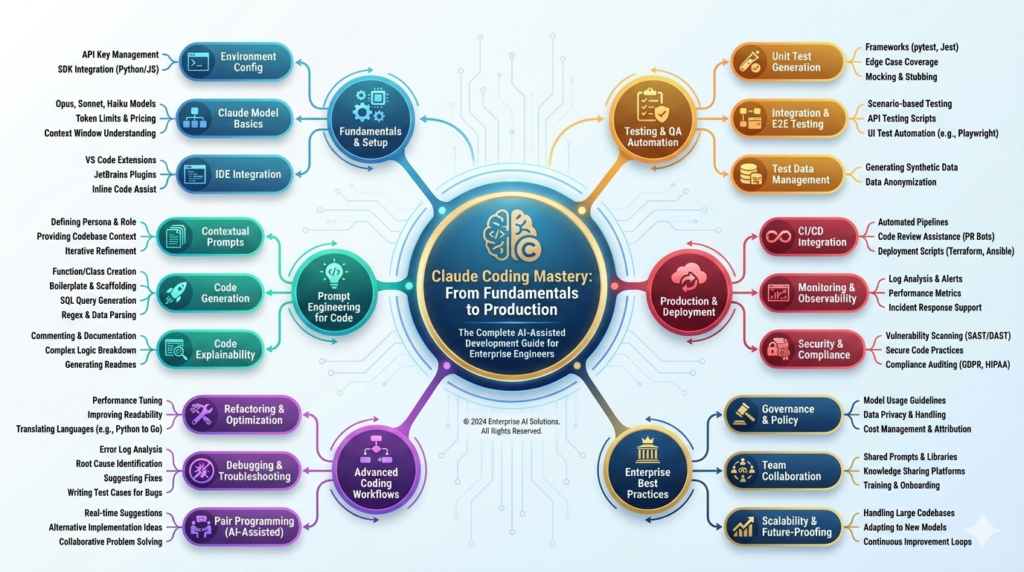

Claude Coding Mastery: From Fundamentals to Production The Complete AI-Assisted Development Guide for Entrepreneur’s in 2026
Claude Coding Mastery: From Fundamentals to Production
The complete AI-assisted development guide for entrepreneurs and engineering teams — how to think in Claude Code, ship real applications faster, and run it safely at enterprise scale.
Claude Code turns natural-language intent into working software — but the engineers getting the biggest gains from it aren’t the ones typing the most prompts. They’re the ones who’ve learned how to direct it: when to hand over implementation, when to hold the architecture line, and how to review what comes back before it reaches production. This guide walks that path end-to-end, from your first terminal session to running AI-assisted development across an enterprise engineering org.
The AI-Assisted Development Shift
Software teams have spent the last two years renegotiating where their time actually goes. The boilerplate, the scaffolding, the “translate this requirement into working code” step — that work is increasingly delegated to an AI collaborator, freeing engineers to spend more of their time on the decisions that still require human judgment: what to build, how to architect it, and whether the result is actually correct. Claude Code, Anthropic’s terminal-native coding agent, is one of the tools driving that shift, and by mid-2026 it has become a standard part of the toolchain at companies ranging from early-stage startups to regulated enterprises.
What makes this moment different from earlier “autocomplete” style AI coding tools isn’t raw code generation — it’s comprehension. A capable coding agent doesn’t just pattern-match the next few tokens; it reads a codebase, forms a model of what a function is for, and can explain the reasoning behind a fix rather than only producing one. That distinction matters enormously in production environments, where an engineer still has to sign their name to what ships.
Why Claude Code specifically
Intelligence & understanding
Reasons about intent and business context, not just syntax — and will ask a clarifying question instead of guessing when a requirement is genuinely ambiguous.
Safety by default
Trained to avoid known-insecure patterns (unparameterized queries, hardcoded secrets, disabled auth checks) and to decline requests for malicious code outright.
Terminal-native workflow
Runs where engineers already work — reading files, running tests, using git, and calling MCP-connected tools directly from the command line or desktop app.
Who this guide is for
This is written for three overlapping audiences: founders who need to ship product without a large engineering headcount, senior engineers moving their day-to-day workflow onto Claude-based development, and tech leads evaluating how to roll AI-assisted coding out across a team responsibly. It assumes solid programming fundamentals in at least one language, comfort with a terminal, and basic Git — not prior experience with any specific AI coding tool.
What you’ll be able to doBy the end of this guide you’ll be able to set up and run Claude Code from scratch, write prompts that get production-usable output on the first or second pass, build a full-stack application end-to-end with Claude as your implementation partner, and put reasonable guardrails around AI-generated code before it reaches a production environment.
Claude’s Architecture & Model Family
Claude Code is not a single model — it’s an agent runtime that sits on top of the Claude model family, and knowing which model is doing the work changes how you should prompt it. As of this guide’s publication, Anthropic’s current lineup spans four generally available models, each tuned for a different point on the speed-versus-depth curve.
| Model | Best for | Input / Output (per MTok) | Context window |
|---|---|---|---|
| Claude Haiku 4.5 | Fast, low-cost answers; simple generation and lookups | $1 / $5 | Standard |
| Claude Sonnet 5 | Default for day-to-day development — the best balance of quality, speed and cost | $2 / $10 | 1M tokens |
| Claude Opus 5 | Complex architecture, gnarly refactors, security-critical review | $5 / $25 | 1M tokens |
| Claude Fable 5 | Frontier-capability work where you want maximum reasoning depth | $10 / $50 | 1M tokens |
Pricing per the Claude Platform pricing page, current as of August 2026. Confirm current rates at claude.com/pricing before budgeting, since Anthropic updates them periodically.
For most application development, Claude Sonnet 5 is the practical default — it’s the model new Claude Code sessions use out of the box, and it comfortably handles everyday feature work, refactors, and debugging. Reach for Opus 5 when you’re making an architectural decision you don’t want to revisit, doing a security-focused review pass, or working through a bug that’s resisted several rounds of investigation. You can switch models mid-session with /model opus without losing conversation context.
Context window and token economics
Claude 4.6-and-later models, including the full Sonnet 5 / Opus 5 / Fable 5 line, ship with a full 1-million-token context window. In practice, that’s enough headroom to hold an entire mid-sized codebase, a long debugging conversation, and your project’s documentation in a single session without losing earlier context — a meaningful shift from the “paste one file at a time” workflow of earlier-generation tools.
Cost-optimization basicsOutput tokens cost roughly 5x input tokens, so the biggest lever is usually generating less, more targeted output rather than trimming input. Prompt caching (10% of standard input price on a cache hit) and the Batch API (a flat 50% discount for non-interactive workloads) stack together and materially cut spend on repetitive pipelines.
Safety and guardrails, in practice
Claude is trained to decline requests for malware, exploit code, or anything designed to defeat authentication or access controls — regardless of how the request is framed. For legitimate security work, it will help with things like authorized penetration-testing scripts, vulnerability explanations, and defensive tooling, but it will always want context that the use is authorized. That’s a feature, not friction: it’s the same posture you’d want from a senior engineer reviewing a risky request from a teammate.
What Claude Code doesn’t do for you
- It doesn’t guarantee production-readiness — every generated change still needs human review before it ships.
- It can’t see anything outside the files, commands, and tools you give it access to in a session.
- It won’t make an irreversible architectural call unilaterally — expect it to ask, or to lay out trade-offs and wait for your decision.
- It can occasionally reference an API or library detail incorrectly, especially for fast-moving ecosystems — treat unfamiliar API calls as worth a quick verification, the same way you’d double-check a stack-overflow answer.
Environment Setup: Zero to First Session
Getting Claude Code running takes under two minutes on any of the three major platforms. As of 2026, Anthropic’s recommended path is the native installer — a self-contained binary that needs no Node.js runtime and updates itself quietly in the background. The older npm-based install still works and remains useful if your team standardizes tooling through npm, but it’s now the secondary path rather than the default.
# Native installer — no Node.js required, auto-updates
curl -fsSL https://claude.ai/install.sh | bash

# Confirm it's on your PATH
claude --version
# Run from PowerShell — administrator rights not required
irm https://claude.ai/install.ps1 | iex

claude --version
# WSL2 users: run the macOS/Linux command inside your WSL shell instead
# Requires Node.js 22+ — supported, but no longer the default path
npm install -g @anthropic-ai/claude-code

claude --version
# Never run this with sudo — reconfigure npm's prefix instead
npm config set prefix '~/.npm-global'
# From inside any project directory:
cd ~/your-project
claude
# First launch opens a browser window for OAuth login
# against your Claude Pro, Max, Team, or Console account

# Headless / CI environments: skip the browser flow
export ANTHROPIC_API_KEY="sk-ant-api03-your-key-here"

# Diagnose install or auth issues at any point:
claude doctor
Account requirementClaude Code needs a paid path to run — a Claude Pro, Max, Team, or Enterprise seat, or a Console account billed at API rates. The free Claude.ai plan doesn’t include Claude Code access. If your team is running it heavily and interactively, a Max seat is usually more predictable to budget than pay-per-token Console billing.
IDE and editor integration
Claude Code is terminal-first by design, but it plugs cleanly into the tools most teams already use. VS Code and JetBrains both have Claude Code integrations that surface diffs and file changes inline instead of only in the terminal, and Anthropic’s desktop app wraps the same underlying agent in a GUI for engineers who prefer not to live in a shell. For frontend and general web work, `Claude in Chrome` extends the same agent into the browser itself. None of these change how you prompt — they change where you watch the work happen.
A minimal first project
Resist the urge to point Claude Code at your largest, messiest repo on day one. Start with a small, self-contained project — a CLI tool, a single API endpoint, a script — so you can build intuition for how it asks clarifying questions, how it structures multi-file changes, and how much detail you need to give it before it stops guessing and starts asking. That intuition transfers directly once you move to production codebases.
Vibe Coding & Prompt Engineering
“Vibe coding” is the shorthand that’s stuck for a specific shift in how you describe work to a machine. Traditional coding starts from an explicit specification: you decide the algorithm, the data structures, the exact shape of the code, then type it. Vibe coding starts from intent: you describe the outcome you want, in plain language, and let Claude propose an implementation — which you then review, refine, and iterate on rather than writing from scratch.
That shift moves your cognitive load from “how do I implement this” to “what should be built, and is this correct” — problem clarity, requirements, review, and testing become your job in full; Claude absorbs the boilerplate, the scaffolding, and a first pass at error handling and documentation.
The five-part prompt
Vague prompts get vague code. The prompts that reliably produce usable output on the first try tend to include five things: the situation (context), what you actually want (objective), the limits it needs to respect (constraints), the shape of the output (format), and any special requirements (details).
Context: I'm building a fitness-tracking API.
Objective: Create a function that calculates daily
calorie burn from user stats.
Constraints: Users aged 18–80, metric units,
activity level on a 1–5 scale.
Format: Return JSON — daily_calories, hourly_rate,
confidence_interval.
Details: Use the Harris-Benedict equation, validate
all inputs, return clear error messages for invalid data.
The interaction loop
A healthy Claude Code session isn’t one giant prompt — it’s a loop. You describe intent (vague is fine to start). Claude either asks a clarifying question or proposes an approach. You refine. Claude generates. You review, test, and either confirm or push back with specifics. That loop, repeated, is how a rough idea turns into reviewed, working code without either side guessing.
Stacking everything at once
“Build an entire order-management system with auth, payments, notifications, admin dashboard, and reporting” — one prompt, fifty requirements. You’ll get something, but reviewing it is its own project.
One requirement per round
Round 1: core CRUD. Round 2: add auth. Round 3: add rate limiting. Round 4: make it persistent in Redis. Each round is reviewable on its own, and Claude’s context carries forward.
When Claude generates code you don’t like
The instinct is to say “this is wrong, fix it” — that’s the least useful feedback you can give. State why it doesn’t work for your case and what you’d rather see: “this works, but I don’t want a synchronous call here because we’re processing 10K+ items/sec — switch to async with retry and exponential backoff.” Specific feedback like that gets you a materially better second pass than a generic rejection does.
Languages, Frameworks & Project Context
Claude writes idiomatic, working code across most mainstream languages, but proficiency isn’t uniform — and knowing where it’s strongest helps you pick a stack that plays to those strengths, especially early in a project when you have the most freedom to choose.
Deepest coverage
Python, JavaScript/TypeScript, Java, C++, SQL — largest training corpus, most idiomatic output, fewest surprises.
Very strong
Go, Rust, PHP, C#/.NET, Ruby — production-ready output with occasional need for a closer review pass on newer language features.
Solid, verify more
Swift, Kotlin, Shell/Bash, R, Scala — reliable for common patterns; worth a second look on less common idioms or niche libraries.
If you’re choosing a stack from scratch specifically to pair with AI-assisted development, Python remains the strongest default: clear syntax, a huge library ecosystem, and it reads as naturally to Claude as it does to a human reviewer. TypeScript is a close second for full-stack web work — its type system gives Claude (and you) an extra layer of self-checking that plain JavaScript doesn’t. Frameworks across the web, mobile, and data/ML stacks — React, Next.js, Django, FastAPI, Express, React Native, Flutter, PyTorch, and friends — are all well supported for production-grade generation.
How Claude Code understands a multi-file project
Point Claude Code at a directory and describe the structure — which file defines your models, which one wires up the API, where auth lives — and it builds a working model of how the pieces relate, so a change to your data model gets reflected consistently across serializers, endpoints, and tests instead of just the one file you’re staring at. With a 1M-token context window on Sonnet 5 and Opus 5, that “understand the whole project” mode comfortably covers most application codebases in a single session.
| Include in context | Leave out |
|---|---|
| Relevant source files, architecture notes, dependency versions | Entire node_modules or build artifacts |
| Error messages and logs, verbatim | Full git history unless it’s directly relevant |
| Test cases describing expected behavior | Large unrelated files “just in case” |
The practical strategy: paste or reference the relevant code once at the start of a session, then ask follow-up questions against that same context rather than re-pasting everything each time — it’s both cheaper and keeps Claude’s understanding of your project consistent turn to turn.
Build: Fitness Tracker, Git & Debugging
The fastest way to internalize this workflow is to build something real. Here’s a compact walkthrough of a full-stack fitness tracker — the same shape of project you’ll use to validate your own setup — showing how a project actually gets built in rounds rather than in one shot.
Step 1 — architecture first
Before any code, describe the feature set and constraints and ask Claude to propose structure: “Build the backend for a fitness tracking app with FastAPI — user auth, workout logging (exercise, duration, intensity, calories), personal records, and stats. Multi-user. Start with the directory structure and explain it.” You’ll typically get a clean, conventional layout back — models, schemas, routers, auth, database config — with a short explanation of why each piece is separated the way it is.
Step 2 — build incrementally
class Workout(Base):
    __tablename__ = "workouts"

    id: Mapped[int] = mapped_column(primary_key=True)
    user_id: Mapped[int] = mapped_column(ForeignKey("users.id"))
    exercise_type: Mapped[str]
    duration_min: Mapped[int]
    intensity: Mapped[int]  # 1–5
    calories_burned: Mapped[float]
    date: Mapped[datetime]
    created_at: Mapped[datetime] = mapped_column(default=utcnow)
    updated_at: Mapped[datetime] = mapped_column(
        default=utcnow, onupdate=utcnow)
class WorkoutCreate(BaseModel):
    exercise_type: str
    duration_min: int = Field(gt=0, le=600)
    intensity: int = Field(ge=1, le=5)
    calories_burned: float = Field(ge=0)
    date: datetime

    @field_validator("date")
    def not_in_future(cls, v):
        if v > datetime.utcnow():
            raise ValueError("date cannot be in the future")
        return v
@router.post("/workouts", status_code=201)
async def log_workout(
    payload: WorkoutCreate,
    user: User = Depends(get_current_user),
    db: AsyncSession = Depends(get_db),
):
    workout = Workout(**payload.model_dump(), user_id=user.id)
    db.add(workout)
    await db.commit()
    await db.refresh(workout)
    return workout
Notice the pattern: models first, then validated schemas, then the endpoint that ties them together — each generated and reviewed as its own round, with follow-ups like “add validation for duration between 1 and 600 minutes” layered on afterward rather than specified upfront.
Git workflow with Claude in the loop
Claude Code fits naturally into a standard feature-branch workflow — it can draft commit messages that actually describe the change (feat(auth): add JWT refresh token endpoint rather than fix stuff), and it’s a genuinely useful second reviewer before you open a pull request: paste the diff and ask directly whether it’s production-ready and what you should fix before merging.
Debugging systematically
The debugging prompts that get fast, accurate diagnoses share a shape: the exact error message and stack trace, the relevant code, and what you were trying to do when it broke. Claude will typically walk back from the error to a root cause, explain why it’s happening — not just paste a fix — and suggest how to prevent the same class of bug next time. That explanation is worth reading even when you could have found the fix yourself; it’s where the actual learning happens.
Testing, right-sized
A useful mental model for test coverage: most of your tests should be fast unit tests on individual functions, a smaller layer of integration tests should check that components work together against a real (or realistic) database, and a thin top layer of end-to-end tests should walk core user journeys. Ask Claude to write tests immediately after it generates a function, while the context of what the function should and shouldn’t do is freshest — “write pytest tests for this: normal operation, edge cases, and error conditions” is enough to get a solid first pass.
Multi-Agent, RAG & Production Security
Once a project outgrows a single conversational thread, two patterns tend to show up: splitting work across specialized agent roles, and grounding generation in your own codebase through retrieval. Both are extensions of the same core loop, applied at larger scale.
Multi-agent patterns for complex projects
For anything beyond a small app, it helps to think in terms of specialized roles rather than one general-purpose conversation: a UI-focused session generating accessible, typed React components; a backend session generating validated API endpoints and auth logic; a database-focused session handling schema design and query optimization. Each session gets a tighter, more specific system prompt for its domain, and an orchestration layer (which can be you, manually, on smaller projects) routes work and reconciles the interfaces between them.
RAG: grounding generation in your own code
Retrieval-Augmented Generation solves a specific problem: a generic prompt gets a generic answer, but your team has existing patterns, existing auth flows, existing conventions it should be consistent with. A code-aware RAG setup indexes your codebase, retrieves the most relevant existing files for a given request, and feeds them into context alongside the prompt — so “add a payment endpoint” comes back looking like the rest of your payment module, not like a fresh implementation with different naming conventions and different error handling.
The production-readiness checklist
Before any Claude-generated code goes live, it should clear the same bar any human-written change would — the model doesn’t change what “production-ready” means, it just changes who did the first draft.
- Passes linting and type checks (mypy / TypeScript strict mode)
- Meaningful test coverage on the changed paths, not just happy-path
- No hardcoded secrets — verified, not assumed
- Parameterized queries everywhere user input touches SQL
- Authorization checked per-resource, not just per-endpoint
- Docstrings and comments on non-obvious logic
- Rollback plan documented before deploy
- Monitoring and alerting wired up for the new surface area
Security review, concretely
Claude is a genuinely capable first-pass security reviewer against the OWASP Top 10 — ask it directly, “is this vulnerable to SQL injection, and if so fix it,” or “review this authentication flow for token-validation and session-handling issues” — and it will typically flag real problems and default to parameterized queries, proper hashing, and explicit authorization checks. That said, treat it as a strong first reviewer, not the last one: verify dependencies yourself, run an actual security scanner, and test the specific attack scenarios that matter for your application before you consider a security pass complete.
The habit that matters mostEvery mistake in this section of the original playbook traces back to one root cause: reviewing generated code less carefully than code a human teammate wrote. Hold Claude’s output to the same review bar, every time — that discipline is what separates teams that ship faster and safer from teams that just ship faster.
Performance, APIs & Microservices
Finding real bottlenecks before optimizing
Optimization prompts work best anchored to real numbers — expected concurrent users, data volume, target latency — rather than a vague “make this faster.” Given that context, Claude is reliably good at spotting the usual suspects: an O(n²) loop that should be O(n log n), an N+1 query pattern hiding inside an ORM relationship, a missing index, or a data structure that’s the wrong shape for how it’s actually being accessed.
Database
Index recommendations, query restructuring, and targeted denormalization for read-heavy paths at scale.
Caching
Redis-backed caching for expensive, rarely-changing data — plus a coherent invalidation strategy, which is the part people usually skip.
Async conversion
Turning blocking I/O into async/await with correct error handling and backpressure, not just a mechanical keyword swap.
Designing APIs that age well
A well-specified API prompt front-loads exactly what a spec review would: resources, required operations, pagination and filtering behavior on list endpoints, and the error-handling contract, along with a request for an OpenAPI/Swagger specification alongside the implementation. That specification becomes documentation your frontend team and any external consumers can build against immediately, rather than reverse-engineering from the code.
# /v1 and /v2 live side by side during migration
@app.get("/v1/orders/{id}", deprecated=True)
async def get_order_v1(id: int): ...

@app.get("/v2/orders/{id}")
async def get_order_v2(id: int): ...

# Sunset header tells clients exactly when v1 goes away
response.headers["Sunset"] = "Wed, 01 Apr 2026 00:00:00 GMT"
Microservices — when the split is worth it
Claude is genuinely useful for thinking through service boundaries — where a user service ends and a payments service begins, whether two services should share a database or stay fully isolated, REST versus a message queue for a given interaction. It’s less useful as a rubber stamp for “we should be microservices” as a default; the honest answer for most early-stage products is that a well-organized monolith is faster to build, easier to debug, and easier to deploy, and the split is worth the operational overhead once team size and scaling needs actually demand it — not before.
Enterprise: CI/CD, Cost & Career Path
CI/CD that treats AI-generated code like any other change
The pipeline doesn’t need to know or care whether a commit originated from a human or from a Claude Code session — the same gates apply either way: automated tests, linting, type checks, and coverage thresholds on every push and pull request, with a manual approval gate in front of production deploys regardless of how confident the diff looks. Claude is well-suited to drafting the actual CI/CD YAML — GitHub Actions workflows, Terraform for infrastructure, Dockerfiles — from a description of what you want the pipeline to enforce.
Monitoring what you shipped
Ask Claude to add structured logging and instrumentation as part of generating a feature, not as an afterthought — request/response logging for debugging, error logging with enough context to actually diagnose from, and logging for the specific business events you care about (signups, purchases, workout entries, whatever the feature represents). The three metric categories worth tracking from day one are application health (latency percentiles, error rate, throughput), business signals (activation, usage, revenue), and infrastructure load (CPU, memory, queries per second) — and alerts should be tied to thresholds that actually predict user-facing pain, not just infrastructure noise.
Team workflows and onboarding
Claude Code adoption sticks best when it’s treated as a documented team practice, not an individual habit — shared code-review guidelines that specify what Claude-assisted PRs still need (the production-readiness checklist from Module 7 is a reasonable starting point), and an onboarding doc that walks new engineers through environment setup, your team’s prompting conventions, and common pitfalls specific to your codebase. Claude itself is a fast way to draft that documentation — architecture overviews, setup guides, and troubleshooting notes generated from your actual codebase rather than written from scratch.
Cost discipline at scale
Four levers do most of the work: default to Sonnet 5 for routine development and reserve Opus 5 or Fable 5 for genuinely hard problems; reuse context within a session instead of re-explaining the same code repeatedly; enable prompt caching for large, frequently reused context like system prompts or reference documentation; and route non-interactive, non-urgent workloads through the Batch API for its flat 50% discount. Combined, caching and batch discounts can cut the effective cost of high-volume pipelines by well over half compared to uncached, real-time calls.
A lean team scaling a payments API in one quarter
A small fintech team used Claude Code to compress the usual timeline for a payment-processing service: architecture review and endpoint scaffolding in the first week, a security-focused pass with Opus 5 before the first external integration, and generated test suites kept coverage high throughout rather than as a pre-launch scramble. The pattern that made it work wasn’t the tool alone — it was pairing fast generation with a review discipline that never skipped the checklist from Module 7, even under deadline pressure.
Your learning path from here
| Stage | Focus |
|---|---|
| Foundation (weeks 1–4) | Comfortable daily use, one small shipped project, framework familiarity |
| Intermediate (months 2–4) | Multi-feature applications, architecture ownership, production deploys |
| Advanced (months 5–12) | Complex systems, team standards, mentoring others on the workflow |
| Mastery (year 2+) | Setting org-wide practice, building genuinely AI-native products |
The engineers who get the most durable value from this shift aren’t the ones who generate the most code — they’re the ones whose review instincts stay sharp even as generation gets faster. That’s the skill worth deliberately building as you move through these stages: not less scrutiny, but scrutiny applied at a higher level, further up the stack, where it actually compounds.
Bring this into your team’s workflow
This guide doubles as a training SOP — walk a new engineer through it module by module, or use the production-readiness checklist as a standing review gate for AI-assisted pull requests.
Read the official Claude Code docs →