
n8n Workflow Automation & AI Agent Building
A Complete Guide from Fundamentals to Enterprise-Level Implementation
- Executive Summary & Industry Context
- Fundamentals of Workflow Automation
- n8n Platform Overview & Architecture
- Core Building Blocks & Node Types
- Basic Workflow Construction (Beginner)
- Intermediate Workflow Patterns
- AI Agent Fundamentals
- Building AI Agents with n8n
- Advanced AI Agent Patterns
- Enterprise Integration & Orchestration
- Real-World Industry Use Cases
- Best Practices & Production Deployment
- Monitoring, Debugging & Optimization
- Conclusion & Career Path
1. Executive Summary & Industry Context
1.1 Why Workflow Automation Matters in 2025
Workflow automation has transformed from a nice-to-have feature into a mission-critical capability for enterprises worldwide[1]. In the current landscape:
- 70% of enterprise IT operations rely on automation platforms to manage infrastructure[1]
- Cost reduction: Organizations achieve 60-80% operational cost savings through intelligent automation[2]
- Speed to market: Deployment time reduces from weeks to hours[2]
- Error reduction: Automation eliminates 95% of manual data entry errors[1]
- AI integration: Modern workflows increasingly incorporate AI for decision-making and context-aware processing[2]
1.2 n8n’s Position in the Automation Ecosystem
n8n stands apart in the automation market as the platform for technical teams[3]:
Key Differentiators:
- Open-source architecture with 500+ pre-built integrations[3]
- Self-hosting capability for enterprises requiring data sovereignty[3]
- Visual + code hybrid approach – accessible to non-technical users while powerful for engineers[3]
- AI-native design with built-in support for OpenAI, Anthropic, Google Gemini, and custom LLMs[2]
- Enterprise-ready with governance, audit logs, and Kubernetes deployment support[3]
As a new AI engineer joining a global MNC, understanding n8n will enable you to:
✓ Automate repetitive engineering tasks
✓ Build intelligent AI agents for customer-facing applications
✓ Integrate disparate enterprise systems seamlessly
✓ Deploy production-ready workflows in hours instead of weeks
✓ Scale automation across global operations
2. Fundamentals of Workflow Automation
2.1 What is Workflow Automation?
Workflow automation is the orchestration of automated tasks, data flows, and decision logic to execute business processes without human intervention.
Core Components:
Input/Trigger → Processing → Logic → Integration → Output/Action
Example Workflow:
Email arrives (Trigger)
↓
Parse email content (Processing)
↓
Classify as urgent/normal (Logic)
↓
Retrieve related records from CRM (Integration)
↓
Send response or escalate to team (Action)
2.2 Traditional vs Modern Automation
| Aspect | Traditional | Modern (n8n) |
| Development | Requires custom coding | Visual drag-and-drop + optional code |
| Speed | Weeks to months | Hours to days |
| Flexibility | Low – tied to specific platform | High – 500+ integrations |
| Cost | High (developer time + licensing) | Moderate (infrastructure + learning) |
| AI Integration | Complex, separate systems | Native, first-class support |
| Maintainability | Difficult with code churn | Transparent, version-controlled |
| Scalability | Limited, requires refactoring | Built-in for enterprise scale |
Modern workflows operate on event-driven architecture:
Event Triggered (e.g., new data, time schedule)
↓
[TRIGGER NODE]
↓
[PROCESSING NODES] ← Data transformation, enrichment
↓
[DECISION NODES] ← Conditional logic (if/then/else)
↓
[ACTION NODES] ← Execute integrations, send messages
↓
Workflow Complete
Benefits:
- Workflows execute only when needed
- Reduced resource consumption
- Real-time responsiveness
- Auditable execution logs
3. n8n Platform Overview & Architecture
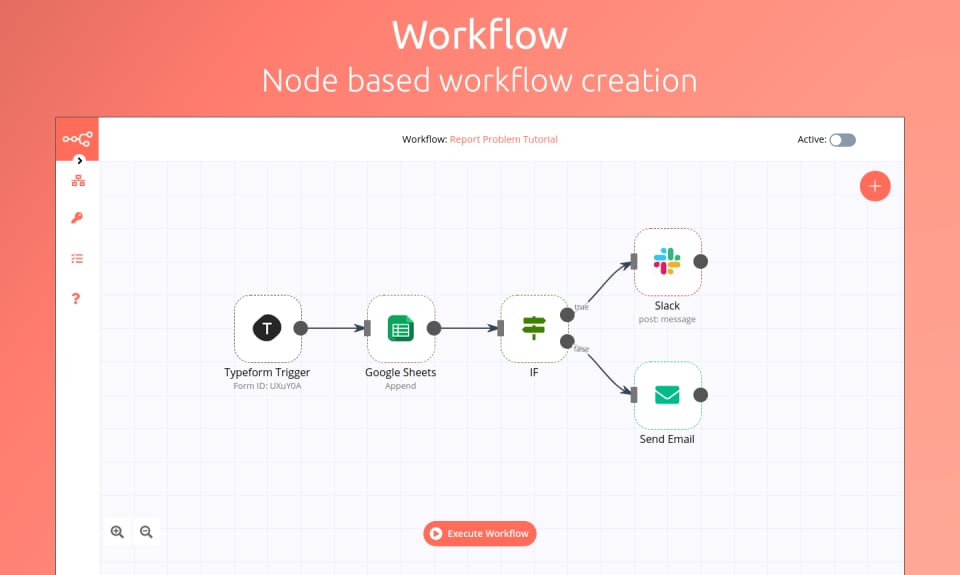
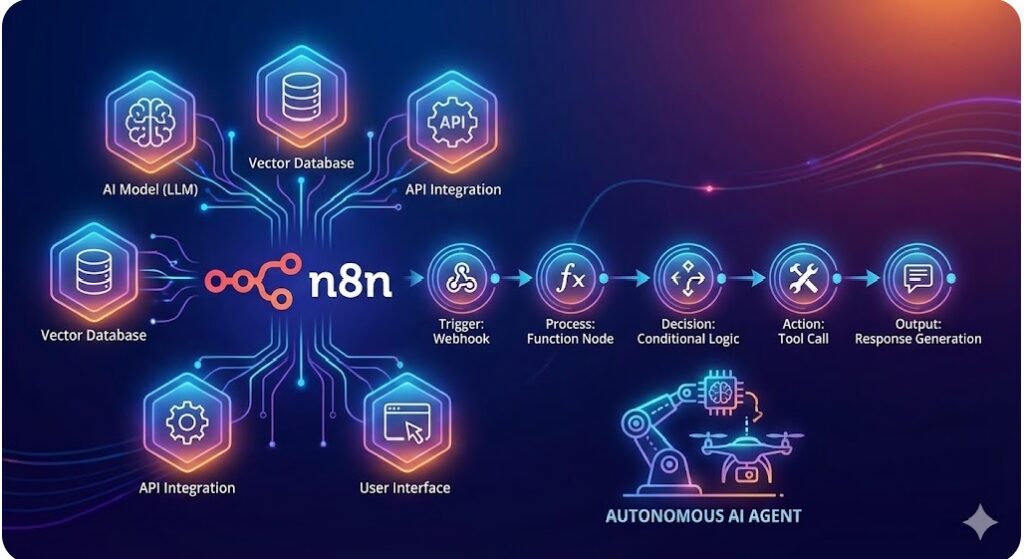
Figure 1: Figure 1: n8n Platform Architecture – Visual Workflow Editor and Integration Hub
n8n operates on a modular, extensible architecture:
Core Components:
- Visual Workflow Builder – Drag-and-drop canvas for designing workflows
- Node Library – 500+ pre-built integrations and utilities
- Expression Engine – JavaScript-based data transformation
- Execution Engine – Processes workflows with queuing and retry logic
- Data Store – Persistent storage for workflow state and history
- API Layer – Webhooks and REST APIs for external integration
n8n offers three deployment models to match your infrastructure needs:
Cloud (n8n Cloud):
- Managed by n8n team
- Zero infrastructure overhead
- Automatic scaling
- Best for: Quick prototyping, POC projects
Self-Hosted (Docker/Kubernetes):
- Run on your infrastructure
- Full data control and privacy compliance
- Customize authentication and permissions
- Best for: Enterprise deployments, sensitive data
Air-Gapped (On-Premises):
- Isolated from internet
- Meeting strict compliance requirements
- Highest security posture
- Best for: Regulated industries (finance, healthcare, government)
Workflow:
A sequence of connected nodes that process data from trigger to completion. Can be manually triggered, scheduled, or event-driven.
Node:
A single unit that performs a specific action – fetches data, processes it, makes decisions, or sends outputs.
Trigger:
A starting point for workflow execution (webhook, scheduled timer, file upload, database change, etc.).
Execution:
A single run of a workflow. Each execution has its own data context and logging.
Expression:
JavaScript code to transform or evaluate data dynamically within nodes.
4. Core Building Blocks & Node Types

Figure 2: Figure 2: n8n Core Node Types – Triggers, Logic, Actions, and Integrations
Nodes are categorized into four types:
Trigger nodes start workflow execution. They listen for events and initiate the workflow process.
Common Trigger Types:
Webhook Trigger
Purpose: Listen for HTTP POST requests
Use Case: Form submissions, external API calls, GitHub events
Configuration: Unique URL, authentication method
Schedule Trigger
Purpose: Execute workflow on a schedule
Use Case: Daily reports, periodic data sync, cleanup jobs
Patterns: Cron expressions, simple intervals (every hour, daily at 9 AM)
Email Trigger
Purpose: Execute when emails arrive in inbox
Use Case: Email automation, ticket creation, data extraction
Configuration: IMAP/Exchange connection, folder monitoring
Database Trigger
Purpose: Execute when data changes in database
Use Case: Real-time data sync, event-driven processing
Configuration: Connection string, table, polling interval
File Trigger
Purpose: Execute when files arrive or change
Use Case: Document processing, log analysis, data imports
Configuration: File path, file types, monitoring method
Webhook Example – Practical Flow:
External system sends data to webhook URL
↓
n8n validates signature (optional)
↓
Workflow executes with payload as input
↓
Response returned to sender (success/error)
Logic nodes make decisions and transform data. They control workflow flow based on conditions or data manipulation.
If/Then/Else Node
Purpose: Conditional branching based on expressions
Example:
IF priority = “high” THEN assign to senior engineer
ELSE assign to queue
Configuration: JavaScript condition evaluation
Switch Node
Purpose: Multi-way branching (like switch statement)
Example:
status = “new” → send welcome email
status = “updated” → send update notification
status = “closed” → send summary report
Code Node
Purpose: Execute custom JavaScript for complex transformations
Use Case: Data manipulation, calculations, business logic
Example:
const discountedPrice = price * (1 – discountPercentage/100);
return { …item, discountedPrice };
Loop Node
Purpose: Iterate over arrays or repeated operations
Example:
FOR EACH user in userList:
– Fetch user details
– Send notification
– Update status
Split In Batches Node
Purpose: Process large datasets in manageable chunks
Use Case: Avoid timeouts with large data sets
Configuration: Batch size, memory management
Merge/Combine Data Node
Purpose: Combine multiple data streams
Use Case: Join results from multiple API calls
Example:
Merge user data + order data + product data
Action nodes execute concrete operations – send messages, update databases, call APIs.
Common Action Nodes:
HTTP Request Node
Purpose: Call any REST API
Configuration: Method, URL, headers, body, authentication
Example: Call third-party APIs, webhooks to other systems
Email Node
Purpose: Send emails
Configuration: SMTP server or Gmail/Outlook integration
Template: HTML body, attachments, recipient lists
Database Nodes
Types: PostgreSQL, MySQL, MongoDB, Oracle, etc.
Operations: SELECT, INSERT, UPDATE, DELETE
Use Case: Direct database manipulation in workflows
Slack Node
Purpose: Send Slack messages
Configuration: Channel, message format, file attachments
Use Case: Team notifications, alerts, progress updates
Google Workspace Nodes
Services: Gmail, Google Drive, Google Sheets, Calendar
Use Case: Document automation, email handling, scheduling
CRM Nodes
Platforms: Salesforce, HubSpot, Pipedrive, etc.
Operations: Create/update leads, opportunities, accounts
Use Case: Sales automation, data enrichment, reporting
AI Model Nodes
Supported Models: OpenAI, Anthropic Claude, Google Gemini, Hugging Face
Configuration: API key, model selection, prompt engineering
Use Case: Content generation, classification, analysis
5. Basic Workflow Construction (Beginner Level)
5.1 Your First Workflow: Welcome Email on New User Signup
Objective: When a user signs up via form, send them a welcome email.
Components Needed:
- Webhook Trigger (receive form data)
- HTTP Request (optional – validate email)
- Email Node (send welcome message)
Step-by-Step Construction:
Step 1: Add Webhook Trigger
- Click “+” button on canvas
- Search “Webhook”
- Select “Webhook” from Triggers
- Set HTTP Method: POST
- Copy the webhook URL
- Create a test form that POSTs to this URL
Step 2: Add Email Node
- Click “+” to add node
- Search “Email”
- Select “Send Email” action
- Connect output of Webhook to Email node
- Configure email:
- From: your-company@domain.com
- To: {{ $json.email }}
- Subject: Welcome to {{ $env.COMPANY_NAME }}!
- Body: HTML template with user details
Step 3: Test & Deploy
- Send test data to webhook
- Check execution logs
- Verify email received
- Activate workflow (toggle ON)
Workflow Diagram:
Form Submission (POST)
↓
Webhook Trigger
↓
Extract email field
↓
Send Email Action
↓
Execution Complete
Key Concepts Learned:
- Adding and configuring trigger nodes
- Data extraction using expressions ({{ $json.email }})
- Action nodes and email templates
- Testing and debugging workflows
In n8n, data flows through nodes as JSON:
{
“name”: “John Doe”,
“email”: “john@example.com“,
“signupDate”: “2025-12-01T10:30:00Z”,
“source”: “website”
}
Accessing data in expressions:
{{ $json.name }} // “John Doe”
{{ $json.email }} // “john@example.com“
{{ $json.signupDate }} // Date string
{{ $json.source }} // “website”
{{ $json[‘key with spaces’] }} // Alternative syntax
Common Data Transformations:
String Operations:
{{ $json.email.toLowerCase() }} // Convert to lowercase
{{ $json.name.toUpperCase() }} // Convert to uppercase
{{ $json.email.includes(‘@domain’) }} // Check if contains
Conditional Logic:
{{ $json.priority === ‘high’ ? ‘URGENT’ : ‘normal’ }}
Date Operations:
{{ new Date($json.timestamp).toLocaleDateString() }}
{{ Date.now() }} // Current timestamp
Array Operations:
{{ $json.items.length }} // Array length
{{ $json.items.map(i => i.id) }} // Extract IDs
Every node can fail. n8n provides robust error handling:
Retry Strategy:
Configuration per node:
- Max retries: 2-5 attempts
- Backoff: Linear, exponential, or fixed delay
- Wait between: 5s, 30s, 1m, 5m, 1h
Error Handling Options:
Option 1: Ignore Error
- Workflow continues as if nothing happened
- Use for: Non-critical operations (logging, metrics)
Option 2: Continue on Error (with fallback)
- Provide default value if operation fails
- Use for: Graceful degradation
Option 3: Stop on Error
- Halt workflow immediately
- Use for: Critical operations (payments, auth)
Example Configuration:
HTTP Request Node (fetching user details):
On Error:
- Retry: 3 times with exponential backoff
- If still fails: Continue with default empty object {}
Email Node:
On Error:
- Stop immediately (critical operation)
- Trigger alert workflow
6. Intermediate Workflow Patterns
6.1 Pattern 1: Conditional Logic & Data Enrichment
Scenario: Process customer orders with priority-based routing.
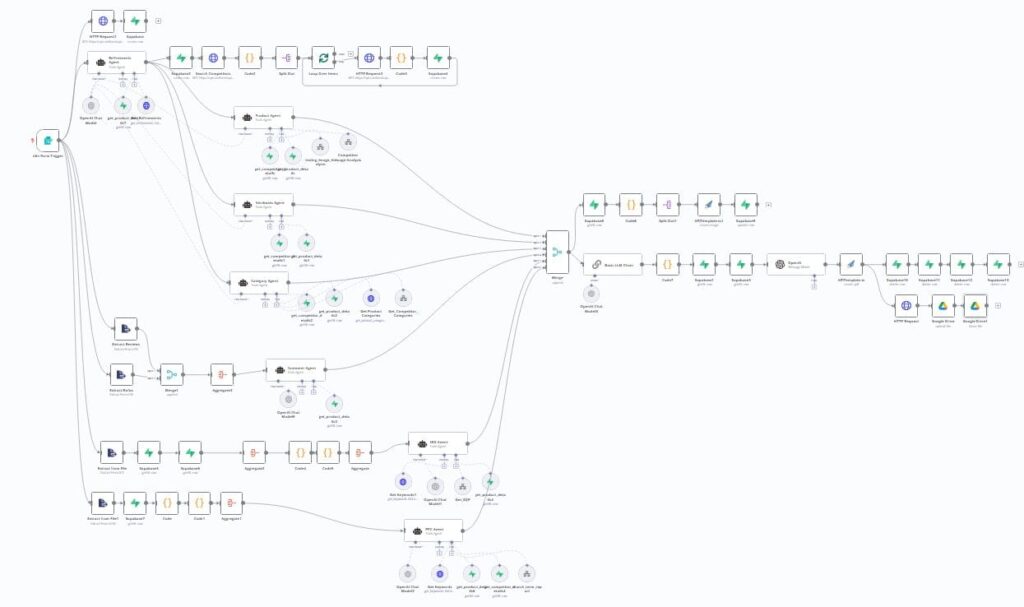
Figure 3: Figure 3: AI Workflow Architecture – Data Enrichment and Conditional Routing
Workflow Steps:
Order Webhook (trigger)
↓
Query Customer Database (get loyalty status)
↓
Query Inventory System (check stock)
↓
IF/THEN Decision Node:
├─ High value + loyal customer → Premium shipping
├─ Standard order → Normal processing
└─ VIP customer → Personal support notification
↓
Send order confirmation email with appropriate content
↓
Update order status in database
Implementation Details:
// In HTTP node – fetch customer loyalty status
const customerId = $json.customerId;
const query = SELECT tier FROM customers WHERE id = ${customerId};
// Returns: { tier: ‘gold’, lifetime_value: 50000 }
// In IF/THEN node – conditional logic
IF ($json.order_value > 1000 AND $json.tier === ‘gold’)
THEN route to premium_workflow
ELSE route to standard_workflow
6.2 Pattern 2: Looping Over Collections
Scenario: Process multiple orders in a single workflow run.
Fetch all orders from past 24 hours
↓
FOR EACH order:
├─ Check inventory
├─ Calculate tax and shipping
├─ Generate invoice
├─ Update database
└─ Send confirmation email
↓
Send summary report to manager
Loop Node Configuration:
Loop over: $json.orders (array of orders)
For each item:
- Item index: 0, 1, 2…
- Current item: $json.item (single order)
- Process in subsequent nodes
Key Consideration: Processing 10,000+ items?
- Use Split In Batches node (batch size 100)
- Avoids timeout and memory issues
- Still processes all items reliably
6.3 Pattern 3: Multi-Source Data Aggregation
Scenario: Build comprehensive customer profile from multiple systems.
Start with Customer ID
↓
(Parallel execution)
├─ Fetch CRM data
├─ Fetch payment history
├─ Fetch support tickets
├─ Fetch website behavior
└─ Fetch social data
↓
Merge all data into single object
↓
Perform analysis/enrichment
↓
Output comprehensive profile
Implementation Pattern:
// Node 1: Fetch from CRM
{ crm_data: {…} }
// Node 2: Fetch payment history
{ payment_data: {…} }
// Node 3: Fetch support tickets
{ support_data: {…} }
// Merge Node: Combine all
{
crm_data: {…},
payment_data: {…},
support_data: {…},
enriched_at: new Date().toISOString()
}
An AI Agent is an autonomous system that:
- Perceives its environment (receives input/context)
- Reasons about the situation using AI models
- Decides on appropriate actions
- Acts by executing operations
- Learns from outcomes and improves behavior
Agent vs Traditional Workflow:
| Aspect | Traditional Workflow | AI Agent |
| Logic | Pre-defined rules | Learns and adapts |
| Decision-making | Deterministic (if/then) | Context-aware with reasoning |
| Adaptability | Fixed sequences | Dynamic based on inputs |
| Complexity | Limited branching | Handles nuanced scenarios |
| Human oversight | Always required | Can operate autonomously |
| Learning | No learning capability | Improves over interactions |
Type 1: Conversational Agent
Purpose: Chat-like interaction with AI
Example: Customer support bot, internal Q&A assistant
Flow: User query → LLM processes → Response generated
Type 2: Tool-Using Agent (ReAct Pattern)
Purpose: Use external tools to accomplish goals
Example: Research assistant that searches web + summarizes
Pattern:
- User asks question
- Agent thinks about approach
- Agent selects appropriate tool
- Executes tool (web search, database query, etc.)
- Analyzes result
- Repeats until question answered
Type 3: Planning Agent
Purpose: Break down complex tasks into steps
Example: Content creation pipeline
Capability:
- Analyze requirements
- Plan multi-step approach
- Execute each step
- Validate outputs
- Deliver final result
Type 4: Specialized Agents
Examples:
- SQL Agent: Natural language → SQL queries
- Code Agent: Write and test code
- Analysis Agent: Complex data analysis
- Research Agent: Gather and synthesize information
System Prompt:
The instruction that defines an agent’s behavior, personality, and constraints.
Example system prompt for support agent:
“You are a helpful customer support specialist.
Your goal is to resolve customer issues quickly and professionally.
You have access to the customer database and knowledge base.
If you cannot resolve an issue, escalate to a human manager.
Always be polite and empathetic.”
Memory/Context:
Agents maintain conversation history to provide contextual responses.
Memory Types:
- Conversation Memory: Previous messages in current chat
- Entity Memory: Important customer/domain information
- Action Memory: What tools have been used recently
Tools/Functions:
External capabilities an agent can invoke.
Available tools might include:
- Search web
- Query database
- Send email
- Create ticket
- Update CRM
- Fetch documentation
Reasoning Chain:
The step-by-step thought process an agent follows.
Thought: “The user is asking about their order status”
Action: “I should query the orders database”
Observation: “Found order #12345, status is shipped”
Thought: “Now I have the information needed”
Final Answer: “Your order is on the way, tracking number is…”
8. Building AI Agents with n8n

Figure 4: Figure 4: AI Agent Architecture in n8n – LLM Integration with Tools and Memory
8.2 Building Your First AI Agent: Customer Support Bot
Objective: Create an AI agent that handles customer inquiries autonomously.
Components:
- Chat Trigger – Receive customer messages
- AI Agent Node – Core reasoning engine
- Tool Nodes – Database query, email, knowledge base
- Memory Management – Conversation history
- Response Action – Send reply to customer
Step-by-Step Implementation:
Step 1: Set Up Chat Interface
Add “Chat Trigger” node:
- Receives messages from chat widget/API
- Passes to AI Agent node
- Maintains user session context
Step 2: Configure AI Agent Node
Configuration:
Model: OpenAI GPT-4 (or Claude/Gemini)
API Key: Your OpenAI API key
Temperature: 0.7 (balance creativity and consistency)
Max Tokens: 1000
System Prompt:
“You are a professional customer support agent for TechCorp.
Your responsibilities:
- Understand customer issues
- Search our knowledge base for solutions
- Query customer account information if needed
- Provide clear, empathetic responses
- Escalate complex issues to human agents
Available tools:
- search_knowledge_base(query)
- query_customer_account(customer_id)
- create_support_ticket(issue_description)
- send_email(recipient, subject, body)
Remember to be helpful, professional, and concise.”
Step 3: Define Tools for Agent
Tool 1: Knowledge Base Search
Function: search_knowledge_base(query)
Implementation: HTTP request to internal search API
Returns: Relevant articles and solutions
Tool 2: Customer Account Lookup
Function: query_customer_account(customer_id)
Implementation: Database query
Returns: Account info, orders, billing status
Tool 3: Ticket Creation
Function: create_support_ticket(issue_description, customer_id)
Implementation: POST to ticketing system
Returns: Ticket ID for tracking
Tool 4: Email Notification
Function: send_email(recipient, subject, body)
Implementation: Email service integration
Returns: Send confirmation
Step 4: Configure Memory
Memory Configuration:
Type: Conversation Memory
Max Messages: 50 (keep conversation context)
TTL: 24 hours (delete after 24h of inactivity)
Additional Context:
- Store customer_id
- Store account_type
- Store previous interactions
Step 5: Add Response Handler
After AI generates response:
- Format response for display
- Check if escalation needed (if agent recommended)
- Log interaction for analytics
- Send response back to customer
- Store in conversation history
Complete Workflow Diagram:
Customer sends message
↓
Chat Trigger
↓
AI Agent Node
├─ Analyze message
├─ Determine if tools needed
├─ Execute tools:
│ ├─ Search knowledge base
│ ├─ Check customer account
│ └─ Analyze sentiment
├─ Reason through response
└─ Generate thoughtful answer
↓
Response Formatter
↓
Send to customer
↓
Log interaction & update analytics
8.3 Advanced Agent Pattern: ReAct (Reasoning + Acting)
The ReAct pattern is the most powerful approach for AI agents:
R – Reasoning: Agent thinks about the problem
E – Evidence: Gathers facts using tools
A – Acting: Executes next action based on reasoning
C – Cycling: Repeats until problem solved
Example: Customer Billing Dispute
Customer: “Why was I charged twice for my subscription?”
THOUGHT:
“The customer reports duplicate charges.
I need to:
- Look up their account
- Check recent transactions
- Understand the issue
- Provide explanation or initiate refund”
ACTION: Call query_transactions(customer_id, last_30_days)
OBSERVATION:
“Found two charges on Dec 1st:
- Charge 1: $99.99 at 00:05 AM
- Charge 2: $99.99 at 00:07 AM
Only 2 minutes apart – likely duplicate.”
THOUGHT:
“This is a clear duplicate charge issue.
I should:
- Acknowledge the error
- Offer immediate refund
- Ensure it doesn’t happen again”
ACTION:
- Call process_refund(customer_id, 99.99)
- Send confirmation email
OBSERVATION:
“Refund processed successfully
Email sent to customer”
FINAL ANSWER:
“I found the issue – you were charged twice due to a system
error. I’ve processed a refund of $99.99 immediately.
You should see it back in your account within 2-3 business days.
Our system has been updated to prevent this in the future.
Sorry for the inconvenience!”
Scenario: Complex processes requiring multiple specialized agents to collaborate.
User Request (e.g., “Plan my Q4 marketing campaign”)
↓
Orchestrator Agent
├─ Delegate to Market Research Agent
│ └─ Returns: Market trends, competitor analysis
├─ Delegate to Content Agent
│ └─ Returns: Content calendar, post ideas
├─ Delegate to Budget Agent
│ └─ Returns: Budget allocation, cost projections
└─ Delegate to Analytics Agent
└─ Returns: KPI targets, measurement plan
↓
Orchestrator synthesizes insights
↓
Returns comprehensive campaign plan
Benefits:
- Specialization: Each agent is expert in their domain
- Parallelization: Multiple agents work simultaneously
- Separation of concerns: Cleaner architecture
- Fault isolation: One agent’s failure doesn’t crash others
9.2 Retrieval-Augmented Generation (RAG)
RAG combines LLMs with external knowledge bases for accurate, context-grounded responses.
Traditional LLM Limitation:
User: “What is our company’s refund policy?”
LLM: Generates response from training data (outdated)
Result: Potentially incorrect information
RAG Solution:
User: “What is our company’s refund policy?”
↓
RAG System:
- Search vector database for “refund policy” docs
- Retrieve relevant policy document
- Pass to LLM with document as context
↓
LLM: Answers question using actual policy
Result: Accurate, current information
n8n RAG Implementation:
- Ingest Document:
- PDF/document uploaded
- Split into chunks
- Generate embeddings using OpenAI
- Store in vector database (Pinecone, Weaviate)
- Query Time:
- User question received
- Convert to embedding
- Search vector database (semantic similarity)
- Retrieve top 3 relevant chunks
- Construct prompt with chunks as context
- LLM Generation:
- LLM reads context + question
- Generates grounded answer
- Cites source documents
Workflow Nodes:
Webhook (user question)
↓
Embedding Node (OpenAI Embeddings)
↓
Vector DB Search (Pinecone/Weaviate)
↓
Format Context
↓
AI Agent Node (with context in prompt)
↓
Response with citations
9.3 Workflow Chains & Agentic Loops
Scenario: Complex task requiring iterative refinement.
Example: Automated Report Generation
User Request: “Generate Q3 sales analysis with projections”
↓
Step 1: Data Collection Agent
- Fetch sales data from data warehouse
- Collect market trends
- Gather competitor data
↓
Step 2: Analysis Agent - Analyze trends and patterns
- Perform statistical analysis
- Identify anomalies
↓
Step 3: Projection Agent - Build forecasting model
- Generate Q4 projections
- Calculate confidence intervals
↓
Step 4: Synthesis Agent - Combine analysis and projections
- Create narrative/insights
- Generate visualizations
↓
Step 5: Review Agent - Quality check
- Verify data accuracy
- Flag concerns
↓
Step 6: Output - Formatted report
- Executive summary
- Detailed appendix
Error Handling in Chains:
If any step fails:
- Log the failure point
- Attempt recovery (retry or alternate approach)
- If unrecoverable:
- Notify human reviewer
- Provide partial results
- Document issue for improvement
10. Enterprise Integration & Orchestration
10.1 Enterprise Architecture Patterns
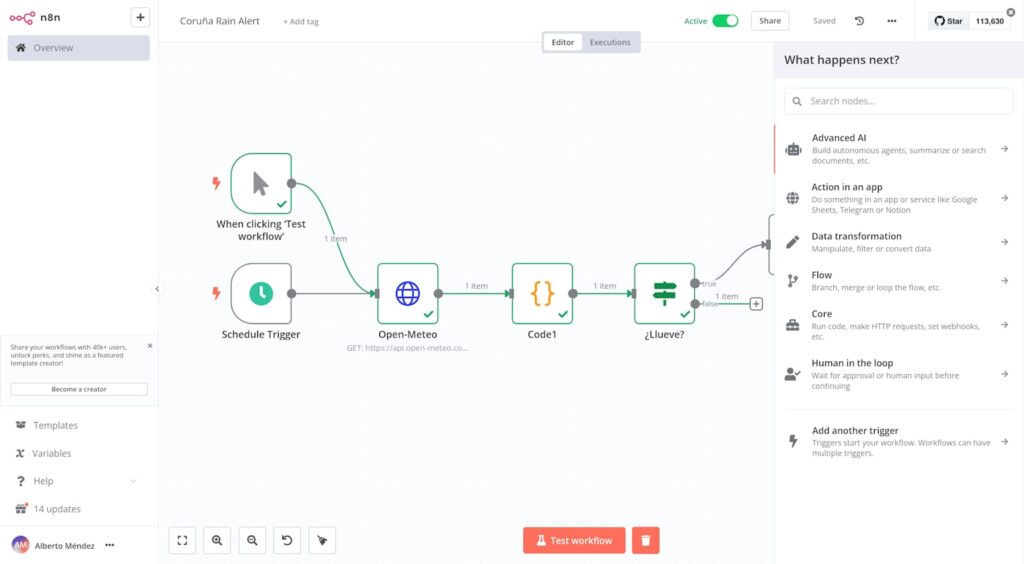
Figure 5: Figure 5: Enterprise Integration Architecture – Multi-System Orchestration
n8n as Central Orchestrator:
ERP System
↓
CRM System ─┐
↓ │
Data Warehouse ├─→ n8n Platform ←─ Business Rules
↓ │ (Central Hub) ← Compliance Policies
Marketing Tools─┤
↓ │ Integrates:
↑ │ – Data flowing
Analytics ←────┘ – Processes coordinated
– Systems synchronized
10.2 Workflow Orchestration at Scale
Orchestration means coordinating multiple workflows and systems to work together.
Key Challenges:
- Workflow Dependencies: Workflow B must wait for Workflow A
- Data Consistency: Multiple systems must stay in sync
- Error Propagation: Failures in one workflow affect others
- Monitoring: Tracking status across all workflows
- Scaling: Handling thousands of parallel executions
n8n Solutions:
Solution 1: Workflow Chaining
Master Workflow:
- Start Workflow A (wait for completion)
- Receive Workflow A output
- Pass to Workflow B
- Continue based on results
Benefits:
- Sequential execution with data passing
- Clear dependencies
- Easy to monitor
Solution 2: Event-Driven Orchestration
Workflow A completes
↓
Emit event “workflow-a-complete”
↓
Workflow B listens for this event
↓
Workflow B automatically triggers
(decoupled, asynchronous)
Solution 3: Queue-Based Processing
Central Queue:
- Incoming jobs added to queue
- Multiple worker instances
- Each worker processes jobs
- Parallel processing at scale
Benefit: Horizontal scaling
Add more workers = higher throughput
10.3 Integration Examples: Global MNC Tech Company
Example 1: HR Onboarding Process
New Employee Record in HR System
↓
n8n Orchestration Workflow:
├─ Create email account (Active Directory)
├─ Create user in CRM
├─ Add to communication platforms (Slack, Teams)
├─ Provision development tools (GitHub, Jira)
├─ Generate equipment orders (IT ticketing)
├─ Update org chart (internal wiki)
├─ Send welcome email
├─ Schedule training sessions (Calendar)
└─ Notify manager
↓
All systems synchronized within minutes
(instead of weeks of manual work)
Example 2: Customer Data Synchronization
HubSpot CRM (lead management)
↑
│ (Customer record updated)
↓
n8n Sync Workflow:
- Detect change in HubSpot
- Enrich with Clearbit data
- Update Salesforce
- Update data warehouse
- Trigger personalization engine
- Update customer portal
- Log to analytics platform
↓
All systems have consistent customer view
Example 3: Incident Response Automation
Monitoring tool detects server outage
↓
n8n Alert Workflow:
- Classify severity
- Page on-call engineer (PagerDuty)
- Create incident ticket (Jira)
- Notify Slack channel with details
- Start runbook execution
- Gather system metrics
- Document incident timeline
- Post-incident communication
↓
Faster response, better documentation
11. Real-World Industry Use Cases
11.1 Customer Support Automation
Scenario: Global SaaS company with 24/7 support needs.
Challenge:
- 500+ tickets/day
- Limited support team (20 people)
- Response time: 2-4 hours
- Manual escalation errors
n8n Solution:
Incoming Email (customer inquiry)
↓
AI Agent Analyzes:
├─ Sentiment: Frustrated? Neutral? Satisfied?
├─ Category: Billing? Feature? Bug? Question?
├─ Priority: Urgent? Normal?
└─ Customer Type: Enterprise? SMB? Trial?
↓
Decision:
IF routine question (FAQ):
– AI provides immediate answer
– Store in ticket system
– Close ticket
IF billing issue:
– Fetch account data
– Calculate resolution
– Process refund if needed
– Send confirmation
IF bug report:
– Create Jira ticket
– Notify dev team
– Provide workaround
IF enterprise customer:
– Escalate to priority support
– Page specialist
↓
Send Response
Results:
- 60% of tickets resolved without human
- Response time: < 5 minutes
- Team can focus on complex issues
- Customer satisfaction: +35%
11.2 Lead Scoring & Sales Acceleration
Scenario: B2B SaaS company with hundreds of leads/week.
Challenge:
- Sales team doesn’t know which leads to pursue
- Manual lead scoring takes hours
- Hot leads go cold waiting for follow-up
n8n Solution:
New Lead from Marketing (form/CRM)
↓
Data Enrichment:
├─ Clearbit: Company data, financials
├─ LinkedIn: Decision maker profile
├─ Website: Traffic analysis, engagement
└─ Email: Industry, seniority validation
↓
Scoring Algorithm (AI):
Score factors:
– Company size (higher = better)
– Industry match (our sweet spot)
– Decision maker title
– Engagement level
– Purchase timeline
– Budget indicators
↓
Lead Routing:
IF score > 80:
– Assign to senior AE immediately
– Send priority alert
– Auto-schedule intro call
IF score 50-80:
– Assign to junior AE
– Queue for follow-up
IF score < 50:
– Nurture campaign
– Monitor for signal
↓
Personalized Outreach:
- Custom email based on company
- LinkedIn connection from relevant AE
- Timing optimized by timezone
Results:
- Deal velocity: 30% faster
- Conversion rate: +22%
- AE productivity: +40%
- Time to first response: < 1 hour
11.3 Data Pipeline & Analytics Automation
Scenario: Data-driven company needing real-time insights.
Challenge:
- Data silos across multiple systems
- Manual data collection (error-prone)
- Stale reports (updated daily at best)
- Can’t respond to real-time events
n8n Solution:
Multiple Data Sources (continuous):
├─ Web analytics (Google Analytics)
├─ Product usage (internal tracking)
├─ Financial (Stripe, QuickBooks)
├─ Marketing (HubSpot, LinkedIn Ads)
├─ Customer (Zendesk, Salesforce)
└─ Infrastructure (AWS, monitoring tools)
↓
n8n Data Pipeline:
- Scheduled ingestion (every 15 min)
- Data validation & cleaning
- Transformation to common schema
- Load to data warehouse
- Real-time alerting
↓
Analytics & Insights:
├─ Dashboard updates (real-time)
├─ Anomaly detection (AI-powered)
├─ Predictive models
└─ Automated reports
↓
Example Alerts:
“Revenue down 20% from trend”
“Churn spike detected in enterprise segment”
“Unusual traffic pattern (possible DDoS)”
“High-value customer engagement drop”
Results:
- Data freshness: Real-time instead of daily
- Accuracy: +95% (automated validation)
- Response time to issues: From hours to minutes
- Decision quality: +40% (data-driven insights)
11.4 IT Operations & Infrastructure Automation
Scenario: Global tech company managing infrastructure across regions.
Challenge:
- Manual server provisioning (days)
- Reactive incident response
- Compliance reporting tedious
- Cost optimization ignored
n8n Solution:
Automated Infrastructure Management:
- Server Provisioning (on-demand):
User requests new server
↓
AI validates request against policy
↓
Provisions in appropriate region
↓
Configures network, security groups
↓
Deploys OS & applications
↓
Updates inventory and monitoring
↓
Sends access details to user
Time: 15 minutes (vs 3 days manually)
- Incident Response (automated):
Monitoring detects issue (CPU > 90%)
↓
Immediate escalation:
├─ Auto-scale if application
├─ Collect diagnostics
├─ Page on-call engineer
├─ Create incident ticket
├─ Notify team via Slack
└─ Start runbook
↓
Engineer responds with full context
Response time: < 2 minutes
- Security & Compliance Automation:
Daily schedule:
├─ Scan for misconfigurations
├─ Check access permissions
├─ Verify encryption settings
├─ Audit API keys rotation
├─ Generate compliance report
└─ Alert on violations
↓
Compliance score: 99.2% - Cost Optimization:
Weekly analysis:
├─ Identify unused resources
├─ Right-size over-provisioned servers
├─ Recommend reserved instances
├─ Calculate savings potential
└─ Auto-implement if approved
↓
Cost reduction: 25-35%
Results:
- Infrastructure deployment: 95% faster
- Incident resolution: 10x faster
- Compliance automation: 40 hours/week saved
- Infrastructure costs: 30% lower
12. Best Practices & Production Deployment
Principle 1: Keep Workflows Focused
✓ Good: Single responsibility per workflow
“Send Welcome Email” workflow
“Process Payment” workflow
✗ Bad: Monolithic workflow doing everything
“Handle New User” (10 different steps)
Why: Easier to test, debug, reuse, and maintain
Principle 2: Error Handling is Not Optional
Every node should have error handling:
- Retry logic with backoff
- Fallback values
- Escalation to human
- Comprehensive logging
Network calls ALWAYS fail eventually.
Plan for it from day one.
Principle 3: Use Version Control
Export workflows as JSON
Commit to Git repository
Track changes over time
Enable easy rollbacks
Benefits:
- Audit trail
- Collaboration
- Disaster recovery
- Code review process
Principle 4: Instrument Everything
Log all significant events:
- Workflow start/end
- Node execution times
- Errors and retries
- Data transformations
- API calls
Tools: n8n’s built-in execution logs + external monitoring
Principle 5: Security First
Credentials:
✓ Store in n8n credential system
✗ Never hardcode API keys
Data:
✓ Encrypt sensitive data in flight
✓ Minimize logging of PII
✗ Don’t pass passwords in plain text
Access:
✓ Use least privilege principle
✓ Audit API access
✗ Don’t use admin credentials for everything
12.2 Development to Production Workflow
Phase 1: Local Development
- Build workflows in n8n Cloud (dev instance)
- Use test data and API keys
- Thorough testing in isolation
- Document workflow purpose and assumptions
- Export workflow definition
Phase 2: Testing Environment
- Deploy to test instance
- Run with realistic data volume
- Performance testing
- Security review
- Error scenario testing
- Get approval from technical lead
Phase 3: Staging
- Deploy to staging environment
- Mirror production data (anonymized)
- Run for 24-48 hours
- Monitor for issues
- Business user acceptance testing
- Get sign-off from stakeholders
Phase 4: Production Deployment
- Create production credentials
- Deploy workflow
- Start with reduced load (if applicable)
- Monitor closely first 24 hours
- Have rollback plan ready
- Document runbook for operations
Phase 5: Monitoring & Maintenance
- Daily execution logs review
- Weekly performance metrics
- Monthly optimization review
- Continuous improvement backlog
- Regular security audits
Optimization 1: Batch Operations
Instead of:
For each customer:
Send individual email
Use:
Batch 100 customers together
Send bulk email with personalization
Benefit: 100x faster for large datasets
Optimization 2: Caching
Frequently accessed data:
├─ Cache database query results (1 hour)
├─ Cache API responses
├─ Cache enrichment data
Implementation:
- Use Redis or n8n’s built-in cache
- Set appropriate TTL based on data freshness needs
Benefit: 10-100x reduction in API calls
Optimization 3: Conditional Processing
Before expensive operation, check:
“Is this data already processed?”
“Is this necessary given current state?”
“Can we skip this step?”
Example:
Check if email already sent before sending again
Skip processing if no significant changes
Optimization 4: Parallel Execution
Instead of sequential:
Step 1 → Wait
Step 2 → Wait
Step 3 → Done
(Takes 3 time units)
Use parallel:
Step 1 ┐
Step 2 ├─→ All run simultaneously
Step 3 ┘
(Takes 1 time unit)
Benefits: Massive speed improvement
Optimization 5: Lazy Loading
Don’t fetch all data upfront.
Fetch only what you need, when you need it.
Example:
✗ Fetch all customer details for 10,000 customers
✓ Fetch customer ID only, then fetch details as needed
Pattern 1: Circuit Breaker
Problem: Third-party API down
Normal behavior: Keep retrying until timeout
Solution: Circuit Breaker pattern
- After 5 consecutive failures → Open circuit
- Stop sending requests to failing service
- Fail fast instead of timing out
- Periodically test if service recovered (half-open)
- Resume normal operation when recovered
Benefit: Faster failure detection, resource savings
Pattern 2: Bulkhead Pattern
Problem: One failing workflow impacts others
Solution: Resource isolation
├─ Workflow A: 2 worker threads
├─ Workflow B: 2 worker threads
├─ Workflow C: 2 worker threads
└─ Each workflow independent
Benefit: Failure containment, predictable resource usage
Pattern 3: Fallback Mechanism
Primary approach fails?
Try fallback approach.
Example:
Primary: Call primary API
If fails: Call backup API (different provider)
If both fail: Use cached response
If no cache: Return default value
Benefit: Graceful degradation, service availability
Pattern 4: Dead Letter Queue
Problem: Poison message causes workflow to crash
Solution: Dead letter queue
- Message processing fails
- Retry N times (with backoff)
- Still failing? Send to dead letter queue
- Alert team
- Manual review and resolution
- Reprocess when fixed
Benefit: System stays up, no data loss
13. Monitoring, Debugging & Optimization
13.1 Understanding Execution Logs
Every workflow run produces an execution log. Learn to read it!
Execution Details:
├─ Status: Success / Partial success / Failed
├─ Duration: 2.3 seconds
├─ Execution ID: exec_abc123def456
├─ Trigger: Webhook (2025-12-01 14:32:15)
├─ Input data: Customer ID 5491, Email john@example.com
└─ Output data: Ticket ID 8821, Success message
Node-by-Node Breakdown:
├─ Webhook Trigger [SUCCESS] (0.01s)
│ └─ Received: 1 item, 2.3 KB
├─ Query Customer [SUCCESS] (0.15s)
│ └─ Database response: 1 record, customer premium
├─ AI Agent [SUCCESS] (1.2s)
│ └─ Model: GPT-4, Tokens: 450 in, 120 out
├─ Send Email [SUCCESS] (0.8s)
│ └─ Provider: SendGrid, Message ID 12345
└─ Database Update [FAILED – RETRY 1] (0.05s)
└─ Error: Connection timeout
→ RETRY ATTEMPT 2 [SUCCESS] (0.08s)
Common Log Patterns:
✓ SUCCESS: Node executed as expected
✓ PARTIAL SUCCESS: Node executed but some data failed
⚠ RETRY: Temporary failure, will retry
✗ ERROR: Unrecoverable failure
✗ TIMEOUT: Operation took too long
Issue 1: Workflow produces wrong data
Debug Steps:
- Add debug output to see intermediate data:
console.log(JSON.stringify($json, null, 2)) - Check data transformations:
Verify expressions are correct
Check data types (string vs number) - Trace through manually:
What data enters node?
What transformation happens?
What data exits? - Compare with expected:
Is mapping correct?
Are formulas right?
Issue 2: Workflow fails intermittently
Debug Steps:
- Check execution logs:
When did it last fail?
What was different about that run? - Check external dependencies:
Was API unavailable at that time?
Was database down? - Add more robust error handling:
Increase retry count
Add exponential backoff
Implement fallback - Add monitoring:
Alert on errors
Track success rate
Monitor latency
Issue 3: Workflow runs very slowly
Performance Debug:
- Check execution timeline:
Which node is slowest?
Are there sequential operations that could parallel? - Profile database queries:
Add indexes if needed
Optimize JOIN queries - Optimize API calls:
Batch requests
Use pagination
Cache results - Check n8n logs:
Worker saturation?
Memory issues?
Queue depth?
Key Metrics to Monitor:
- Execution Metrics
├─ Success rate: Target 99.5%+
├─ Average duration: Compare to baseline
├─ Error rate: Should be < 0.5%
└─ Retry rate: Should be < 5% - Resource Metrics
├─ CPU usage: Spikes indicate performance issues
├─ Memory: Monitor for leaks
├─ API quota usage: Don’t exceed limits
└─ Database connections: Monitor pool - Business Metrics
├─ Tickets created per hour
├─ Customers onboarded per day
├─ Revenue processed
└─ Customer satisfaction scores
Alerting Strategy:
Set alerts for:
✓ Success rate < 95% (something is wrong)
✓ Average execution time > 2x normal (degradation)
✓ Error count > 10 in 5 minutes (incident)
✓ API rate limit approaching (quota issues)
✓ Database connection pool depleted (resource issue)
Alert destinations:
├─ PagerDuty: Critical issues
├─ Slack channel: Warnings and info
├─ Email: Summary reports
└─ Custom webhook: Integration with your tools
What You’ve Learned:
✓ Workflow automation transforms manual processes into intelligent systems
✓ n8n provides both visual simplicity and technical depth
✓ AI agents enable autonomous decision-making and problem-solving
✓ Enterprise-grade automation requires careful design and monitoring
✓ Real-world applications span customer support, sales, IT, and beyond
n8n Fundamentals Checklist:
- [ ] Understand basic triggers, nodes, and actions
- [ ] Build simple workflows with conditional logic
- [ ] Design and implement AI agents
- [ ] Integrate enterprise systems
- [ ] Monitor and optimize production workflows
- [ ] Implement error handling and retries
- [ ] Version control and testing workflows
14.2 Career Path in AI & Automation
Your Journey at Global MNC:
Month 1-3: Foundation
Goal: Master n8n fundamentals
Tasks:
├─ Complete n8n tutorial courses
├─ Build 10+ practice workflows
├─ Deploy first production workflow
├─ Pair program with senior engineer
└─ Contribute to internal automation library
Outcome: Comfortable with platform basics
Month 3-6: Specialization
Goal: Build AI agents for real use cases
Tasks:
├─ Design customer support AI agent
├─ Implement RAG for documentation
├─ Build data pipeline workflow
├─ Lead automation project
└─ Mentor other engineers
Outcome: Experienced with AI agent patterns
Month 6-12: Advanced Systems
Goal: Architect enterprise-scale automation
Tasks:
├─ Design multi-agent systems
├─ Implement orchestration patterns
├─ Build compliance-ready workflows
├─ Lead platform improvements
└─ Present at internal tech talks
Outcome: Can architect complex systems
Year 2+: Leadership
Goal: Shape company automation strategy
Tasks:
├─ Define automation standards
├─ Build automation center of excellence
├─ Mentor team of automation engineers
├─ Drive innovation initiatives
└─ Present at industry conferences
Outcome: Expert, thought leader, staff engineer
14.3 Continuous Learning Resources
Official Resources:
- n8n Documentation: https://docs.n8n.io/
- n8n Workflows Community: https://n8n.io/workflows/
- n8n YouTube: In-depth tutorials and case studies
- n8n Community Forum: Connect with other users
Advanced Topics to Explore:
- Langchain Integration – For advanced LLM applications
- Vector Databases – For RAG implementation (Pinecone, Weaviate)
- Kubernetes Deployment – For enterprise scale
- Custom Node Development – Extend n8n capabilities
- AI Agent Frameworks – ReAct, Plan-Execute, Multi-Agent
Recommended Reading:
[1] n8n Official Blog – Latest AI automation trends
[2] Papers on Agentic AI and ReAct pattern
[3] Enterprise Integration Patterns book
[4] Production workflows best practices guides
[5] AI/ML system design resources
Welcome to the world of AI automation! The skills you’re acquiring are in high demand and will define modern engineering careers.
Key Mindsets:
- Always think about automation first – When you find yourself doing something twice, automate it.
- Design for failure – Production systems fail. Build resilience from the start.
- Measure impact – Quantify the value your automations create (time saved, errors prevented, revenue generated).
- Stay curious – AI and automation evolve rapidly. Continuous learning is essential.
- Build with empathy – Understand how your automation affects end users and team members.
Your Impact:
By mastering n8n and AI automation, you’ll:
- Eliminate tedious work for your team
- Enable faster decision-making through data automation
- Improve customer experiences with intelligent systems
- Reduce operational costs by 30-50%
- Scale your impact across the entire organization
The future belongs to engineers who can combine technical depth with automation thinking. You’re building that skill set now.
Go build something amazing! 🚀
[1] Gartner (2025). Workflow Automation Market Analysis Report
[2] n8n (2025). AI Workflow Automation Trends in 2025. Retrieved from https://blog.n8n.io/
[3] n8n Documentation (2025). n8n Platform Overview. Retrieved from https://docs.n8n.io/
[4] Scalevise (2025). n8n for Enterprise Automation. Retrieved from https://scalevise.com/resources/n8n-enterprise-automation/
[5] Codecademy (2025). How to Build AI Agents with n8n. Retrieved from https://www.codecademy.com/article/build-ai-agents-with-n8n
[6] ExascaleAI (2025). How to Define an AI Workflow in n8n. Retrieved from https://blog.exascale-ai.in/ai-workflow-in-n8n-2025/
[7] Zero to Mastery (2024). Build AI Agents with n8n Course. Retrieved from https://zerotomastery.io/courses/learn-n8n/
[8] SoftPyramid (2025). AI Automation Trends in 2025: n8n, Agentic AI, and the Future. Retrieved from https://softpyramid.com/
[9] n8n Enterprise Documentation (2024). Enterprise Workflow Automation Features. Retrieved from https://n8n.io/enterprise/
[10] SilentInfotech (2025). n8n Enterprise Workflow Automation: Connect ERP, CRM. Retrieved from https://silentinfotech.com/
A.1 Common Node Types Quick Reference
| Node Type | Purpose | Common Use |
| Webhook | Receive HTTP requests | Form submissions, API calls |
| Schedule | Execute on schedule | Reports, data syncs |
| Email Trigger | Monitor email inbox | Email automation |
| Database Trigger | Monitor database changes | Real-time data sync |
| IF/THEN | Conditional branching | Business logic decisions |
| Switch | Multi-way branching | Route based on values |
| Code | Custom JavaScript | Complex transformations |
| Loop | Iterate over arrays | Batch processing |
| HTTP Request | Call REST APIs | External integrations |
| Email Send | Send emails | Notifications |
| Database | Query/modify database | Data operations |
| Slack | Send Slack messages | Team alerts |
| AI Agent | LLM reasoning | Complex decision-making |
| AI Chat | Conversation AI | Chatbots |
| AI Transform | Data transformation | Enrichment |
Table 1: Table 1: Common n8n Node Types
A.2 n8n Expression Cheat Sheet
// Accessing data
{{ $json.propertyName }}
{{ $json[‘property with spaces’] }}
{{ $items[0].json.property }}
// String operations
{{ $json.text.toLowerCase() }}
{{ $json.text.toUpperCase() }}
{{ $json.text.includes(‘search’) }}
{{ $json.text.substring(0, 5) }}
// Math operations
{{ json.value) }}
{{ Math.max(…$json.numbers) }}
// Conditionals
{{ $json.status === ‘active’ ? ‘Yes’ : ‘No’ }}
{{ $json.amount > 1000 && $json.verified }}
// Arrays
{{ $json.items.length }}
{{ $json.items.map(i => i.id) }}
{{ $json.items.filter(i => i.active) }}
// Dates
{{ new Date($json.timestamp).toLocaleDateString() }}
{{ Date.now() }}
// Null checks
{{ $json.optional || ‘default value’ }}
{{ $json?.nested?.property }}
Before deploying to production:
- [ ] All nodes have error handling configured
- [ ] Sensitive data (API keys, passwords) stored in credentials
- [ ] Workflow tested with realistic data
- [ ] Performance verified (execution time acceptable)
- [ ] Logging implemented for troubleshooting
- [ ] Monitoring and alerts configured
- [ ] Documentation updated
- [ ] Stakeholders approve
- [ ] Rollback plan documented
- [ ] Security review completed
Here is a structured, practical list of the most important n8n node types and how they are used inside AI agent workflows. This is not every single node in n8n, but it covers the core building blocks you will actually use day to day.
Note: Tool access is temporarily unavailable right now, so this list is based on existing knowledge of n8n’s design and common AI-agent patterns rather than a freshly fetched catalog.
1. Trigger nodes (how agents “wake up”)
These nodes start the workflow when something happens, effectively defining when your AI agent becomes active.
- Webhook Trigger
- Starts a workflow when an HTTP request is received (from a frontend, chatbot framework, another backend, etc.).
- Common for chat APIs, custom web apps, or Slack/Discord slash commands.
- Schedule / Cron Trigger
- Runs workflows on a fixed schedule (every X minutes, hourly, daily, etc.).
- Used for periodic AI tasks like monitoring logs with an LLM, summarizing daily activity, sending AI-generated digests.
- App-specific Triggers (Gmail Trigger, Slack Trigger, Notion Trigger, etc.)
- Start when a new email, message, or record appears.
- Used to create “event-driven” AI agents, e.g., triage every new support email with an LLM and route it.
- Chat / Form / UI Triggers (where available)
- Start when a chat message or form submission comes in.
- Used to build conversational agents that sit in front of business workflows.
Role in AI agents:
- Define when the agent engages (on-demand vs scheduled vs event-driven).
- Connect external world (users, systems) to AI reasoning.
2. Core AI nodes (LLM calls and embeddings)
These nodes are responsible for interacting directly with LLMs and other AI models.
- “LLM / Chat Model” nodes (OpenAI, Anthropic, Gemini, etc.)
- Given system+user prompts and optional tools/structure, return generated text or structured JSON.
- Used for:
- Intent classification.
- Answer generation / drafting emails.
- Plan creation (high-level plan for an orchestrator agent).
- Tool decision-making in agentic workflows.
- Completion / Text Generation nodes
- Simpler API for “input text → output text” without complex chat history.
- Used for summarization, rewriting, translation, data cleaning.
- Embedding nodes
- Convert text into vector embeddings for similarity search (RAG).
- Used when the agent needs long-term domain knowledge: FAQ answers, policy documents, product catalog.
- Text Classification / Moderation nodes
- Specialized AI nodes for labeling text or checking safety/toxicity.
- Used to route user queries, enforce safety filters, or decide escalation to humans.
Role in AI agents:
- Perform the reasoning and natural language generation.
- Implement classification, summarization, and planning steps.
- Power RAG, routing, and safety layers.
3. AI Agent–specific nodes (agent orchestration)
These nodes are dedicated to defining and orchestrating AI agents (single or multi-agent).
- AI Agent node
- Encapsulates an agent: system prompt, model selection, memory config, tools, and output schema.
- Used as the “brain” of a specialized agent (Order Agent, Policy Agent, Support Agent, etc.).
- Often sits after a trigger and before tools/action nodes.
- AI Agent Tool node
- Exposes another workflow or agent as a callable tool.
- Used for orchestrator patterns where one main agent can call sub-agents (Email Agent, Calendar Agent, Knowledge Agent).
- AI Router / Agent Router (if available in your version)
- Routes queries to different agents based on classification or tool selection.
- Used to implement multi-agent systems where different agents handle different topics or tasks.
Role in AI agents:
- Provide a structured place to define agent behavior, memory, and tools.
- Enable multi-agent orchestration (one agent calling others).
- Standardize how agents plug into business workflows.
4. Logic and control-flow nodes (deterministic glue)
These nodes implement deterministic logic, safety rules, and branching around the AI decisions.
- IF node
- Branches workflow based on boolean condition.
- Often used with classifier output (e.g., “if intent == billing → go to Billing Agent”).
- Switch node
- Multi-branch router based on a field value (e.g., intent category).
- Typical pattern: LLM does classification → Switch sends to appropriate sub-workflow/agent.
- Merge node
- Combines data from multiple branches.
- Used when multiple agents contribute partial results that need to be combined before sending a final response.
- Wait / Wait Until / Delay node
- Pauses execution until a time or event.
- Used in long-running processes (e.g., wait for human approval, then let agent finish automation).
- Error / Try-Catch helpers (depending on version)
- Provide structured error handling.
- Used to gracefully handle failed API calls or model errors (fallback prompts, human escalation).
Role in AI agents:
- Ensure workflows remain predictable and safe around stochastic LLM behavior.
- Implement routing, fallback logic, and escalation to human agents.
- Separate “business rules” from “AI reasoning”.
5. Data transformation nodes (pre- and post-processing)
These nodes prepare data before sending to AI and structure results afterwards.
- Function / Code node (JavaScript)
- Arbitrary transformations: parsing, validation, formatting, small business logic.
- Used to:
- Clean up HTML emails before sending to an LLM.
- Extract structured fields from LLM JSON outputs.
- Implement custom tool logic for agents.
- Set node
- Create or modify workflow fields without code.
- Used to:
- Construct prompt fields.
- Attach metadata (language, user preferences, message IDs) for the agent.
- Move / Rename / Map nodes (depending on version)
- Reorganize fields between nodes.
- Used to align external API responses to the schema expected by AI nodes.
- Split In Batches / Item Lists / Aggregation nodes
- Iterate over lists and aggregate results.
- Used for:
- Chunking long documents and summarizing each piece.
- Batch-processing many tickets with an AI classifier.
Role in AI agents:
- Prepare clean, structured input for AI models (huge impact on quality).
- Turn free-form AI outputs into reliable machine-consumable data.
- Implement custom tools via code for complex tasks.
6. External system / tool nodes (agent tools)
These nodes are the “hands” of your agents: they let agents act on systems.
- HTTP Request node
- Generic API client.
- Core tool for agents: read/write to internal services, third-party APIs, microservices.
- Used to implement tools like “get order status”, “submit refund”, “query internal API”.
- Database nodes (Postgres, MySQL, Mongo, etc.)
- Execute queries, insert/update records.
- Used to:
- Store conversation logs or interaction history.
- Allow agents to query structured business data for answers.
- Implement memory beyond short-term context.
- File / Storage nodes (S3, Google Drive, local files, etc.)
- Store and retrieve files: PDFs, images, logs.
- Used for:
- Document retrieval in RAG flows.
- Storing transcripts or generated reports.
- Email nodes (Gmail, IMAP, SMTP, etc.)
- Read, send, and manage emails.
- Used in agents that:
- Auto-draft emails based on LLM decisions.
- Triage inbox and label/route messages.
- Chat & Collaboration nodes (Slack, Teams, Discord, etc.)
- Send and receive messages in collaboration platforms.
- Used to expose AI agents as chatbots embedded in team workflows.
- CRM / Helpdesk nodes (Zendesk, HubSpot, Salesforce, etc.)
- Create/update tickets, contacts, opportunities.
- Used when agents:
- Log requests as tickets.
- Update customer records.
- Trigger follow-up tasks in sales or support.
Role in AI agents:
- Give agents the ability to act on real systems: read data, update records, send notifications.
- Convert insights and decisions from the LLM into concrete business changes.
7. Memory and logging nodes (agent memory + observability)
These nodes provide persistent memory and observability for AI agents.
- Database nodes (again, but used as memory)
- Store conversation history, user preferences, agent decisions.
- Enable “stateful” agents that remember previous interactions.
- Spreadsheet nodes (Google Sheets, Excel)
- Simple logging for events and interactions.
- Useful for early-stage experiments / analytics before migrating to a proper database.
- Logging / Monitoring integrations
- Send logs to observability tools (e.g., via HTTP Request).
- Used to analyze:
- Agent performance over time.
- Failure rates and common edge cases.
- Prompt/response quality.
Role in AI agents:
- Provide long-term memory across interactions.
- Enable monitoring, auditing, and debugging of agent behavior.
- Support A/B testing of prompts and models.
8. Human-in-the-loop / approval nodes
These nodes inject human review steps into agent workflows.
- Email + Link / Webhook combination
- Send a human a link to approve/deny a decision; use Webhook to resume workflow.
- Common for sensitive changes (refunds, policy updates, escalations).
- Task / Ticket nodes (Jira, Asana, ClickUp, etc.)
- Create tasks for humans to review AI-generated drafts.
- Used when human approval is mandatory for compliance or risk reasons.
Role in AI agents:
- Keep humans in control for risky actions.
- Allow agents to propose actions rather than execute blindly.
- Enable progressive automation: start as draft assistants, then automate safe paths.
9. Example mapping: typical AI agent workflow
To tie it together, here is a typical pattern and how the node families play roles:
- Trigger: Webhook Trigger or Gmail Trigger starts workflow when a user sends a message/email.
- Pre-processing: Code + Set nodes clean and structure input.
- Classification: LLM node or dedicated classifier node labels intent.
- Routing: Switch node routes to “Order Agent”, “Policy Agent”, or “Fallback Agent”.
- Agent: AI Agent node for the selected specialist agent.
- Tools:
- HTTP Request node queries order system.
- Database node reads customer history.
- Email node drafts reply or ticket node logs issue.
- Memory/Logging: Database or Sheets node logs interaction.
- Human-in-the-loop: Optional task/ticket node for approval, then final Email/Chat node sends the response.
| Node family | Example nodes (not exhaustive) | Typical roles in AI agent workflows |
|---|---|---|
| Trigger | Webhook, Cron, Schedule, Gmail Trigger, Slack Trigger | Wake the agent on events (API call, message, email, schedule) and pass initial user/context data. |
| Core AI / LLM | OpenAI Chat, Anthropic Chat, Gemini Chat, Text Generation, Embeddings | Perform reasoning, classification, summarization, planning, and embed text for RAG workflows. |
| AI Agent / Orchestration | AI Agent node, Agent Tool node, Agent Router | Define agent personas, attach tools, manage memory, and orchestrate single or multi-agent flows. |
| Logic & control flow | IF, Switch, Merge, Wait/Delay | Implement routing, fallback paths, safety checks, and long-running or multi-branch processes. |
| Data transform | Function (Code), Set, Move, Split In Batches, Item Lists | Clean/normalize inputs, build prompts, parse LLM outputs, chunk documents, and aggregate results. |
| External tools / APIs | HTTP Request, Postgres, MySQL, MongoDB, Google Sheets, S3, Gmail, Slack, Zendesk | Let agents read/write to business systems, send messages, create tickets, and act on decisions. |
| Memory & logging | Postgres/MySQL nodes, Notion, Google Sheets, file storage | Store conversation history, preferences, vector refs, and interaction logs for observability. |
| Human-in-the-loop | Email + Webhook combo, Jira/Asana/ClickUp nodes, Helpdesk tickets | Insert human approvals, reviews, and escalations into otherwise automated AI workflows. |
This comprehensive guide provides AI engineers with foundational to advanced knowledge of n8n workflow automation and AI agent building. Regular review and practice will solidify these concepts.