
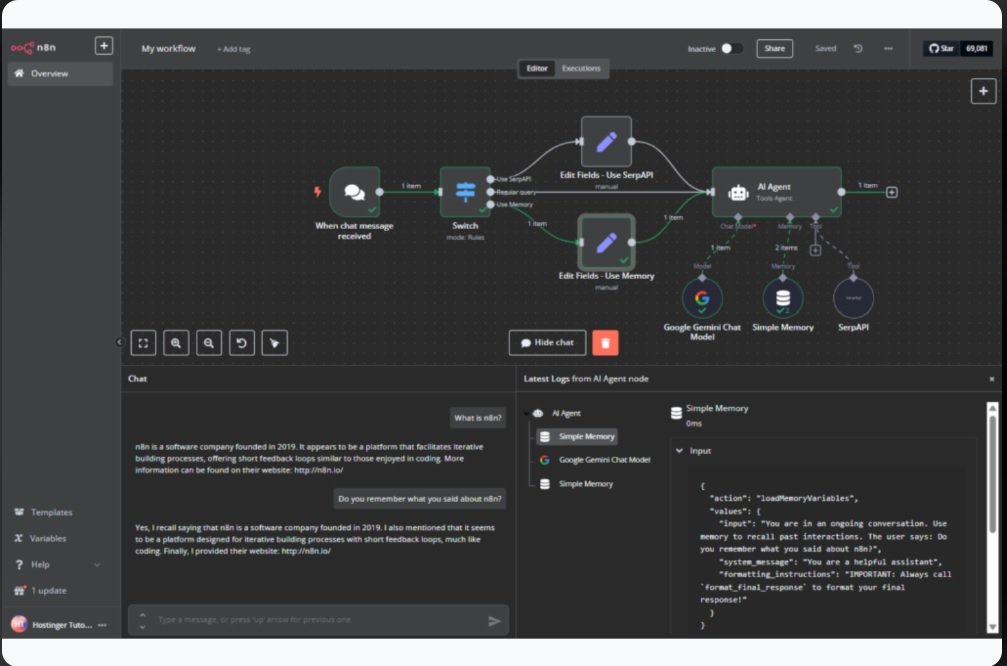
n8n Workflow Automation & AI Agent Building
A complete, CTO-authored guide from first principles to enterprise-grade production systems — built for engineers who need to ship real automation, not just watch a demo.
Curriculum Map
- 01 Executive Summary & Industry Context
- 02 Fundamentals of Workflow Automation
- 03 n8n Platform Overview & Architecture
- 04 Core Building Blocks & Node Types
- 05 Basic Workflow Construction
- 06 Intermediate Workflow Patterns
- 07 AI Agent Fundamentals
- 08 Building AI Agents with n8n
- 09 Advanced AI Agent Patterns
- 10 Enterprise Integration & Orchestration
- 11 Real-World Industry Use Cases
- 12 Best Practices & Production Deployment
- 13 Monitoring, Debugging & Optimization
- 14 Conclusion & Career Path
Why Workflow Automation Is a Board-Level Priority in 2026
Every CTO who got trained in a global telecom and technology organizations asks a version of the same question: “Where is the highest-leverage engineering investment we can make this year?” In 2026, the answer is consistently the same — workflow automation fused with AI reasoning. What used to be a back-office convenience has become a mission-critical capability that determines how fast an enterprise can move, how cheaply it can operate, and how well it can compete against leaner, AI-native challengers.
This is not a marginal improvement story. Organizations that have adopted intelligent automation platforms report that a large majority of enterprise IT operations now rely on automation to manage infrastructure, that operational costs drop by 60–80% in targeted processes, that deployment timelines compress from weeks to hours, and that manual data-entry errors are all but eliminated. The pattern is consistent across industries: automation-first companies out-execute automation-last companies, and the gap widens every quarter.
Where n8n Fits in the Automation Landscape
The automation market is crowded — Zapier, Make, Power Automate, and a dozen enterprise iPaaS platforms all compete for the same budget line. n8n has carved out a distinct position as the platform built for technical teams, and understanding why matters before you write a single workflow.
Open-Source Core
Full source access and 500+ pre-built integrations, with no black-box vendor lock-in on your automation logic.
Self-Hosting
Deploy on your own infrastructure for data sovereignty, regulatory compliance, and cost control at scale.
Visual + Code
Drag-and-drop for speed, raw JavaScript when you need precision — accessible to analysts and engineers alike.
Built-In LLM Support
First-class nodes for OpenAI, Anthropic Claude, Google Gemini, and custom model endpoints.
Your Path Forward as an Engineer
If you’re joining a global technology or telecom organization as an AI or automation engineer, mastering this stack changes what you’re capable of shipping in your first quarter. By the end of this guide, you will be able to:
- Automate repetitive engineering and operations tasks end-to-end
- Build intelligent AI agents for customer-facing and internal applications
- Integrate disparate enterprise systems — CRM, ERP, ticketing, data warehouses — seamlessly
- Deploy production-ready workflows in hours instead of weeks
- Scale automation reliably across global, multi-region operations
Fundamentals of Workflow Automation
Workflow automation is the orchestration of automated tasks, data flows, and decision logic that execute a business process without requiring a human to click through every step. At its core, every workflow — no matter how sophisticated — reduces to the same five-stage skeleton:
Consider a concrete example that any support or operations team will recognize:
Email arrives          // TRIGGER
  ↓
Parse email content   // PROCESSING
  ↓
Classify urgent/normal // LOGIC
  ↓
Retrieve CRM records   // INTEGRATION
  ↓
Send reply / escalate  // ACTION
Traditional Automation vs. Modern (n8n) Automation
| Aspect | Traditional Automation | Modern (n8n) |
|---|---|---|
| Development | Requires custom coding | Visual drag-and-drop + optional code |
| Speed | Weeks to months | Hours to days |
| Flexibility | Low — tied to one platform | High — 500+ integrations |
| Cost | High (dev time + licensing) | Moderate (infra + learning curve) |
| AI Integration | Complex, bolt-on systems | Native, first-class support |
| Maintainability | Difficult, code churn | Transparent, version-controlled |
| Scalability | Limited, needs refactoring | Built-in enterprise scale |
Event-Driven Architecture: The Engine Underneath
Modern workflows don’t poll constantly for changes — they react to events. This event-driven architecture is what makes n8n efficient at scale: workflows execute only when something actually happens, which means lower resource consumption, real-time responsiveness, and a clean, auditable execution log for every run.
- Reduced resource consumption — nothing runs unless triggered
- Real-time responsiveness — reaction happens in milliseconds, not on a polling cycle
- Auditable execution logs — every event has a traceable record
n8n Platform Overview & Architecture
n8n runs on a modular, extensible architecture composed of six core components that work together on every single execution:
Visual Workflow Builder
The drag-and-drop canvas for designing workflows visually.
Node Library
500+ pre-built integrations and utility nodes.
Expression Engine
JavaScript-based data transformation at any step.
Execution Engine
Processes workflows with queuing and retry logic.
Data Store
Persistent storage for workflow state and history.
API Layer
Webhooks and REST APIs for external integration.
Three Deployment Models
Choosing a deployment model is a governance decision as much as a technical one. Here’s how the three options map to real enterprise needs:
| Model | Best For | Key Trait |
|---|---|---|
| n8n Cloud | Rapid prototyping, POC projects | Zero infrastructure overhead, automatic scaling |
| Self-Hosted (Docker / Kubernetes) | Enterprise deployments, sensitive data | Full data control, custom auth & permissions |
| Air-Gapped (on-premises) | Regulated industries — finance, healthcare, telecom, government | Isolated from the internet, highest security posture |
Key Vocabulary Every Engineer Needs
- Workflow — a sequence of connected nodes processing data from trigger to completion; can be manual, scheduled, or event-driven.
- Node — a single unit performing one action: fetch data, transform it, make a decision, or send an output.
- Trigger — the starting point of execution (webhook, timer, file upload, database change).
- Execution — one run of a workflow, with its own isolated data context and log.
- Expression — inline JavaScript used to transform or evaluate data dynamically within a node.
Core Building Blocks & Node Types
Every n8n workflow is assembled from four categories of nodes. Understanding this taxonomy is the single fastest way to go from “I can follow a tutorial” to “I can design my own architecture.”
Trigger Nodes — Where Execution Begins
Webhook Trigger
Listens for HTTP POST requests. Ideal for form submissions, external API calls, and GitHub events.
Schedule Trigger
Executes on cron expressions or simple intervals — daily reports, periodic sync jobs, cleanup tasks.
Email Trigger
Fires when a new email arrives. Powers ticket creation and inbox-driven automation.
Database Trigger
Fires on data changes for real-time sync and event-driven processing.
Logic Nodes — Decisions and Transformations
// If/Then/Else node
IF priority == "high" THEN assign_to(senior_engineer)
ELSE assign_to(queue)

// Code node — custom JavaScript
const discountedPrice = price * (1 - discountPercentage / 100);
return { ...item, discountedPrice };
Beyond If/Else, the logic layer includes the Switch node for multi-way branching, the Loop node for iterating over arrays, Split In Batches for processing large datasets in safe chunks, and a Merge node for combining multiple parallel data streams into one object.
Action Nodes — Where Work Gets Done
Action nodes execute the concrete operation: an HTTP Request node calls any REST API; Email, Slack, and Google Workspace nodes handle communication; dedicated Database nodes cover PostgreSQL, MySQL, MongoDB and more; and CRM nodes plug directly into Salesforce, HubSpot, and Pipedrive for sales automation.
AI Model Nodes — The 2026 Differentiator
This is where n8n pulls ahead of legacy automation tools. AI Model nodes connect directly to OpenAI, Anthropic Claude, Google Gemini, and Hugging Face endpoints — with API key management, model selection, and prompt engineering built into the same canvas as your CRM and database nodes. This is the foundation everything in Chapters 7–9 is built on.
Basic Workflow Construction
Objective: when a user signs up via a web form, automatically send them a welcome email. This is the “hello world” of n8n — and every core concept you’ll use for the rest of your career shows up in this one build.
- Add a Webhook Trigger. Search “Webhook” in the node panel, set the HTTP method to
POST, and copy the generated URL. Point your signup form at this URL. - Add an Email node. Connect its input to the Webhook’s output, then configure
From,To: {{ $json.email }}, a dynamicSubject, and an HTML body template. - Test and deploy. Send test data to the webhook, inspect the execution log, confirm the email arrived, then flip the workflow to Active.
Form Submission (POST)
  ↓
Webhook Trigger
  ↓
Extract email field
  ↓
Send Email Action
  ↓
Execution Complete
Understanding Data Flow
Data moves through every n8n workflow as JSON. A signup event looks like this:
{
  "name": "John Doe",
  "email": "john@example.com",
  "signupDate": "2026-01-14T10:30:00Z",
  "source": "website"
}
Every node downstream can reach into that object with expressions:
{{ $json.name }}                       // "John Doe"
{{ $json.email.toLowerCase() }}        // normalize casing
{{ $json.priority === 'high' ? 'URGENT' : 'normal' }}
{{ new Date($json.timestamp).toLocaleDateString() }}
{{ $json.items.map(i => i.id) }}       // extract array of IDs
Error Handling Is Part of the Design, Not an Afterthought
Every node can fail — a third-party API times out, a database connection drops. n8n gives you three response strategies, and choosing correctly per node is a core design skill:
| Strategy | Behavior | Use When |
|---|---|---|
| Ignore Error | Workflow continues as if nothing happened | Non-critical ops: logging, metrics |
| Continue with Fallback | Supplies a default value and proceeds | Graceful degradation is acceptable |
| Stop on Error | Halts the workflow immediately | Critical ops: payments, authentication |
Intermediate Workflow Patterns
Pattern 1 — Conditional Logic & Data Enrichment
Scenario: process customer orders with priority-based routing based on live loyalty and inventory data.
Order Webhook (trigger)
  ↓
Query Customer Database (loyalty status)
  ↓
Query Inventory System (stock check)
  ↓
IF/THEN Decision:
  ├─ High value + loyal customer  → Premium shipping
  ├─ Standard order               → Normal processing
  └─ VIP customer                 → Personal support notification
  ↓
Send confirmation email + update order status
Pattern 2 — Looping Over Collections
When you need to process every order from the last 24 hours, a Loop node iterates item by item — but at real enterprise volume (10,000+ items), swap in the Split In Batches node with a batch size of ~100 to avoid timeouts and memory pressure while still processing every record reliably.
Pattern 3 — Multi-Source Data Aggregation
Building a comprehensive customer profile means fetching from five systems in parallel — CRM, payment history, support tickets, website behavior, and social data — then merging them into a single enriched object:
{
  crm_data:     { ... },
  payment_data: { ... },
  support_data: { ... },
  enriched_at:  new Date().toISOString()
}AI Agent Fundamentals
An AI Agent is an autonomous system built around five capabilities: it perceives its environment by receiving input and context, reasons about the situation using an AI model, decides on an appropriate action, acts by executing operations, and learns from outcomes to improve future behavior.
Agent vs. Traditional Workflow — Know the Difference
| Aspect | Traditional Workflow | AI Agent |
|---|---|---|
| Logic | Pre-defined rules | Learns and adapts |
| Decision-making | Deterministic (if/then) | Context-aware reasoning |
| Adaptability | Fixed sequences | Dynamic, input-driven |
| Complexity handled | Limited branching | Nuanced, ambiguous scenarios |
| Human oversight | Always required | Can operate autonomously |
Four Agent Archetypes You’ll Build
Conversational Agent
Chat-style interaction for support bots and internal Q&A assistants.
Tool-Using Agent (ReAct)
Selects and executes external tools — web search, database queries — to accomplish a goal.
Planning Agent
Breaks complex tasks into multi-step plans, executes each, and validates the output.
Specialized Agent
Domain-specific: SQL agents, code agents, research agents, analysis agents.
Four Concepts Every Agent Builder Must Master
- System Prompt — the instruction set that defines an agent’s behavior, personality, and hard constraints.
- Memory / Context — conversation memory, entity memory (customer or domain facts), and action memory (which tools were recently used).
- Tools / Functions — the external capabilities an agent can invoke: search the web, query a database, send an email, create a ticket.
- Reasoning Chain — the explicit thought → action → observation → answer sequence an agent follows before responding.
Thought:      "The user is asking about their order status"
Action:       "Query the orders database"
Observation:  "Found order #12345, status: shipped"
Thought:      "I now have the information needed"
Final Answer: "Your order is on the way — tracking number is..."
Building AI Agents with n8n
Objective: build an AI agent that resolves customer inquiries autonomously — the flagship enterprise agent build. Five components make this work end to end:
- Chat Trigger — receives customer messages from a widget or API and maintains user session context.
- AI Agent Node — the reasoning engine. Model: GPT-4 / Claude / Gemini · Temperature:
0.7· Max Tokens:1000. - Tool Nodes —
search_knowledge_base(query),query_customer_account(id),create_support_ticket(),send_email(). - Memory Management — conversation memory capped at 50 messages, 24-hour TTL, plus stored customer_id and account_type.
- Response Handler — formats the reply, checks whether escalation is needed, logs the interaction, and returns the response.
The ReAct Pattern — Reasoning + Acting
ReAct is the most powerful and widely deployed agent pattern in production today. The agent cycles through four phases until the problem is solved:
Reasoning
The agent thinks about the problem.
Evidence
Gathers facts using available tools.
Acting
Executes the next action based on reasoning.
Cycling
Repeats the loop until resolved.
Worked example — a billing dispute: “Why was I charged twice for my subscription?”
THOUGHT      "Customer reports duplicate charges. I need to check the account,
              review recent transactions, and either explain or refund."
ACTION       query_transactions(customer_id, last_30_days)
OBSERVATION  "Two $99.99 charges, 2 minutes apart — likely duplicate."
THOUGHT      "Clear duplicate. Acknowledge, refund, and prevent recurrence."
ACTION       process_refund(customer_id, 99.99) + send_confirmation_email()
FINAL ANSWER "Found the issue — a system error caused a duplicate charge.
              I've refunded $99.99, it'll post in 2–3 business days,
and we've fixed the underlying bug. Sorry for the trouble!"Advanced AI Agent Patterns
Multi-Agent Systems — Specialists, Not Generalists
Complex requests are better handled by a team of specialized agents coordinated by an orchestrator than by one agent trying to do everything.
User Request: "Plan my Q4 marketing campaign"
  ↓
Orchestrator Agent
  ├─ Market Research Agent   → trends, competitor analysis
  ├─ Content Agent           → content calendar, post ideas
  ├─ Budget Agent            → budget allocation, cost projections
  └─ Analytics Agent         → KPI targets, measurement plan
  ↓
Orchestrator synthesizes → comprehensive campaign plan
The benefits compound: each agent specializes in its domain, agents run in parallel rather than sequentially, the architecture stays cleanly separated, and one agent’s failure doesn’t take down the others — a form of fault isolation borrowed straight from distributed-systems design.
Retrieval-Augmented Generation (RAG)
A raw LLM answers company-specific questions from stale training data. RAG fixes that by grounding every answer in your actual current documents.
Ingest:  document → chunk → embed (OpenAI) → store in vector DB (Pinecone/Weaviate)
Query:   question → embed → semantic search → top-3 relevant chunks
Answer:  LLM reads chunks + question → grounded answer with citations
Webhook (user question)
  ↓
Embedding Node (OpenAI Embeddings)
  ↓
Vector DB Search (Pinecone / Weaviate)
  ↓
Format Context
  ↓
AI Agent Node (context injected into prompt)
  ↓
Response with citations
Workflow Chains & Agentic Loops
For genuinely complex deliverables — like an automated Q3 sales analysis with projections — chain specialized agents into a pipeline: a Data Collection Agent gathers sales and market data, an Analysis Agent finds trends and anomalies, a Projection Agent builds the forecast, a Synthesis Agent writes the narrative, and a Review Agent quality-checks the output before it’s delivered.
Enterprise Integration & Orchestration
At enterprise scale, n8n stops being “a workflow tool” and becomes the central orchestration layer that ties ERP, CRM, the data warehouse, marketing tools, and analytics together — governed by shared business rules and compliance policy.
Five Challenges Orchestration Must Solve
- Workflow dependencies — Workflow B must wait for Workflow A to complete.
- Data consistency — multiple systems must stay in sync in near real time.
- Error propagation — a failure in one workflow shouldn’t silently break another.
- Monitoring — tracking status across dozens or hundreds of live workflows.
- Scaling — handling thousands of parallel executions without degrading.
Three Orchestration Solutions
Workflow Chaining
A master workflow starts Workflow A, waits for completion, receives its output, and passes it to Workflow B. Clear dependencies, easy to monitor.
Event-Driven Orchestration
Workflow A emits a “complete” event; Workflow B listens and triggers automatically — fully decoupled.
Queue-Based Processing
Incoming jobs land in a central queue; multiple worker instances process in parallel. Add workers to add throughput.
Global MNC Integration Examples
HR onboarding — a new employee record triggers a single orchestration workflow that creates the email account, provisions CRM access, adds the person to Slack/Teams, provisions GitHub and Jira, generates equipment orders, updates the org chart, sends a welcome email, and schedules training — synchronizing every system within minutes instead of weeks.
Customer data sync — a HubSpot update triggers enrichment via Clearbit, propagates to Salesforce and the data warehouse, refreshes the personalization engine, updates the customer portal, and logs to analytics — keeping every system’s view of the customer consistent.
Incident response — a monitoring alert triggers severity classification, pages the on-call engineer via PagerDuty, opens a Jira ticket, posts to Slack, starts the runbook, and documents the full incident timeline automatically.
Real-World Industry Use Cases
Customer Support Automation
Challenge: a global SaaS company handling 500+ tickets/day with a 20-person team and 2–4 hour response times. Solution: an AI agent analyzes every incoming email for sentiment, category, priority, and customer type, then routes automatically — instant answers for routine FAQs, automated refund calculation for billing issues, Jira tickets with dev-team notification for bugs, and priority escalation for enterprise accounts.
Lead Scoring & Sales Acceleration
Every new lead is enriched via Clearbit, LinkedIn, and website analytics, scored by an AI model against company size, industry fit, decision-maker seniority, and engagement, then routed: scores above 80 go straight to a senior AE with an auto-scheduled intro call; mid-range scores queue for junior AEs; low scores enter nurture campaigns.
Data Pipeline & Analytics Automation
n8n ingests from Google Analytics, product usage tracking, Stripe/QuickBooks, HubSpot/LinkedIn Ads, Zendesk/Salesforce, and AWS every 15 minutes, validates and transforms to a common schema, loads the warehouse, and triggers real-time alerts such as “revenue down 20% from trend” or “unusual traffic pattern detected.”
IT Operations & Infrastructure Automation
Server provisioning that once took three days now completes in 15 minutes, fully policy-validated. CPU alerts above 90% trigger auto-scaling, diagnostics collection, on-call paging, and incident tickets in under two minutes. Daily compliance scans hold a 99.2% compliance score, and weekly cost-optimization analysis identifies unused resources for 25–35% infrastructure savings.
Best Practices & Production Deployment
Five Non-Negotiable Design Principles
- Keep workflows focused. A “Send Welcome Email” workflow and a “Process Payment” workflow beat one monolithic “Handle New User” workflow doing ten things — focused workflows are easier to test, debug, reuse, and maintain.
- Error handling is not optional. Every node needs retry logic with backoff, sensible fallback values, an escalation path to a human, and comprehensive logging. Network calls fail eventually — plan for it from day one.
- Use version control. Export workflows as JSON and commit to Git for an audit trail, real collaboration, disaster recovery, and code review.
- Instrument everything. Log workflow start/end, node execution times, errors and retries, data transformations, and every API call.
- Security first. Store credentials in n8n’s credential system — never hardcode API keys. Encrypt sensitive data in flight, minimize PII in logs, and apply least-privilege access everywhere.
The Five-Phase Path to Production
| Phase | Focus |
|---|---|
| 1. Local Development | Build in a dev instance with test data; document assumptions; export the definition. |
| 2. Testing | Deploy to test with realistic volume; performance and security review; error-scenario testing; technical lead sign-off. |
| 3. Staging | Mirror production with anonymized data; run 24–48 hours; business user acceptance testing. |
| 4. Production | Production credentials; phased rollout; close monitoring for the first 24 hours; rollback plan ready. |
| 5. Monitoring & Maintenance | Daily log review, weekly performance metrics, monthly optimization pass, regular security audits. |
Five Performance Optimizations
Batch Operations
Batch 100 records instead of looping one-by-one — up to 100x faster on large datasets.
Caching
Cache DB queries, API responses, and enrichment data with sensible TTLs — 10–100x fewer calls.
Conditional Processing
Skip expensive operations if data is already processed or state hasn’t changed.
Parallel Execution
Run independent steps simultaneously instead of sequentially — 3 steps in 1 time unit, not 3.
Four Reliability Patterns Borrowed from Distributed Systems
- Circuit Breaker — after 5 consecutive failures, stop calling a failing service, fail fast, and periodically test recovery.
- Bulkhead Pattern — isolate resources per workflow so one failure can’t starve the others.
- Fallback Mechanism — primary API fails → try a backup provider → fall back to cache → return a safe default.
- Dead Letter Queue — a message that fails repeatedly is parked, the team is alerted, and it’s reprocessed once fixed — no data loss, no crashed workflow.
Monitoring, Debugging & Optimization
Every workflow run produces an execution log — learning to read it fluently is what separates engineers who ship reliable automation from those who guess.
Execution Details
├─ Status:      Success
├─ Duration:    2.3s
├─ Execution ID: exec_abc123def456
├─ Trigger:     Webhook (2026-01-14 14:32:15)
└─ Output:      Ticket ID 8821, Success message

Node-by-Node
├─ Webhook Trigger   [SUCCESS] (0.01s)
├─ Query Customer    [SUCCESS] (0.15s)
├─ AI Agent          [SUCCESS] (1.2s) — GPT-4, 450 in / 120 out tokens
├─ Send Email        [SUCCESS] (0.8s) — SendGrid, Message ID 12345
└─ Database Update   [FAILED → RETRY 1] (0.05s) — Connection timeout
    → RETRY 2 [SUCCESS] (0.08s)
Log statuses to know cold: SUCCESS (executed as expected), PARTIAL SUCCESS (executed but some data failed), RETRY (temporary failure, will retry), ERROR (unrecoverable failure), and TIMEOUT (operation exceeded its time budget).
Debugging Playbook
When a workflow produces wrong data, add debug output at each suspect node — console.log(JSON.stringify($json, null, 2)) — to inspect the intermediate payload, isolate exactly where the data diverges from expectations, and fix the transformation at its source rather than patching downstream.
Conclusion & Career Path
Workflow automation and AI agent building have moved from a specialist skill to a core competency for modern engineering careers. The organizations pulling ahead in 2026 aren’t the ones with the most engineers — they’re the ones whose engineers can turn a manual process into a resilient, monitored, production-grade automation in a single sprint.
Five Mindsets to Carry Forward
- Automation-first thinking — the moment a task repeats, it’s a candidate for automation.
- Design for failure — production systems fail; build resilience in from the first draft, not after the first incident.
- Measure impact — quantify time saved, errors prevented, and revenue generated by every automation you ship.
- Stay curious — AI and automation evolve fast; continuous learning is the job, not an extra.
- Build with empathy — understand how your automation affects the end users and teammates who depend on it.
By mastering n8n and AI agent building, you eliminate tedious work for your team, enable faster data-driven decisions, improve customer experience with genuinely intelligent systems, and typically reduce operational costs by 30–50% — while scaling your personal impact across an entire organization. The future belongs to engineers who combine technical depth with automation thinking. You’re building that skill set right now.
Appendix A.1 — Node Types Quick Reference
| Node Type | Purpose | Common Use |
|---|---|---|
| Webhook | Receive HTTP requests | Form submissions, API calls |
| Schedule | Execute on schedule | Reports, data syncs |
| IF/THEN | Conditional branching | Business logic decisions |
| Code | Custom JavaScript | Complex transformations |
| HTTP Request | Call REST APIs | External integrations |
| AI Agent | LLM reasoning | Complex decision-making |
| AI Chat | Conversation AI | Chatbots |
Appendix A.2 — Expression Cheat Sheet
{{ $json.propertyName }}
{{ $json['property with spaces'] }}
{{ $json.text.toLowerCase() }}
{{ $json.status === 'active' ? 'Yes' : 'No' }}
{{ $json.items.filter(i => i.active) }}
{{ $json.optional || 'default value' }}
{{ $json?.nested?.property }}
Appendix A.3 — Production Readiness Checklist
- All nodes have error handling configured
- Sensitive data (API keys, passwords) stored in credentials, never hardcoded
- Workflow tested with realistic data volume
- Performance verified — execution time acceptable
- Logging implemented for troubleshooting
- Monitoring and alerts configured
- Documentation updated
- Stakeholders have approved
- Rollback plan documented
- Security review completed
Go Build Something Amazing 🚀
This guide is part of EDUNXT Tech Learning’s ongoing series translating core engineering concepts into practical, actionable frameworks for global founders and engineering teams.
Restart the Curriculum